
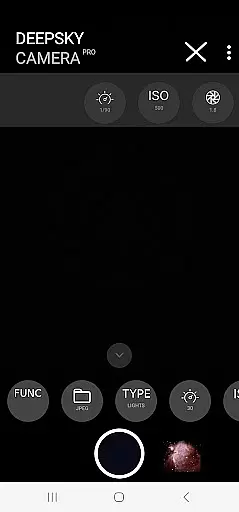
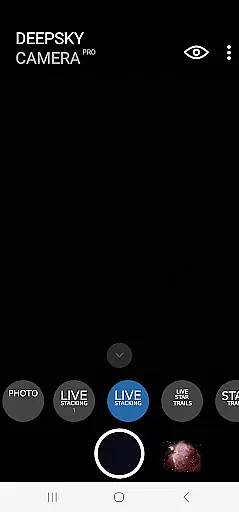
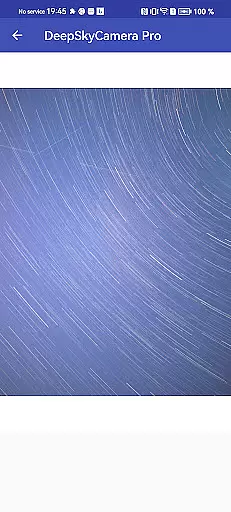
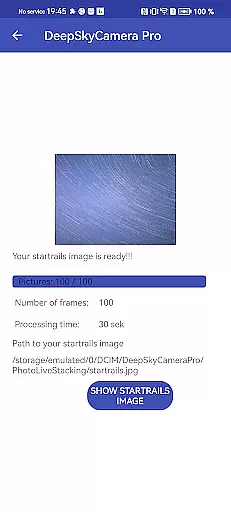
DeepSkyCamera Pro is an advanced astrophotography app designed for capturing stunning images of the night sky using your smartphone. The app offers professional-grade features such as photo live stacking in both RAW and JPEG formats, star trails creation, and timelapse video production with codecs like AVC and HEVC. It supports long exposure photography similar to DSLR cameras and allows users to capture images through telescopes or standalone setups.
The application provides essential tools for astronomers, including viewfinder live stacking that overcomes typical one-second shutter speed limitations, enabling longer exposures up to ten seconds. With compatibility on Android 6 and above, DeepSkyCamera Pro requires a minimum of 3GB RAM and 64GB storage but performs optimally on devices with Android 8 or higher, 8GB RAM, and 128GB storage. This ensures smooth operation during memory-intensive operations like RAW photo stacking.
Designed for knowledgeable astrophotographers, this app is not a one-click solution but rather a powerful tool that demands familiarity with concepts like RAW files and post-processing techniques. Users can install it alongside the free version, allowing simultaneous use without interference. Before purchasing, users are encouraged to test the free version and consult the compatibility list and manual available online to ensure optimal performance on their devices.
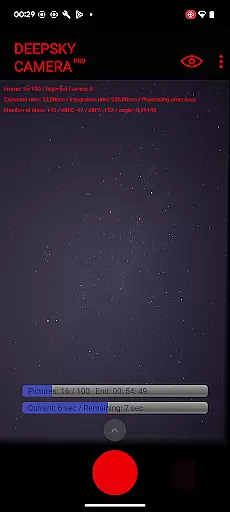
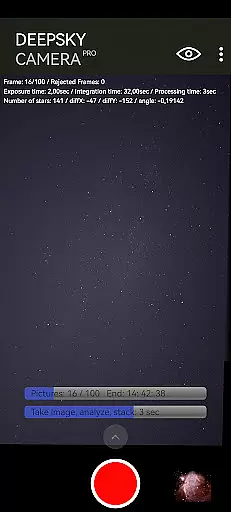
DeepSkyCamera Pro stands out with its comprehensive set of features tailored specifically for astrophotography enthusiasts. One of its core functionalities is photo live stacking, which works seamlessly with both tracked and untracked images. This feature analyzes and aligns images captured through a telescope mount or simple tripod setup, saving the stacked results in TIFF for RAW images and JPEG for standard ones. During the stacking process, the app displays critical information such as frame count, exposure time, integration duration, processing time, and image shift details.
In addition to photo stacking, the app excels in creating dynamic visual content like animated star trails and timelapse videos in mp4 format. These features utilize advanced codecs (AVC, HEVC) to deliver high-quality outputs suitable for various platforms. The viewfinder live stacking function addresses common hardware limitations by allowing shutter speeds up to ten seconds, breaking the usual one-second barrier imposed by many smartphone manufacturers. This capability is crucial when attaching the phone to telescopes for capturing faint celestial objects.
Furthermore, DeepSkyCamera Pro emphasizes user control and customization. It provides detailed settings for adjusting live stacking parameters, catering to both nighttime and daylight imaging needs. While primarily aimed at astrophotography, the app's versatility extends to other low-light photography scenarios with proper configuration. Its independence from the free version allows users to explore different functionalities without overwriting preferences or data, making it a flexible choice for dedicated astronomers seeking to enhance their mobile astrophotography experience.
Real-time capture and preview functionality is essential for astrophotography, allowing users to see the night sky as the camera perceives it. DeepSkyCamera Pro offers advanced live stacking features that enable photographers to stack images directly on their smartphones while capturing.
This app supports both tracked and untracked images, aligning and analyzing them to create a stacked result in TIFF or JPEG formats. The live viewfinder breaks typical smartphone limitations by supporting shutter speeds up to 10 seconds, enhancing the ability to capture dim celestial objects.
Users benefit from on-screen metrics during photo live stacking, including exposure time, integration duration, and frame alignment data. This real-time feedback empowers astrophotographers to make informed decisions about their shoots, ensuring optimal image quality.
By providing these sophisticated tools, DeepSkyCamera Pro transforms a smartphone into a powerful astrophotography device, rivaling traditional DSLR or CCD/CMOS cameras without compromising mobility or convenience.
While primarily focused on astrophotography, DeepSkyCamera Pro also incorporates advanced image processing capabilities that enhance photo quality naturally. Unlike conventional AI beauty modes, this app emphasizes maintaining authenticity in astronomical images through careful post-processing.
The application processes RAW files captured in DNG format, which are compatible with professional stacking software. This allows users to refine their images further using third-party applications while preserving the integrity of celestial details.
DeepSkyCamera Pro's live stacking feature intelligently analyzes and aligns images, reducing noise and improving clarity without artificial enhancements. This approach ensures that star trails, timelapse videos, and other astronomical phenomena appear genuine and scientifically accurate.
For astronomers seeking true-to-life representations of the night sky, DeepSkyCamera Pro delivers unparalleled natural enhancement, making it an indispensable tool for serious astrophotography enthusiasts.
User-friendly interface
Advanced photo stacking
High-quality video output
Customizable settings
Compatibility with telescopes
Steep learning curve
Memory-intensive operations
Limited daytime functionality
Requires technical knowledge
Potential stability issues

Safe & smart flight with Go Fly drone controller for 40+ drone camera, zone map
 4.50
4.50
Create Business Headshots, Polaroid Filter, Retake Photos,Profile Pics,AI Photos
4.50
Superimpose one photo on top of another using the original Superimpose app!
3.20
Future baby face generator: AI kids generator, kid face! What my baby look like?
4.40
Professional quality photo edits with the new Snapseed.
4.00
Unblur, enhance & restore photos with powerful AI photo enhancer tools.
4.60
live datamoshing
4.00
RAW video capture with advanced controls
4.40
Welcome to ProShot, the most powerful camera app on Android.
4.20
Easily view, share, delete photos with Gallery.
4.70
Automatically backup your photos and videos to computer, NAS and Cloud services
4.60
Add Watermark - Sign your pictures with a text or logo. Effective, quick, easy!
4.50
HD Camera Pro with HD Video shooting, Panorama, Photo editor , Beauty Camera.
4.50
Photo editor & gallery. Crop pictures & edit photos offline, no wifi!
4.50
Catch sunlight, sunrise sunset times and sun phases with the AR sun tracker.
4.10
Turn photos into cartoons & avatars! - Photo Editor, Cartoon Face!
3.90
Pet Camera
3.70
Create amazing frames with up to five photos. Rounded corners, effects and more!
3.60
Photo Album Watch Face shows your favorite pictures as a Watchface.
1.90


User Reviews