


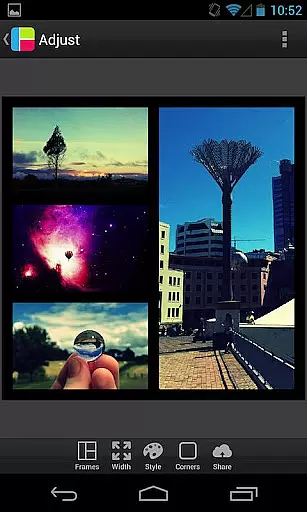
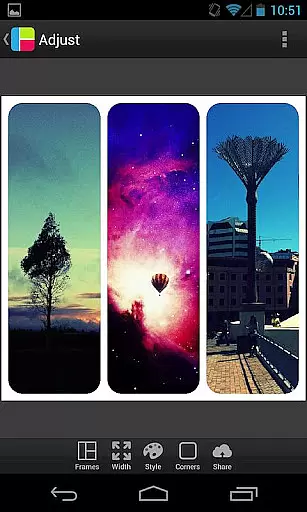

PicFrame is a versatile photography app that allows users to create stunning photo collages by combining multiple images into customizable frames. With 36 adjustable frame layouts, users can include up to five photos in a single composition, offering endless creative possibilities. The app's intuitive interface makes it easy to personalize each frame with rounded corners, unique shapes, and adjustable borders.
One of PicFrame's standout features is its extensive customization options. Users can modify border widths, apply photo effects, and choose from 52 background patterns to give their creations a distinct look. Additionally, the app supports various aspect ratios, making it suitable for different social media platforms. Whether you're looking to share memories with family or showcase your work professionally, PicFrame provides all the tools necessary to produce visually appealing content.
PicFrame offers an impressive array of features designed to enhance photo editing and sharing. At its core, the app provides 36 fully adjustable frames, allowing users to drag inner borders for endless customization. Each photo within the frame can be individually edited, with options to adjust brightness, contrast, and saturation, ensuring optimal image quality.
Beyond basic editing, PicFrame includes creative tools such as shape transformations (circle, heart, hexagon), rounded corners, and an easy-to-use color picker for border customization. The app also supports precise photo manipulation through pinch-to-zoom and drag-to-move functionality. With multiple output resolutions and seamless sharing to platforms like Instagram and Facebook, PicFrame empowers users to create and distribute professional-quality collages directly from their mobile devices.
Real-time capture and preview functionality is essential for photography apps like PicFrame. This feature allows users to see exactly what their final composition will look like before capturing the image.
PicFrame excels in this area by providing live feedback as users adjust photo frames, borders, and effects. The app's interface enables instantaneous visualization of changes, ensuring that users can fine-tune every aspect of their photo collages.
With real-time adjustments to brightness, contrast, saturation, and zoom, users can create perfectly balanced compositions. This immediate feedback loop enhances creativity and saves time during the editing process.
The value of real-time preview extends beyond convenience; it empowers users to produce professional-quality collages with confidence. PicFrame's implementation ensures that what you see in the preview is exactly what you get in the final output.
While PicFrame isn't primarily an AI beauty enhancement tool, it incorporates various features that contribute to natural-looking photo enhancements. These tools help users create visually appealing collages without making images appear overly processed.
The app offers adjustable photo effects that maintain the authenticity of original images while allowing subtle improvements. Users can control the intensity of effects like brightness, contrast, and saturation, ensuring that enhancements remain true to the source material.
PicFrame's shape-changing feature, including options like heart and hexagon forms, adds artistic elements without compromising the natural essence of photographs. The color picker for borders provides precise control over aesthetic enhancements.
This approach to enhancement emphasizes maintaining the integrity of original photos while offering creative tools for improvement. The result is a perfect balance between enhancement and natural presentation, giving users professional-grade results without artificial appearances.
User-friendly interface
Extensive customization options
Multiple photo effects
Variety of aspect ratios
Easy sharing to social media
Limited to five photos per frame
No advanced editing tools
Some features may feel overwhelming
Occasional performance lags
In-app purchases for additional content

Photo Album Watch Face shows your favorite pictures as a Watchface.
 1.90
1.90
Create AI Photos, Improve and restore quality of blurry, old or damaged pics.
4.20
Create Business Headshots, Polaroid Filter, Retake Photos,Profile Pics,AI Photos
4.50
Over 800 film simulation recipes for Fujifilm. Black Friday Offer!
4.5
Light-weight Media Gallery app for Android made with Jetpack Compose
4.60
Enhance, retouch & create your story - Share the moment with Photoshop Express.
4.60
AI-powered video creator by MiniMax - Where ideas meet cinema
4.20
Hair color changer, AI haircut app, fun hair editor and buzz cut filter for all!
3.80
Discover & download millions of art for The Frame TV or Hisense CanvasTV
4.60
Collage your moments in one tap: 1000+ layouts, filters, stickers, and texts.
4.90
AI photo editor with hair editor, retouch tools, hair color changer & filters!
4.50
Fit multiple photos on one post. Create carousels & scroll layouts for Instagram
4.50
RAW video capture with advanced controls
4.40
Natural Beauty, Selfie Retouch
4.30
All-in-One Editor & AI Photo Enhancer, Collage, Cartoonify, Funny Stickers & BGS
4.10
The #1 app for B&W film developing featuring an advanced darkroom timer.
4.10
Gallery Slideshow is slideshow maker app for slideshow from your gallery photos.
3.90
Pet Camera
3.70
An interval timer to automate photo taking process for timelapse
2.90


User Reviews