

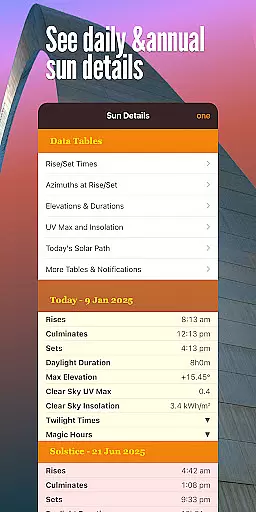

Sun Seeker is a premier sun tracking and surveying application designed for photographers, architects, real estate buyers, cinematographers, drivers, campers, picnickers, and gardeners. This app provides comprehensive tools to track sunrise and sunset times, sunlight exposure, solar path, and sun position with precision. The inclusion of a flat compass and 3D AR view allows users to visualize equinox, solstice paths, golden hour, twilight times, and more.
With its advanced GPS, magnetometer, and gyroscope integration, Sun Seeker accurately determines the sun path and position for any location worldwide. Whether planning shoots during magic hour, assessing spatial variability of solar angles, or finding optimal planting locations, this app delivers essential solar data in real-time. Its practicality extends to everyday use, such as finding parking spots with ideal lighting conditions.
The app's utility spans across various professions and hobbies, making it an indispensable tool for maximizing sunlight exposure and planning activities around daylight. By providing detailed solar information, Sun Seeker empowers users to make informed decisions based on the sun's movement.
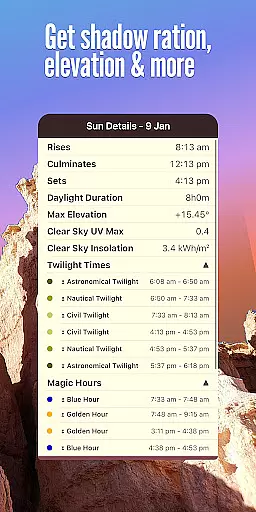
Sun Seeker stands out with its robust feature set tailored for diverse user needs. The app leverages GPS, magnetometer, and gyroscope technology to provide accurate sun path and position tracking for any global location. Users can monitor sunrise and sunset times in real-time with the built-in sunset timer, ensuring they never miss the golden hour.
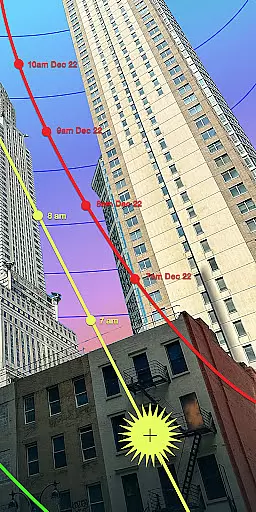
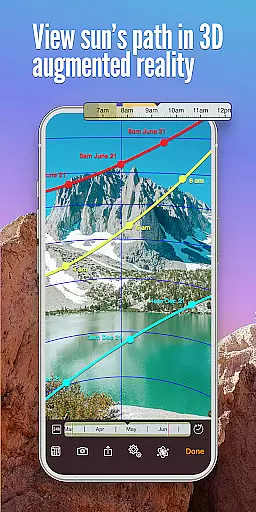
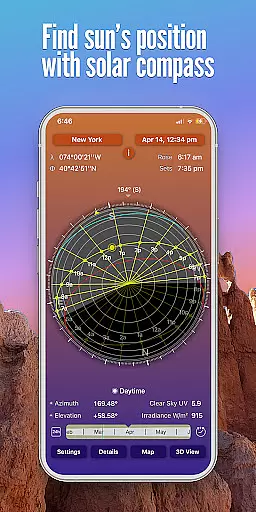
A key highlight is the dual-view system: the flat compass view displays the sun path, diurnal sunlight angle, elevation segmented into day and night, shadow length ratio, and sun phases. Meanwhile, the 3D AR camera overlay shows the sun's current position and hourly points along its path, guiding users to locate the sun effortlessly.
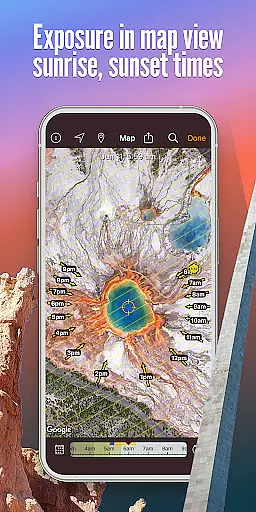
Additional features include map view with solar direction arrows, customizable location selection from over 40,000 cities, and optional notifications for golden hour alerts. The display of equinox and solstice paths on both flat compass and camera views further enriches the user experience, making Sun Seeker an essential tool for solar tracking.
Sun Seeker excels in providing real-time capture and preview capabilities that are essential for photographers, cinematographers, and outdoor enthusiasts. The app's advanced AR technology allows users to visualize the sun's position and path in real-time through their device's camera.
This feature is particularly valuable when planning shoots during golden hour or other critical lighting periods. By overlaying the solar path directly onto the live camera view, users can accurately predict how the sunlight will interact with their subjects throughout the day.
The app's precise GPS integration ensures that the displayed sun position matches the user's exact location. This level of accuracy enables professionals to optimize their shooting schedules and locations based on actual sunlight conditions rather than estimates.
Furthermore, the real-time preview extends beyond just photography applications. Architects and surveyors can use this feature to assess potential sunlight exposure for buildings, while gardeners can determine optimal planting positions based on year-round solar patterns.
While Sun Seeker doesn't employ traditional AI beauty enhancements, it offers sophisticated natural enhancement features that help users understand and utilize natural lighting conditions effectively. The app's 3D AR view provides a natural representation of sunlight patterns without artificial modifications.
The application's ability to display equinox and solstice paths, along with hourly sun positions, serves as a natural enhancement tool for various professional fields. These features allow users to work with authentic solar data rather than relying on digital approximations or enhancements.
For instance, real estate buyers can make informed decisions about property purchases based on accurate sunlight exposure patterns throughout the year. Similarly, campers can identify ideal locations that offer appropriate shade and sunlight balance without needing artificial adjustments to the displayed information.
The app maintains the natural integrity of solar data while presenting it in an enhanced, easily digestible format. This approach ensures that all displayed information remains true to actual solar conditions, providing users with reliable data for their decision-making processes across different applications.
Accurate sun tracking
Real-time data updates
Comprehensive feature set
User-friendly interface
Versatile professional use
Premium price point
Complex for beginners
Limited free features
Occasional GPS errors
High battery consumption

A collection of tools and reference tables for DPs, ACs, DITs and Operators.
 4.70
4.70
How would you look like with a differently shaped nose, chin or lips?
3.90
An interval timer to automate photo taking process for timelapse
2.90
Natural Beauty, Selfie Retouch
4.30
Photo Exif Editor allows to view, add and modify EXIF data of multiple photos
4.50
Raw Image Viewer. Gallery with support of raw images (.cr3, .cr2, .nef, .raf).
2.00
Luminar: Photo Editor - easy picture editing with AI
4.20
Professional camera app that brings DSLR manual photography controls to Android.
4.20
Discover & download millions of art for The Frame TV or Hisense CanvasTV
4.60
Pro version: AR sun/moon tracker for any date. Tool for photographers & planners
4.90
Photo prints, cards, & gifts at Walgreens. Easy ordering & fast local pickup !
4.80
Easily create custom gifts, cards, photo books & more on the Shutterfly app!
4.60
Unblur, enhance & restore photos with powerful AI photo enhancer tools.
4.60
Safe & smart flight with Go Fly drone controller for 40+ drone camera, zone map
4.50
AI photo enhancer with Sora 2! Enhance, descratch, and colorize your old photos.
4.50
The #1 app for B&W film developing featuring an advanced darkroom timer.
4.10
Turn photos into cartoons & avatars! - Photo Editor, Cartoon Face!
3.90
Astrophotography with your smartphone, photo live stacking and much more!
3.90
Snap photos remotely using your Garmin watch as the camera trigger
4.3


User Reviews