



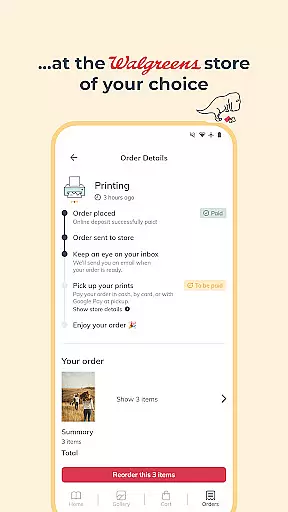

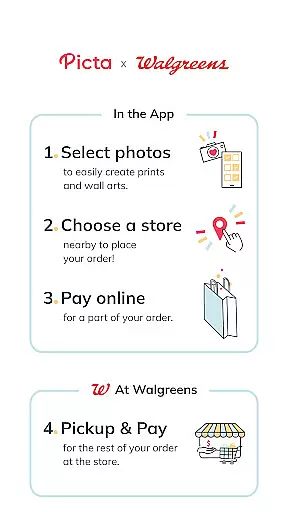
Picta is a photo printing app that allows users to print photos at Walgreens with ease. The app offers various print sizes, including 4x6, 5x7, and square prints, as well as the option for glossy photo prints. Users can select their nearest Walgreens store for 1-hour pickup, making it a convenient choice for quickly turning digital photos into physical prints.
With Picta, users can crop and zoom pictures easily within the app, create photo collages, and even design personalized photo gifts such as magnets, posters, and photobooks. The app also features a gallery that organizes mobile photos by date taken and provides fast and safe photo transfer. All products are manufactured exclusively in the United States, ensuring professional-quality photo printing services.
Picta stands out with its user-friendly interface and comprehensive feature set tailored for photo enthusiasts. One of the key features is the ability to order prints directly from your phone and pick them up at a Walgreens store within an hour. This service is supported by professional-quality photo printing on Kodak paper, available in multiple sizes to suit different needs.
Beyond standard prints, Picta offers creative options like photo collages in four different layouts and personalized gifts including magnets, posters, canvas prints, and greeting cards. The app's enhanced Walgreens store locator makes it easy to find the nearest location for quick pickup. Additionally, users can track their order status in real time and benefit from Walgreens' unique service policy, paying only if satisfied with the print quality.
For those looking to save, Picta provides exclusive coupons and deals for app users. Whether you're printing family photos or creating custom gifts, Picta ensures a seamless and rewarding photo printing experience.
Real-time capture and preview functionality is essential for ensuring that users can accurately select and edit their photos before printing. The Picta app offers a seamless experience by allowing users to choose photos directly from their mobile devices with instant previews.
This feature enables users to crop and zoom each picture easily within the app, ensuring that the final print meets their expectations. By providing real-time feedback on the selected images, users can make necessary adjustments to achieve the desired outcome without any surprises upon receiving their prints.
The ability to preview edits in real time significantly enhances user satisfaction. It eliminates the guesswork involved in photo editing, making the entire process more intuitive and user-friendly. This ensures that every print order placed through Picta results in high-quality, professional-looking photos.
AI beauty and enhancement features are designed to improve the visual appeal of photos while maintaining a natural look. In the context of photo printing, these enhancements ensure that printed photos reflect the best version of the original image without appearing overly processed or artificial.
Picta incorporates advanced AI algorithms that automatically adjust lighting, contrast, and color balance. These enhancements help bring out the details in each photo, making them more vibrant and lifelike. Users can trust that their printed photos will have a polished appearance that still retains the authenticity of the original shot.
By focusing on naturalness, Picta ensures that enhanced photos remain true to life. This approach not only improves the aesthetic quality of the prints but also enhances the overall user experience, making it easy for anyone to produce stunning photo prints with minimal effort.
User-friendly interface
Fast 1-hour pickup
Wide range of print sizes
Professional-quality prints
Exclusive app discounts
Limited to Walgreens stores
No direct payment in app
Occasional delays in printing
Geographic limitations
Fewer customization options

Long exposure camera with computational photography
 2.60
2.60
All-in-One Editor & AI Photo Enhancer, Beautify & Retouch, Collage, Cartoonify
4.20
Shooting photos and records video easily and efficient with professional Camera
4.30
An interval timer to automate photo taking process for timelapse
2.90
What celebrity do you look like? Celebs will find your celebrity match!
4.10
Android Native system HD camera app. Never been so simple and faster.
4.70
AI Photo Editor with 100+ Filters, Effects! Remove BG, Retouch & Photo Enhancer.
4.80
Easily view, share, delete photos with Gallery.
4.70
Catch sunlight, sunrise sunset times and sun phases with the AR sun tracker.
4.10
Find time and duration of different sunlight phases at any location
4.90
Light-weight Media Gallery app for Android made with Jetpack Compose
4.60
PhotoSync Bundle Add-On License. Enables all features and services in PhotoSync.
4.60
Discover & download millions of art for The Frame TV or Hisense CanvasTV
4.60
HD Camera Pro with HD Video shooting, Panorama, Photo editor , Beauty Camera.
4.50
Trendy TikTok time warp scan funny filter app brings you unique photos & videos.
4.40
[3DSteroid Pro] is a stereoscopic application for Android.
4.30
Virtual makeup, hair filters & body tuner—edit from face to full body!
4.20
Create AI Photos, Improve and restore quality of blurry, old or damaged pics.
4.20
Professional photography on your mobile phone
4.20


User Reviews