

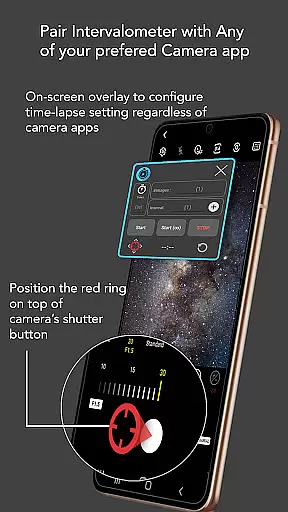
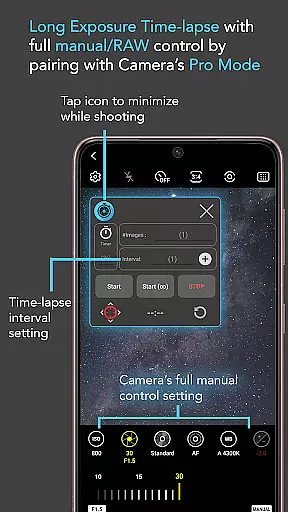
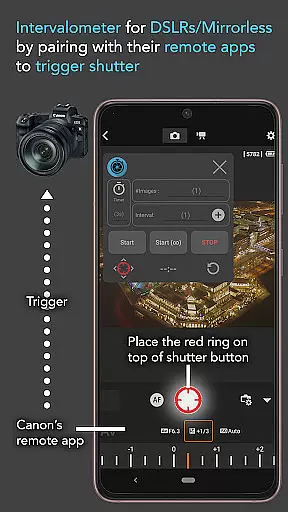
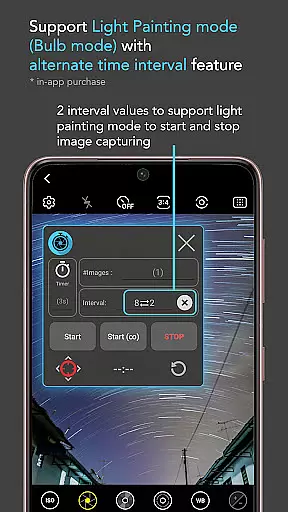
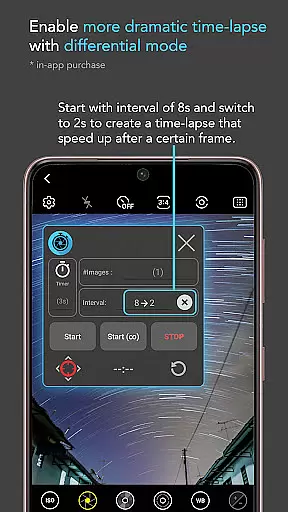
Intervalometer for TimeLapse is a powerful photography tool designed to automate the process of capturing time-lapse sequences. This app allows photographers to configure specific time intervals for triggering the camera shutter, enabling greater creative control over exposure settings and image formats.
The application works seamlessly with any camera app on Android devices (version 7 and above), including advanced modes such as HDR, night mode, and ultra-wide angle. It also supports dedicated camera remote apps from brands like Canon, Sony, and Nikon, making it versatile for both smartphone and professional-grade cameras.
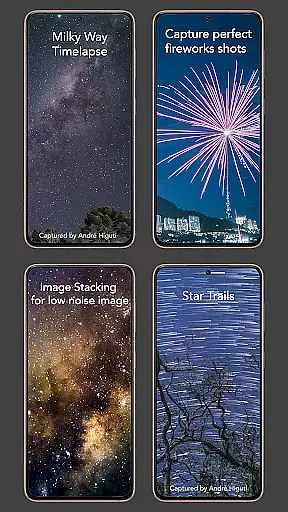
With its precise automation capabilities, Intervalometer is ideal for creating stunning low-light time-lapses, star trails, and even complex transitions like day-to-night sequences. Its flexibility extends beyond time-lapse photography, supporting techniques like image stacking and lightning stacking for enhanced post-processing results.
Intervalometer stands out with its robust feature set tailored for both amateur and professional photographers. The app provides full control over time-lapse configurations, allowing users to customize delay timers, interval durations, and the number of shots. This level of customization ensures that every project can be executed with precision.
One of the standout features is its compatibility with virtually any camera app, regardless of the mode being used. Whether you're working in manual mode, light-painting mode, or telephoto settings, Intervalometer integrates effortlessly. Additionally, its bulb mode and infinite mode options cater to long-exposure photography enthusiasts.
For users working with dedicated cameras, the app functions as a true intervalometer by automating the shutter button in remote apps. This makes it an indispensable tool for scenarios requiring exact timing, such as astrophotography or high-dynamic-range (HDR) time-lapses.
Real-time capture and preview functionality is essential for ensuring that every moment of your time-lapse project is captured exactly as intended. Intervalometer for TimeLapse offers this by integrating seamlessly with any camera app, allowing users to automate the shutter triggering process while maintaining control over exposure settings.
This app leverages the AccessibilityService API to work on any Android camera app, providing a consistent and reliable capture experience. Whether you're shooting in low light, capturing star trails, or creating a Holy Grail time-lapse transitioning from day to night, the real-time feedback ensures precision and accuracy.
Users benefit from having full control over their time-lapse configurations, including delay timers, interval times, and the number of shots. This level of customization empowers photographers to execute complex projects like HDR time-lapses or ultra-wide angle sequences with confidence.
The ability to use Intervalometer with dedicated camera remote apps from brands like Canon, Sony, and Nikon further enhances its versatility. By acting as an actual intervalometer for these devices, it bridges the gap between smartphone convenience and professional-grade equipment.
While Intervalometer for TimeLapse focuses primarily on automation and control, it indirectly supports AI beauty and enhancement features by working seamlessly with any camera app's existing modes. This includes light-painting mode, HDR, night mode, and more, which rely on sophisticated algorithms to enhance image quality.
The appu2019s flexibility allows photographers to experiment with different camera modes without sacrificing the benefits of automated time-lapse photography. For instance, using the app in conjunction with a camera appu2019s night mode can result in stunning low-light time-lapses that maintain natural colors and details.
By enabling infinite and bulb modes, Intervalometer ensures that even long-exposure shots can be automated and enhanced through the underlying camera appu2019s processing capabilities. This results in images that are not only technically correct but also aesthetically pleasing.
Photographers looking to push creative boundaries will appreciate how Intervalometer complements advanced camera functionalities, making it possible to achieve high-quality outputs such as milky way time-lapses or intricate light painting sequences without compromising on naturalness.
User-friendly interface
Wide device compatibility
Customizable time-lapse settings
Supports advanced camera modes
Ideal for professional workflows
Requires AccessibilityService API
Limited initial setup guidance
Potential touch input issues on some devices
No built-in camera functionality
Dependent on third-party camera apps

Add Watermark - Sign your pictures with a text or logo. Effective, quick, easy!
 4.50
4.50
Find time and duration of different sunlight phases at any location
4.90
What celebrity do you look like? Celebs will find your celebrity match!
4.10
The #1 app for B&W film developing featuring an advanced darkroom timer.
4.10
A must-have app for landscape photographers
4.60
Luminar: Photo Editor - easy picture editing with AI
4.20
Snap photos remotely using your Garmin watch as the camera trigger
4.2
Professional camera app that brings DSLR manual photography controls to Android.
4.20
Unlock the full potential of your DJI drone with Litchi
4.50
Amazing Photo Effects - The most fun you can have with your photos!
4.70
Easily view, share, delete photos with Gallery.
4.70
The original Rarevision VHS look seen everywhere!
4.70
Enhance, retouch & create your story - Share the moment with Photoshop Express.
4.60
Safe & smart flight with Go Fly drone controller for 40+ drone camera, zone map
4.50
Photo Exif Editor allows to view, add and modify EXIF data of multiple photos
4.50
Movie camera, supports pro recording settings for filming. Try it and be amazed!
4.50
Create AI photos & videos with Enhancer; restore, fix, beautify, enhance photos
4.50
Photobooth mini FULL app will allow you to add more fun to your parties
4.00
Astrophotography with your smartphone, photo live stacking and much more!
3.90


User Reviews