
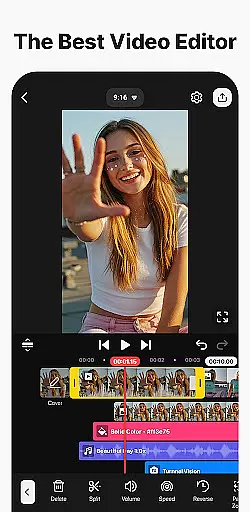
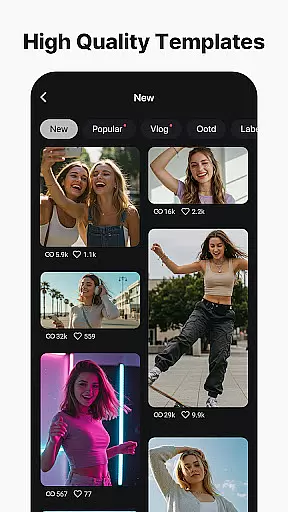
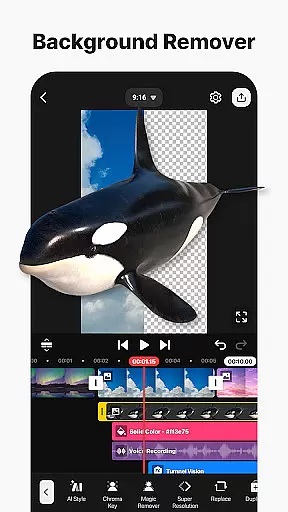
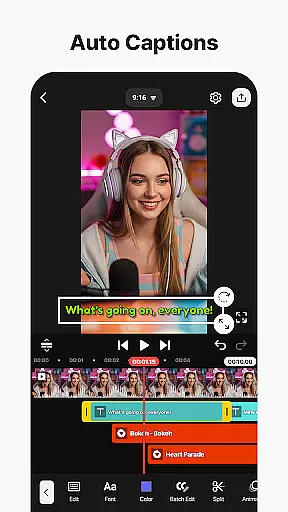
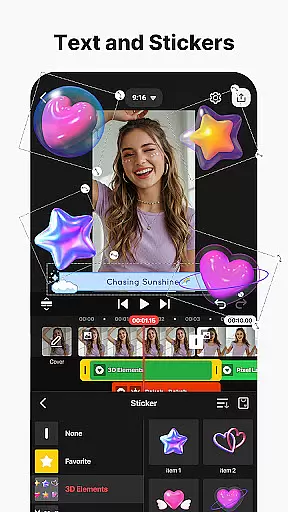

KineMaster is a powerful video editing application designed for both amateur and professional creators. It offers an extensive suite of AI-powered tools that simplify complex video production tasks, making it easy to create high-quality content for platforms like YouTube, TikTok, and Instagram. The app's standout features include AI Auto Captions, AI Text-to-Speech, and AI Magic Removal, which allow users to add subtitles, generate voiceovers, and remove backgrounds with minimal effort.
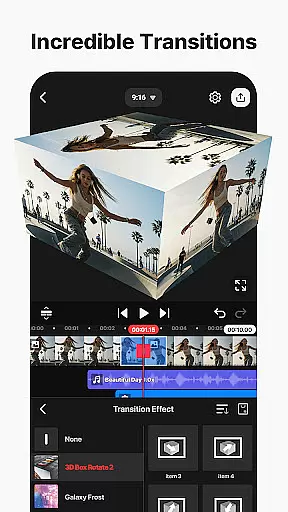
In addition to its AI capabilities, KineMaster provides advanced video editing tools such as keyframe animation, chroma key (green screen), and speed control. These features enable users to produce professional-grade videos with custom animations, background removal, and creative speed effects. With thousands of templates, effects, transitions, stickers, music tracks, and fonts available in the KineMaster Asset Store, users can enhance their projects with visually stunning elements. Whether you're editing movies, vlogs, or short-form content like Reels and Shorts, KineMaster ensures your videos stand out.
The app supports multi-layer editing, allowing users to stack videos, images, and audio tracks seamlessly. It also includes practical tools like magnetic guides, full-screen previews, and multiple undo/redo functions, ensuring precise and enjoyable editing experiences. KineMaster outputs videos in up to 4K resolution at 60 FPS while offering optimized settings for quick social media uploads. Its versatility extends to supporting transparent backgrounds, ideal for compositing purposes. Available on mobile devices, KineMaster empowers creators to edit anywhere, anytime.
KineMaster distinguishes itself through its robust feature set tailored for modern video editors. One of its most notable aspects is the integration of AI-driven tools that streamline workflows. For instance, AI Auto Captions automatically generate accurate subtitles from audio or video files, saving hours of manual transcription work. Similarly, AI Vocal Separator splits songs into vocals and instrumentals, giving creators flexibility when working with music tracks. These innovations not only improve efficiency but also lower the barrier to entry for beginners who may lack technical expertise.
Beyond AI functionalities, KineMaster excels in traditional video editing techniques. Keyframe animation lets users create dynamic visual effects by adjusting layer properties over time, while chroma key technology enables seamless background replacement—a staple in professional filmmaking. Speed control options allow for slow-motion, reverse playback, and time-lapse effects, adding cinematic flair to any project. Additionally, the app's asset library boasts tens of thousands of resources, including clip graphics, sound effects, stock footage, and stylish fonts, all designed to elevate video quality without requiring external plugins.
Another highlight is KineMaster's user-friendly interface, which caters to creators across skill levels. Magnetic guides assist with alignment, ensuring polished compositions, while full-screen previews help visualize final outputs before exporting. The ability to save projects as reusable templates via the Mix feature fosters collaboration within the KineMaster community. Furthermore, cloud backup through KineCloud ensures continuity, letting users pick up where they left off on different devices. With support for high-resolution exports and transparent backgrounds, KineMaster meets diverse creative needs, whether for personal projects or commercial use.
Video format compatibility is a crucial feature for any video editing application, ensuring that users can work with a wide range of file types. KineMaster excels in this area by supporting an extensive array of video formats, allowing creators to import and export projects without worrying about conversion issues.
The app's advanced codec support enables seamless integration of various media elements, including high-resolution 4K videos at 60 frames per second. This versatility ensures that content creators can maintain their preferred workflow while working with different source materials, from professional-grade cameras to smartphone recordings.
Furthermore, KineMaster's optimized export settings cater to different social media platforms, automatically adjusting parameters for YouTube, TikTok, Instagram, and other popular services. The application also supports transparent background exports, making it ideal for compositing work and professional video production pipelines.
AI-powered editing features have revolutionized the way users approach video creation, and KineMaster stands at the forefront of this innovation. The application incorporates multiple artificial intelligence tools that significantly streamline the editing process while maintaining professional-grade results.
Among these features are AI Auto Captions, which instantly generate subtitles from audio tracks, and AI Noise Removal, eliminating unwanted background sounds with remarkable precision. The AI Vocal Separator allows users to split music tracks into vocals and instrumentals, while AI Tracking enables dynamic object-following effects for text and graphics.
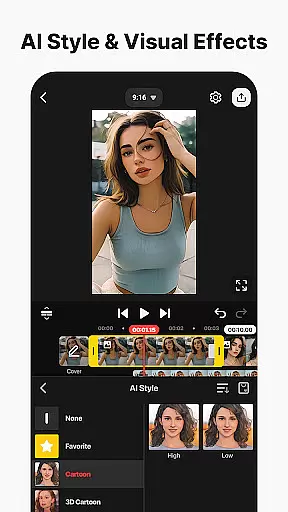
Additional intelligent tools include AI Upscaling for enhancing low-resolution media, AI Style for applying artistic effects, and AI Magic Removal for background elimination. These features collectively reduce complex editing tasks to simple operations, making professional-quality video production accessible to creators of all skill levels.
User-friendly interface
Extensive AI tools
High-quality export options
Versatile asset library
Multi-layer editing
Subscription fees apply
Watermark in free version
Steep learning curve
Limited offline assets
Resource-intensive

AirMirror is Receiver for Screen Mirroring and Casting from Apple Devices.
 3.60
3.60
Download videos easily & play them all in one smart, powerful video manager.
3.40
An easy-to-use and all-round screen recorder with audio
4.80
Download website videos fast&privacy
4.40
Play and download HD videos from all sources — fast, simple, and all-in-one.
4.5
Powerful Video Editor & Photo Editing App —— Quick Edits & Stunning Effects!
4.30
Connect EasyCap or UVC devices for recording and broadcast video/audio stream
3.60
Powerful video player with advanced hardware acceleration and subtitle supports
4.20
Capture the moment and Cut
3.40
Tik & Story Saver-Download ALL social media videos, photos & reels no watermark.
4.80
?100% FREE! Download & save videos? safely in this app. All formats supported.
4.60
Photo and Music Video Creator into Stunning Videos—Effortlessly
4.40
Full HD Video mp3 Player, MP4 player play 1080p, File manager, Video Downloader
4.40
Viddo: Generate Action Figure, AI Anime, AI kiss, AI hug Video from image & text
4.40
KMPlayer Plus (Divx Codec) officially support Divx codec.
4.30
Movie maker & video editing app with AI effects and green screen
4.30
Video Downloader is an utility that can save videos and music from web sites
4.20
All format media Player, no need video converter any more!
4.00
Video player with powerful streaming playback and various convenient features.
2.10


User Reviews