
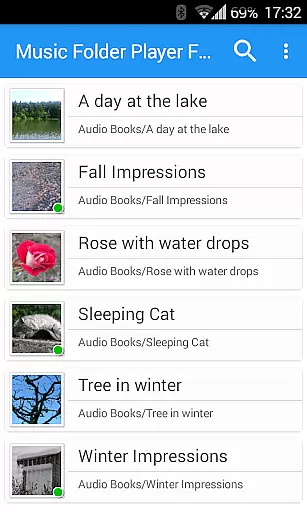
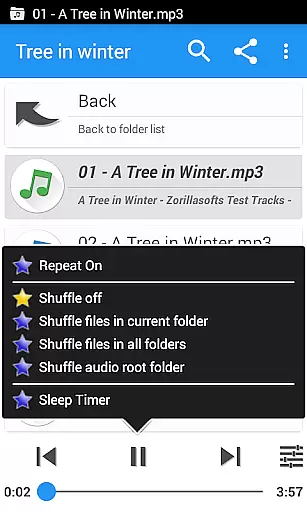
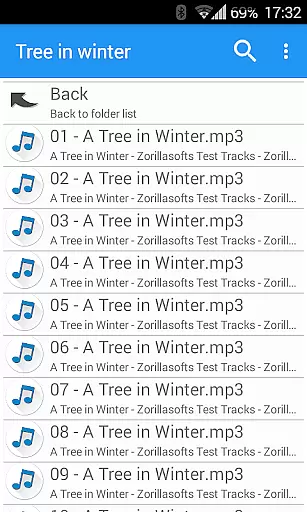
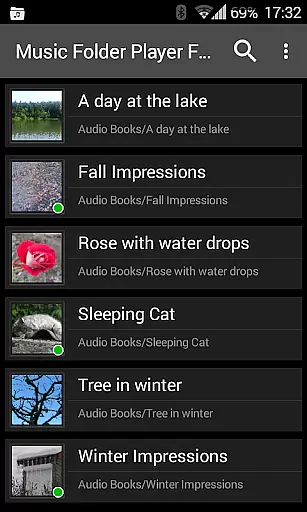
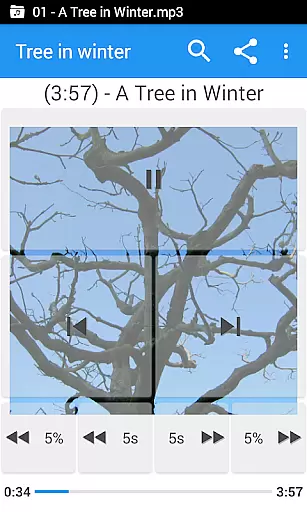
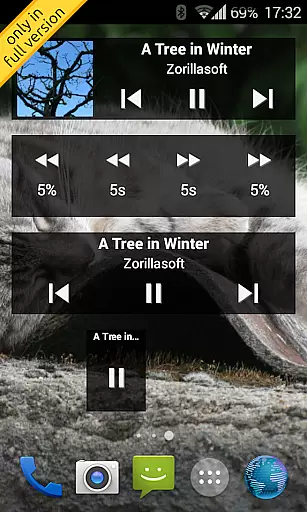
Music Folder Player Full is a specialized audio player designed for users who prefer organizing their music files in folders rather than traditional categories like artist or album. The app offers a unique folder-based playback experience, making it ideal for those with custom file organization systems.
This full version features advanced functionalities including homescreen widgets, resume playback where you left off in each folder, and multiple display options for music libraries of all sizes. With its powerful equalizer, speed control with pitch correction, and innovative 432 Hz playback mode, the app caters to audiophiles and podcast enthusiasts alike.
The application stands out with its Material Design interface and versatile features. Users can choose from three different homescreen widgets to control music playback directly from their home screen. The smart resume function remembers playback positions for each folder, while the flexible folder view options accommodate both small and large music collections.
Advanced audio controls include four customizable seek buttons perfect for navigating podcasts, an equalizer with 12 presets, virtual room effects, and playback speed adjustment. Additional professional-grade features comprise pre-amplification, balance control through gestures, and integration with Last.fm for scrobbling.
Music Folder Player Full offers an extensive music library management system that allows users to organize their audio tracks in folders rather than traditional categories like artist or album. This unique approach provides a personalized way to manage your music collection.
The application supports various audio formats and enables users to import and play music directly from their folder structures. With the ability to create virtual folders for favorite songs and build custom playlists, users can curate their music library according to their preferences while maintaining copyright authenticity.
Additionally, the app includes advanced features such as resuming playback where you left off in each folder and displaying folders either as a flat list or hierarchical view depending on the size of the collection. These organizational tools ensure that users can efficiently navigate and enjoy their entire music library with ease.
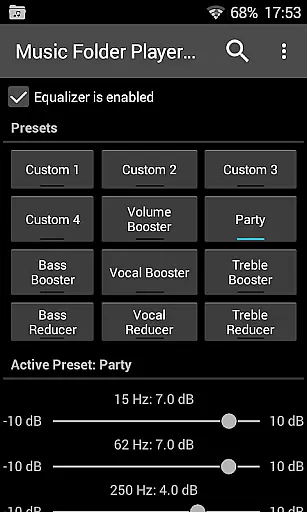
One of the standout features of Music Folder Player Full is its robust equalizer settings which provide four customizable and eight predefined audio configurations. These include specialized settings like Bass Booster, Vocal Booster, and Party mode, allowing users to fine-tune their listening experience based on different genres or environments.
For those seeking even more control over sound quality, the app offers virtual room and reverb effects available on Android 2.3 and newer versions. Additionally, speed control with pitch correction is supported on Android 4.2+, enabling users to adjust playback speeds ideal for podcasts or audiobooks without distorting the audio.
Other notable enhancements include a pre-amplifier feature for increasing low-level recordings' volume and a 432 Hz playback mode offering alternative tuning frequencies believed by some to enhance musical harmony. These diverse audio quality options make Music Folder Player Full a versatile choice for audiophiles looking to optimize their listening sessions.
User-friendly folder organization
Advanced equalizer settings
Speed control with pitch correction
Multiple widget options
Comprehensive playback features
No free version limitations
Complex for casual users
Requires folder organization
Limited traditional library views
Some features Android-specific

Formerly known as Spotistats! View your top tracks, artists, albums and more!
 4.40
4.40
DJ Music Mixer Pro is a real DJ controllers and DJ Music Studio to remix DJ.
4.40
Time Trainer: accurate metronome w tools to help you develop your internal time!
4.20
Play your hearts out on TouchTunes jukeboxes & connect with fellow music lovers.
4.80
Help you quickly get started with Shokz headphones
4.40
Turn your Android phone into a professional audio analyser with up to 120 bands.
4.00
The iconic iOS metronome app is now on Android.
3.70
Travel To The Music Universe
3.40
Get alarms that fit your lifestyle and wake up to the sounds you love.
4.80
Brian Eno and Peter Chilvers’ acclaimed music app Bloom, radically reinvented.
4.80
Let your Android device with the sound effects you want
4.50
Manage your Sonos system directly from your home-screen!
4.40
Bass Booster Pro takes auto-equalizing to the next level!
4.30
Network/Cloud Streaming, Visualization, Graphic Equalizer and Sound Effects.
4.20
Learn to play the piano using falling notes!
3.80
Slow music down without changing pitch.
3.70
The Cubase remote control app
3.60
MilkDrop for Android TV
3.00
Simply convert wav to mp3. Clear. Reliable. Safe.
4.3


User Reviews