
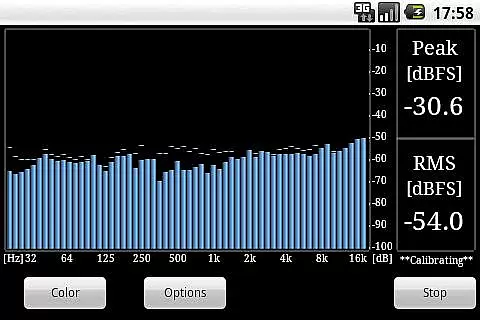
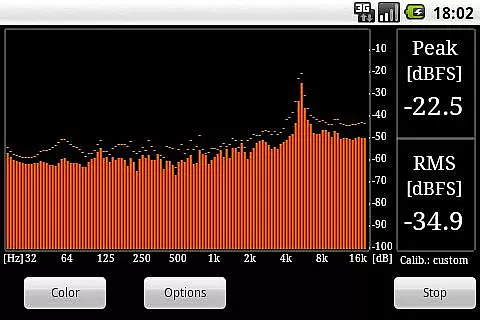
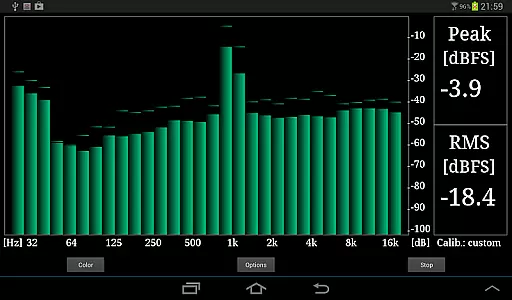
RTA Pro Analyzer is a professional-grade audio analysis tool designed for music and audio enthusiasts. This application offers advanced features such as 1/4, 1/6, and 1/12 octave band analysis with up to 120 bands, providing users with detailed insights into their audio content. The app also includes scalable peak holds and multiple color schemes, allowing for customizable visualization of audio data. RTA Pro Analyzer permanently stores calibration data, ensuring consistent and reliable measurements over time.
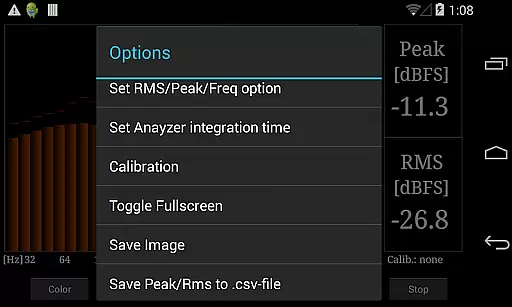
In addition to its core analytical capabilities, the app allows users to save screenshots and export peak/RMS values to CSV files. These features make it an ideal choice for professionals who need to document and analyze audio performance in various settings. Whether you are an audio engineer, musician, or simply passionate about high-quality sound, RTA Pro Analyzer provides the tools necessary to achieve precise audio analysis.
RTA Pro Analyzer stands out with its comprehensive feature set tailored for audio professionals. One of its key features is the ability to perform detailed audio analysis using different octave band spacings (1/4, 1/6, and 1/12) with support for up to 120 bands. This level of granularity enables users to pinpoint specific frequencies and understand complex audio signals more effectively. Additionally, the app's scalable peak hold functionality ensures that transient peaks are captured accurately, providing valuable information for sound optimization.
The application also offers several customization options, including multiple color schemes that enhance the visual representation of audio data. Users can tailor the interface to suit their preferences or specific project requirements. Furthermore, RTA Pro Analyzer supports permanent storage of calibration data, which is crucial for maintaining accuracy across different sessions. With the ability to save screenshots and export peak/RMS values to CSV files, this app facilitates easy documentation and sharing of analysis results, making it an indispensable tool for anyone involved in music production or audio engineering.
When evaluating a music and audio application like RTA Pro Analyzer, the size and authenticity of its music library are crucial factors. This app provides users with advanced audio analysis tools that can handle up to 120 bands of resolution, including 1/4, 1/6, and 1/12 octave spacing options.
The inclusion of these features ensures that users have access to an extensive range of audio data for thorough analysis. The app's ability to permanently store calibration data adds another layer of reliability, allowing users to maintain consistent settings across multiple sessions.
Furthermore, the app supports exporting peak and RMS values to CSV files, which is essential for professionals who need to document their findings accurately. While the app doesn't explicitly mention a vast music library, its focus on detailed audio analysis makes it a valuable tool for audio engineers and enthusiasts alike.
RTA Pro Analyzer offers a variety of audio quality options that cater to both amateur and professional users. With scalable peak holds and multiple color schemes, users can customize their experience to suit their specific needs and preferences.
The app allows users to save screenshots and export data, enhancing its utility in professional environments where documentation is key. These features ensure that users can capture precise moments in their audio analysis and revisit them later for further examination.
Additionally, the ability to calibrate and store settings means that users can achieve consistent audio quality across different devices and sessions. This level of customization and control over audio parameters makes RTA Pro Analyzer a powerful tool for anyone involved in audio production or analysis.
Advanced audio analysis
Customizable color schemes
Permanent calibration storage
Export to CSV
Save screenshots
Paid version only
Complex for beginners
Limited free support
No real-time collaboration
Requires technical knowledge

SqueezePlayer turns your Android phone or tablet into a SqueezeBox on its own!
 4.60
4.60
Time Guru will strengthen your internal sense of musical time via random muting.
4.30
Performance-Synthesizer & Multi-Track-Sequencer, polyphonic + multi timbral!
4.70
Taal player that lets you sing any Indian & Western song with Tabla & Tanpura
4.60
Remove ads permanently from Music Visualizer
4.5
Listen to live FM radio stations, sports, music and news on global radios online
4.70
Your song collections with lyrics and chords on Android smartphones and tablets.
4.80
Bass Booster Pro takes auto-equalizing to the next level!
4.30
The Minimalistic Premium Music Player. Handmade with passion for music
2.20
24,000 free audio books and no ads!
4.90
Voice recorder - Audio recorder. Best recorder for recording
4.90
Ultimate Sonos Controller
4.70
Over 100 million tracks available for high quality streaming and download
4.60
A synth that really lets you shape your sounds!
4.50
Your HD audio recorder on the go for music, meetings, ambience, animal sounds…
4.30
Equalizer, Bass Booster and Volume Booster (Eq & Bass) improve sound quality
4.30
Enjoy singing any song, no matter how high or low it is
4.30
Background pads for your band
3.80
Powerful beat maker & DJ mixer to remix tracks, make music, & perform DJ mix
3.70


User Reviews