
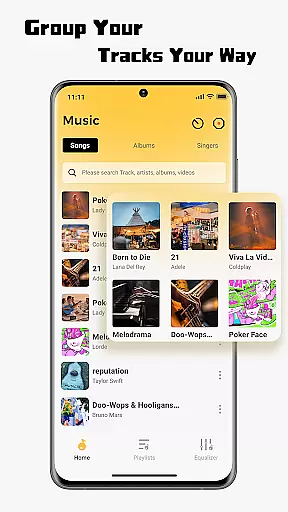
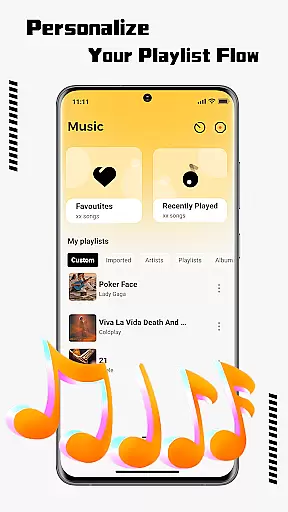
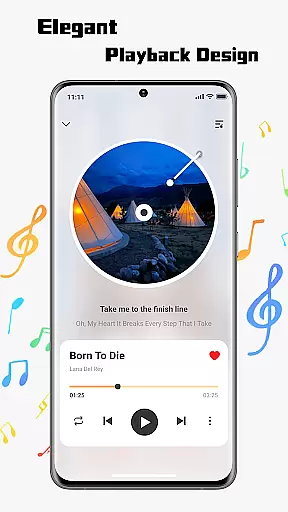
SonicNest is a premium music player app designed to enhance your audio experience through advanced features and an intuitive interface. The app allows seamless import of local music files, making it easy to consolidate your entire music library in one place. With smart management tools, users can organize tracks by albums, artists, or custom playlists tailored to specific moods and activities.
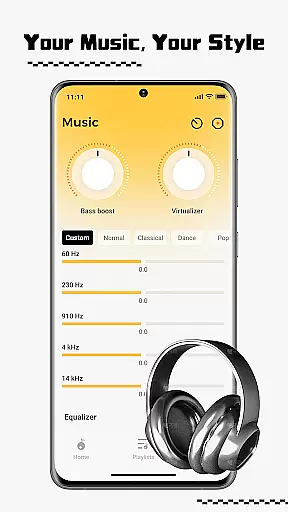
One standout feature is the built-in equalizer that offers precision sound customization. Whether you're looking to boost bass for workouts or fine-tune vocals for relaxed listening, SonicNest provides both presets and manual controls to suit every preference. This makes it an ideal choice for audiophiles and casual listeners alike who seek high-quality playback and effortless navigation.
SonicNest boasts a range of innovative features that set it apart from standard music players. Its local music import functionality simplifies the process of transferring songs from your device storage directly into the app. Once imported, users benefit from powerful organizational tools that allow editing track details and sorting options based on various criteria such as album or artist.
The highlight of SonicNest is undoubtedly its advanced equalizer. It includes multiple presets crafted by audio experts but also supports detailed manual adjustments. This ensures each track sounds exactly how you want it—whether you prefer deep bass tones or crystal-clear highs. Additionally, the sleek design enhances usability with smooth transitions between menus and quick access to frequently used functions.
These comprehensive capabilities not only streamline music management but also significantly improve overall sound quality, providing a richer listening experience compared to other apps in this category.
One of the key features of SonicNest is its extensive music library, which allows users to seamlessly import and manage their personal music collection. The app supports local music import, enabling users to browse their device's storage and add tracks directly into the SonicNest interface.
The app ensures that all imported music retains its original quality, providing a rich and immersive listening experience. Users can organize their music by albums, artists, or custom playlists, ensuring easy access to their favorite tracks at any time.
SonicNest also emphasizes copyright authenticity, allowing users to enjoy their legally owned music without concerns about licensing issues. This makes it an ideal choice for audiophiles who value both the quality and legality of their audio content.
SonicNest takes audio quality seriously, offering advanced sound customization through its built-in equalizer. Users can fine-tune every track with precision, adjusting bass, treble, and mids to suit their preferences. Whether you're looking for deep bass for workouts or enhanced vocals for acoustic sessions, SonicNest delivers.
The app provides multiple expertly crafted presets for different genres and activities, ensuring optimal sound performance across various listening scenarios. For those who prefer manual control, SonicNest offers detailed customization options to create a personalized audio profile.
This focus on audio quality ensures that every listening session is not only enjoyable but also tailored to individual tastes, making SonicNest a standout choice in the Music & Audio category.
User-friendly interface
Advanced equalizer settings
Efficient library organization
Seamless music import
Customizable playback options
Limited streaming services
No lyrics display feature
Occasional bugs reported
Premium version required
High system requirements

Gorgeous UI, Powerful music Search and Equalizer, the great choice for you!
 4.70
4.70
Simple & Intuitive Metronome
4.70
Your song collections with lyrics and chords on Android smartphones and tablets.
4.80
Enjoy singing any song, no matter how high or low it is
4.30
Help you quickly get started with Shokz headphones
4.40
The original SP-1200 experience on your iPad
4.20
Slow music down without changing pitch.
3.70
Offline Tunes, Unlimited Vibes
3.90
Listen to offline music and sounds from all categories
4.70
Listen radio AM / FM Stations. Live AM / FM Radio App Station. Radio Com.
4.70
Unleash your creativity! Turn simple prompts into full fledged songs.
4.70
Let your Android device with the sound effects you want
4.50
Permanently backup Now Playing. Maps, filters & listening stats.
4.00
Sheet music reader, piano & music note player. Play music score & learn to read.
3.90
Simple mp3 and mp4 player with advanced features.
3.40
Control your MIDI USB or Bluetooth devices in app and avoid some trampling
3.30
Simply convert wav to mp3. Clear. Reliable. Safe.
4.1
Remove ads permanently from Music Visualizer
4.5
Music Streaming suite for Ampache, Nextcloud Music and compatible backends.
4.5


User Reviews