
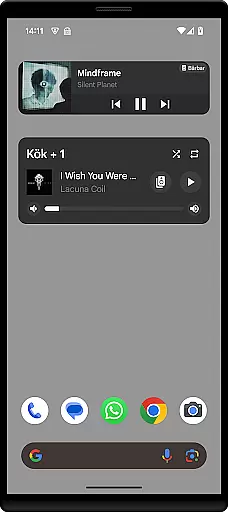
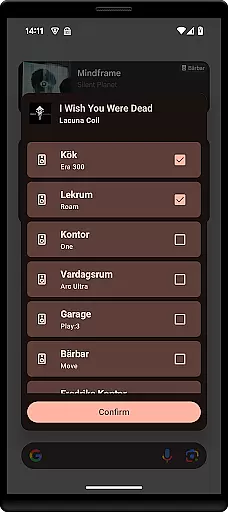
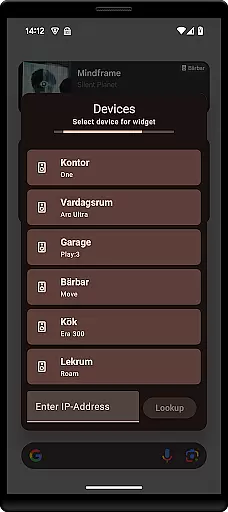
Sonos Widget is a powerful tool designed for music enthusiasts who want seamless control over their Sonos audio system directly from their smartphone's home screen. This app offers two distinct widget styles, Compact and Enhanced, allowing users to choose the display that best suits their needs.
With features like volume control, grouping of speakers, playback options (Play, Pause, Next, Previous), and support for modes such as Shuffle and Repeat, Sonos Widget ensures you have complete command over your listening experience without needing to open the main Sonos app.
Whether you're at home or entertaining guests, this widget provides quick access to essential controls, making it easier than ever to manage your Sonos setup effortlessly.
The standout feature of Sonos Widget is its dual-widget offering. The Compact widget provides a minimalist interface with basic controls, while the Enhanced widget delivers a more detailed view with additional functionalities such as metadata display.
Users can easily adjust the volume, group speakers for synchronized playback, and control music flow with playback buttons. The inclusion of Shuffle and Repeat modes adds versatility to how users interact with their playlists.
Setting up the widget is straightforward; simply select the Sonos Widget from your 'Widget' drawer and follow the on-screen instructions to connect it to your Sonos system. For any issues or inquiries, users can reach out via email at contact@freddroid.com.
Sonos Widget offers a unique way to manage your music experience by providing direct control over your Sonos system from your home screen. While the app itself does not host a music library, it enables seamless access to your existing Sonos music ecosystem, ensuring that all content streamed is fully licensed and legal.
The application supports playback controls such as Play, Pause, Next, and Previous, allowing users to navigate their music library effortlessly. This ensures that users can enjoy a vast array of songs, albums, and playlists while maintaining full confidence in the copyright legitimacy of the content they are accessing through their Sonos system.
Additionally, the Enhanced widget provides relevant metadata about the currently playing track, including artist information and album art. This feature not only enriches the listening experience but also reinforces the authenticity of the music being played, sourced from verified and legal channels within the Sonos ecosystem.
One of the standout features of Sonos Widget is its ability to offer superior audio quality options tailored to enhance your listening experience. By integrating directly with your Sonos system, the widget allows for precise volume control, ensuring that users can customize their audio output to match their preferences and environment.
The widget's support for advanced modes like Shuffle and Repeat further enhances the audio experience by giving users more control over how their music is played. These features ensure that listeners can enjoy a dynamic and personalized audio experience without compromising on quality.
Moreover, the app's compatibility with various audio formats supported by Sonos guarantees that users can experience high-fidelity sound, whether they are streaming local files or online content. This dedication to maintaining top-notch audio quality makes Sonos Widget an essential tool for audiophiles who demand the best from their home audio setup.
User-friendly interface
Comprehensive volume control
Efficient speaker grouping
Versatile playback options
Quick access to essential features
Limited official support
No direct Sonos affiliation
Potential compatibility issues
Basic visual design
Dependent on main Sonos app

Fun & Easy Voice Changer – Record, Edit & Add Hilarious Effects!
 4.50
4.50
Make music anywhere. Turn your device into an instrument.
4.2
The Music Journey in Your Hands
4.30
Control your MIDI USB or Bluetooth devices in app and avoid some trampling
3.30
10-Band Audio Equalizer, Sound / Bass Booster for Spotify Users & Music Players
4.40
Time Trainer: accurate metronome w tools to help you develop your internal time!
4.20
The best music and audio player, with beautiful UI, music search and equalizer.
4.60
The iconic iOS metronome app is now on Android.
3.70
Play your music offline without limits
4.80
24,000 free audio books and no ads!
4.90
Full-featured, High-Quality Groovebox Workstation, perfect for Live Performance!
4.80
Walkout Song DJ is the most intuitive app to manage your sports music.
4.70
Over 100 million tracks available for high quality streaming and download
4.60
Recording studio w/ 10k beats, pro vocal FX and a network of 20M rappers & fans!
4.60
Enhance the sound quality of your devices, listen to what you want
4.50
A High-Precision Audio Spectrum Analysis App
4.20
The original SP-1200 experience on your iPad
4.20
The official Sonos app
4.10
Music Streaming suite for Ampache, Nextcloud Music and compatible backends.
4.5


User Reviews