
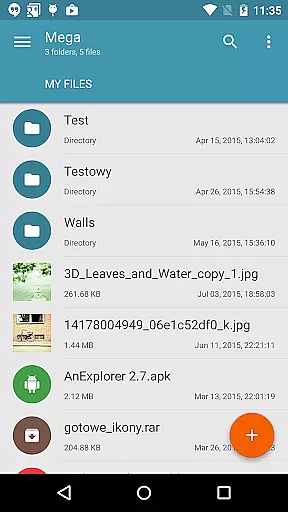
Mega Plugin for Solid Explorer is a productivity-focused extension that seamlessly integrates with your Solid Explorer file manager. This plugin enables users to directly connect their Mega cloud storage accounts, providing comprehensive file management capabilities without leaving the Solid Explorer interface. With support for essential operations like copying, moving, renaming, and previewing files, it ensures efficient cloud resource handling.
In addition to basic file operations, the plugin allows for smooth downloading and uploading of files between local and cloud storage. Users can also stream multimedia content such as music and videos directly from their Mega accounts. Whether you're managing documents or media files, this plugin offers a streamlined solution for integrating cloud storage into your daily workflow.
The Mega Plugin stands out with its robust feature set tailored for power users. The plugin supports full-featured file management, including advanced options like copy, move, rename, and direct file viewing. These features are presented within an intuitive interface that maintains the familiar look and feel of Solid Explorer.
Another key highlight is its seamless integration with Mega's cloud services. By following simple connection steps, users can securely authenticate their accounts and gain instant access to their cloud data. The ability to stream multimedia files adds another layer of convenience, making it ideal for users who need quick access to their media libraries while on the go.
Furthermore, the plugin ensures reliable performance through optimized upload and download processes. Its design emphasizes both speed and security, ensuring that files are transferred efficiently while maintaining data integrity. These capabilities make it an indispensable tool for anyone seeking to enhance their productivity through better cloud storage management.
At the heart of Mega Plugin for Solid Explorer lies its robust core task management system. This plugin enables users to efficiently handle their cloud-based files with ease and precision.
The application allows seamless operations such as copying, moving, renaming, and viewing files directly from your Mega account. These features ensure that users can organize and manage their digital assets without hassle.
Additionally, the ability to download and upload files further enhances productivity by providing a comprehensive set of tools for file management. Users can effortlessly maintain their data flow between local and cloud storage.
By integrating these capabilities, Mega Plugin for Solid Explorer delivers an essential productivity tool for individuals seeking efficient cloud-based task management.
Cross-device synchronization is a critical feature of Mega Plugin for Solid Explorer, ensuring reliable access to your Mega account across multiple devices. This functionality supports modern workflows where users operate on various platforms.
With this plugin, users can stream music and videos directly from their Mega cloud drive. This capability ensures that media content is accessible wherever you are, without the need for local storage.
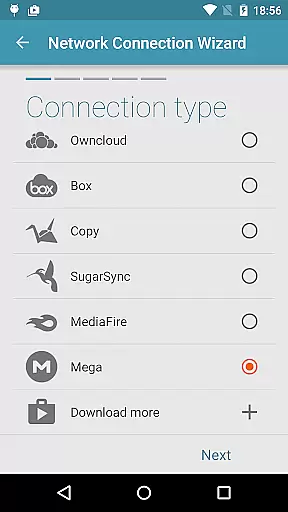
The process to connect to Mega is straightforward: tap the + button, choose 'Cloud connection,' select the Mega option, enter your login credentials, and tap connect. Once connected, your cloud drive becomes an integral part of your file management system.
This synchronization reliability guarantees that users have consistent and up-to-date access to their files, enhancing both convenience and efficiency in managing digital resources.
Seamless integration
Comprehensive file management
Secure authentication process
Efficient upload/download
Multimedia streaming support
Limited to Mega users
Requires Solid Explorer
No standalone functionality
Premium account recommended
Occasional sync delays

Auto-shutoff Alarm with Sunrise, Sunset & Fixed Options.
 3.50
3.50
The upgraded version of Name Wheel with AI and the power to add your own wheels.
4.5
The Pro Version of Android's tiniest Notepad app. Just 0.3MB but feature-packed!
4.60
Customizable calendar widget for seamless event sync, planning & scheduling.
4.00
CalenGoo is a very flexible and feature-rich calendar app
4.40
Stay on top of your to-dos with Google Tasks, part of Google Workspace.
4.60
Okta MFA
4.70
Seamlessly read, manage, and organize all your PDF files solution in one place
4.40
QuickEdit is a fast, stable and full featured text and code editor.
4.20
Best Tool for the professionals Electrician, Electrical contractors, etc.
4.90
QuickBooks Workforce lets teams view pay info and track time in one place.
4.70
aCalendar+ makes your day, week and month
4.70
Secure, fast, open-source, Remote Desktop Client for Windows and Linux with SSH
4.60
App Lock with fingerprint, password: Lock apps & hide photos with lock screens
4.60
Secure your apps with lock screens, use custom themes and different features.
4.40
Unlock AutoNotification
4.00
Access your phone's notifications, calls, apps, photos & texts on your PC
3.90
Ultimate Virtual AI Character for immersive Roleplay Chat. Perfect Companion
3.90
A simple, portable logger for POTA, SOTA, Field Day, and more
4.5


User Reviews