
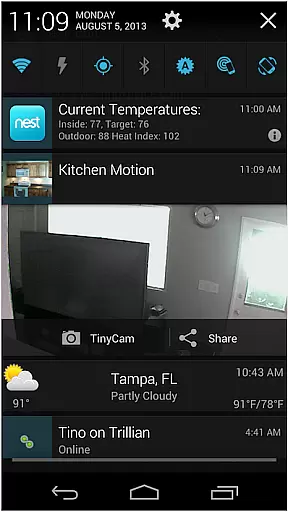
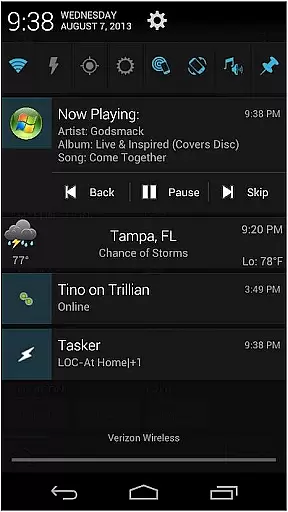
AutoNotification Unlock Key is a productivity-enhancing application that unlocks the full potential of AutoNotification. This app allows users to fully utilize advanced notification management features on their Android devices, making it easier to automate responses and manage notifications efficiently.
The core functionality includes enabling all premium features within AutoNotification such as customizing notification actions, setting up automatic replies, and integrating with various apps and services. It is designed for power users who need granular control over their device's notification system.
Ideal for busy professionals and tech-savvy individuals, this app streamlines notification handling, saving time and enhancing focus by automating routine tasks.
This app boasts a variety of powerful features aimed at maximizing productivity. Users can access advanced customization options for notifications, including the ability to create context-aware actions and automated responses based on specific triggers.
Additionally, AutoNotification Unlock Key provides seamless integration with other applications and services, allowing for a cohesive and efficient digital environment. The ability to set up complex automation rules ensures that users can tailor their notification experience precisely to their needs.
These capabilities result in a highly personalized and automated notification management system, significantly boosting productivity and reducing manual intervention.
Effective task management is essential for productivity applications, serving as the backbone for organizing and executing tasks efficiently. AutoNotification Unlock Key enhances this aspect by unlocking advanced features within the main AutoNotification app. These features allow users to create complex notification-based workflows that automate routine tasks.
The application enables users to set up precise triggers based on notifications from other apps, allowing seamless integration into daily routines. With the full version unlocked, users gain access to more sophisticated task automation options, including multi-step actions and conditional logic. This level of customization ensures that users can tailor their task management system to fit specific needs.
By leveraging these capabilities, users experience significant time savings and improved efficiency in managing notifications and related tasks. The ability to fine-tune how notifications are processed transforms a simple notification tool into a powerful productivity assistant. Ultimately, this leads to a more organized digital environment where important information is never overlooked.
In today's interconnected world, reliable cross-device synchronization is crucial for maintaining workflow continuity across multiple devices. AutoNotification Unlock Key addresses this need by ensuring that all notification-based workflows and settings remain consistent and up-to-date regardless of the device being used.
The unlock key activates enhanced synchronization features within the main application, allowing real-time updates across devices. Whether you're switching from your phone to a tablet or vice versa, all your notification preferences, triggers, and automated actions remain intact and functional. This seamless transition between devices ensures that no important notifications are missed.
With this reliable synchronization, users can trust that their productivity systems will work consistently wherever they go. The peace of mind that comes from knowing your setup is always current and accurate across all devices significantly boosts overall efficiency. This feature makes AutoNotification a valuable tool for those who rely on multiple devices for their daily tasks.
Unlocks full version
Advanced customization
Automation capabilities
Seamless integrations
Time-saving
Requires base app
Paid unlock
Complex for beginners
Android only
Feature overload

Create study competitions, track your hours, and stay consistent with friends
 4.3
4.3
All in one sketching tool. Technical and General drawing. Online Maps support.
3.70
Android Wallet Password Manager
4.80
Remotely view listen control and record cameras.
3.70
⏰ Finally a timer app which can run multiple timers simultaneously on your watch
3.90
IP Camera Viewer - Android TV : RTSP Surveillance camera viewer for Android TV
4.2
Docker, Kubernetes management over Portainer Mobile
4.40
Quickly and easily keep track of your work shifts
4.70
QuickEdit is a fast, stable and full featured text and code editor.
4.20
Seamlessly integrate data and reports to build your presentation to impress
4.80
Scan paperwork into PDF/JPG, generate your own e-signature and send fax or email
4.70
The AI assistant that thinks with you - write, code, and solve complex tasks
4.60
Subscribe to Webcal & .ics calendars and keep them up-to-date!
4.50
Experience Reading - Night Mode for Documents
4.40
Easily read and manage all your PDF files
4.10
Make apps & sites with natural language prompts
4.10
The ultimate file manager for rooted devices. The original and still the best.
4.00
Take control of your clipboard with Clipper!
3.90
Smart PDF reader & editor to view, organize and manage PDF documents easily.
3.70


User Reviews