
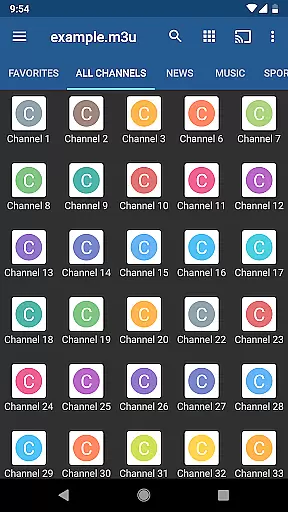
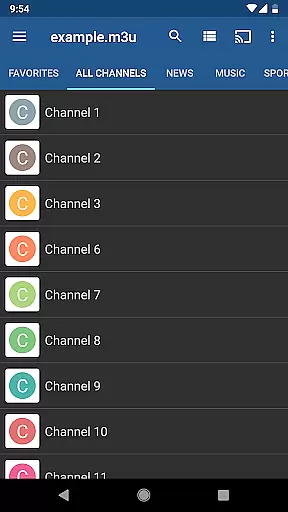
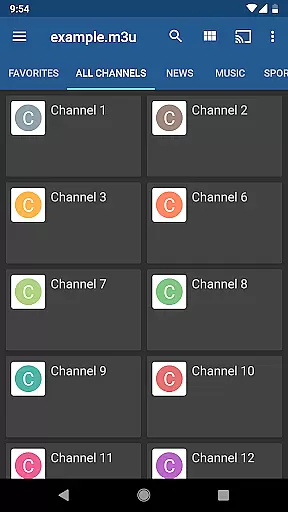
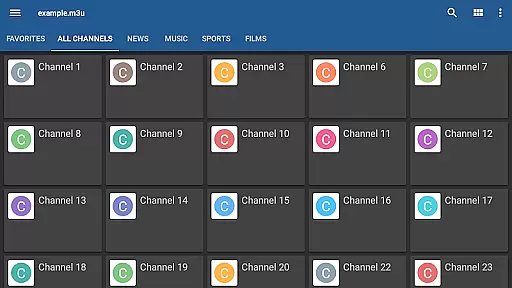
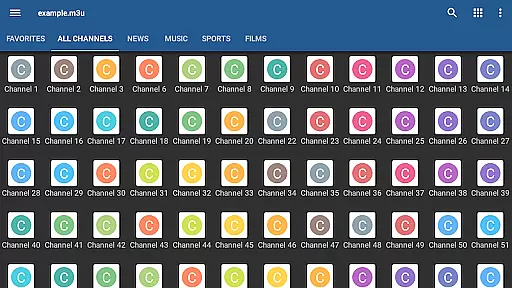
IPTV Pro is the premium version of IPTV app, offering an ad-free experience with advanced features for seamless TV streaming. It supports M3U and XSPF playlists, enabling users to watch IPTV from their Internet service provider or free live TV channels from any web source.
Designed for both casual viewers and tech-savvy users, IPTV Pro includes options like starting on device boot, auto-playing the last channel, and extended playlist history. The app also provides EPG support in XMLTV and JTV formats, parental controls, and multiple viewing modes such as grid, list, or tile view. However, it does not include built-in channels; users must provide their own playlist.
This app is ideal for those seeking a customizable and uninterrupted IPTV experience, especially on set-top boxes or devices requiring multicast stream support via UDP proxy.
IPTV Pro stands out with its comprehensive feature set tailored for diverse user needs. The app offers multiple viewing options including grid, list, and tile views, catering to user preferences for channel navigation. With support for both XMLTV and JTV EPG formats, users can easily access electronic program guides.
One of the key highlights is the app's ability to handle multicast streams using a UDP proxy, which is particularly useful in LAN environments. Additionally, IPTV Pro provides both internal and external video player options, giving users flexibility in how they consume content. Parental controls add a layer of security, making it family-friendly.
The paid version removes ads and adds practical features like auto-playing the last channel and starting on device boot, which are especially beneficial for set-top box users. These functionalities collectively enhance user convenience and streamline the TV viewing experience.
Video format compatibility is a crucial aspect of any video player application, ensuring that users can access content in various formats without technical hindrances. IPTV Pro supports M3U and XSPF playlists, which are commonly used for internet television and radio broadcasts.
The app's ability to handle different playlist formats allows users to seamlessly integrate their personal media libraries or streams from various sources. This flexibility ensures that whether you're accessing content from your Internet service provider or other web sources, IPTV Pro can manage and play it effectively.
Moreover, the internal and external video player options enhance this compatibility further. Users can choose between an embedded player for convenience or an external one for additional features, catering to diverse preferences and technical requirements.
By supporting both XMLTV and JTV EPG formats, IPTV Pro not only plays videos but also enriches the viewing experience with detailed program guides. This comprehensive support for multiple formats positions IPTV Pro as a versatile tool for all your video playback needs.
While IPTV Pro does not focus on traditional AI-powered editing features like video trimming or effects, it offers advanced functionalities that enhance user interaction and content management. The app provides extended playlist history and parental control features, which serve as intelligent tools for managing and securing your viewing experience.
The extended playlists history allows users to easily revisit previously watched channels or streams, creating a personalized and efficient navigation experience. This feature leverages usage patterns to simplify content discovery and retrieval, saving time and effort.
Parental control is another significant aspect, acting as an intelligent safeguard for family-friendly viewing. By enabling content restrictions, IPTV Pro ensures that inappropriate material is inaccessible to younger audiences, providing peace of mind for parents and guardians.
Additionally, the auto-play last channel option and grid, list, or tile view of TV channels incorporate smart functionalities that adapt to user preferences. These features collectively contribute to a more intuitive and customized interface, enhancing the overall user experience without traditional video editing capabilities.
Ad-free experience
Device boot start option
Auto-play last channel
Extended playlist history
Multiple EPG formats
No built-in channels
Requires technical setup
UDP proxy needed
Paid version only
Limited to personal playlists

Connect 2 UVC devices for recording and broadcast video/audio stream
 3.90
3.90
Cast Videos from Web Browser, IPTV to Roku, Chromecast, DLNA, Smart TV +more
4.60
VLC Remote lets you control your VLC Media Player on Mac, PC or Linux.
4.60
Fast & easy HD video downloader for all formats, support 4K playback & download.
4.60
Manage your IPTV live channels and VOD playlists (no playlist included)
3.80
This app is an emulator of some specific IPTV boxes
3.50
Web Browser for LG TV to stream webvideos, online movies and livestreams in HD
4.20
A Simple app to download Video & Music from the Internet.
4.70
Powerful video player with advanced hardware acceleration and subtitle supports
4.20
An easy-to-use and all-round screen recorder with audio
4.80
Full HD Video mp3 Player, MP4 player play 1080p, File manager, Video Downloader
4.40
Browser for Fire TV to stream webvideos, online movies, livestreams in HD
4.40
Video player, file manager for all formats, 4K/HD media player supports subtitle
4.30
Powerful, professional, versatile teleprompter. Developed by an active film crew
4.00
AI Video Editor:AI Music, Text to Video,Text to Speech,Auto Caption,Video Effect
4.00
Kodi media center, a free and open source cross-platform entertainment hub
3.60
Connect EasyCap or UVC devices for recording and broadcast video/audio stream
3.60
Client application for NextPVR software
3.00
Powerful HD video player with support for all formats & subtitles.
4.3


User Reviews