
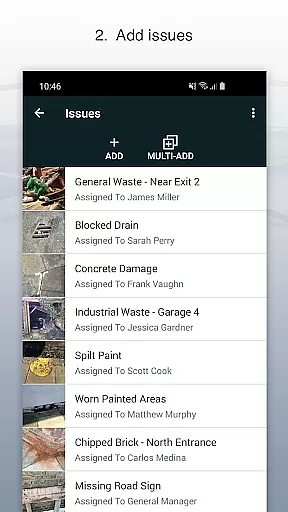
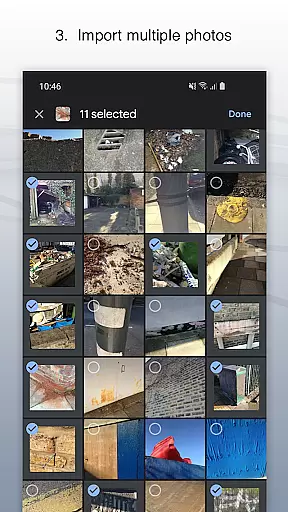
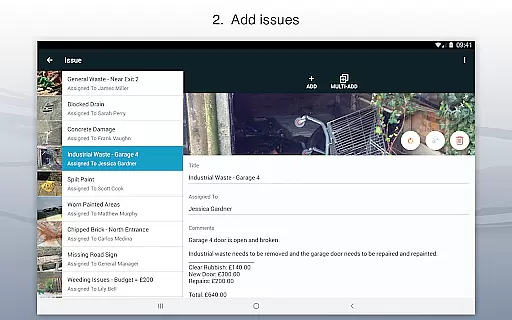
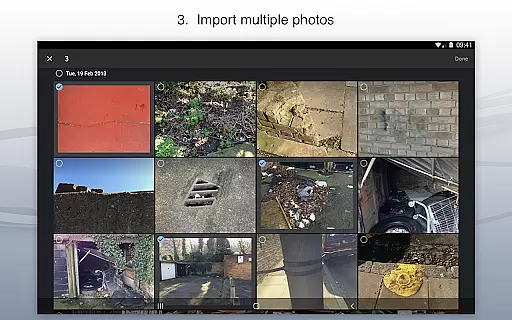
Site Audit Pro is a powerful productivity tool designed to streamline the auditing process for businesses across various industries. This mobile application allows users to efficiently record issues by capturing photos, adding descriptive titles, assigning tasks to specific individuals, and including relevant comments. The app's intuitive interface makes it easy to annotate images, highlighting critical information directly on the photos.
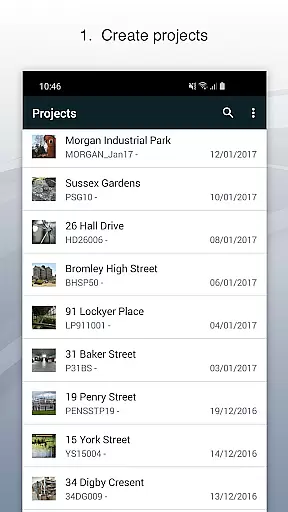
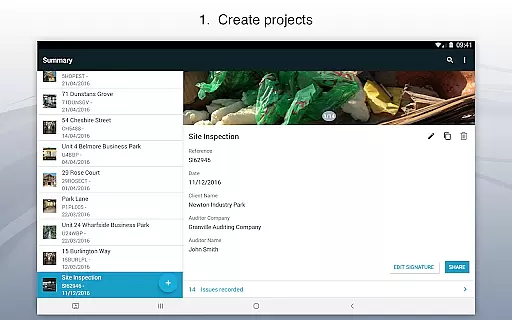
One of the standout features of Site Audit Pro is its ability to organize findings into well-structured projects. Users can input detailed site and client information for each project, ensuring that all data remains contextually relevant and easily accessible. With over 40,000 businesses worldwide already benefiting from its capabilities, this app significantly enhances productivity by simplifying audits and inspections. Whether you're conducting safety checks, creating punch lists, or providing quotations, Site Audit Pro enables professionals to compile and share their results seamlessly through customizable reports.
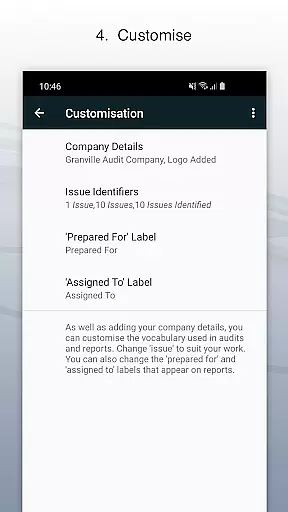
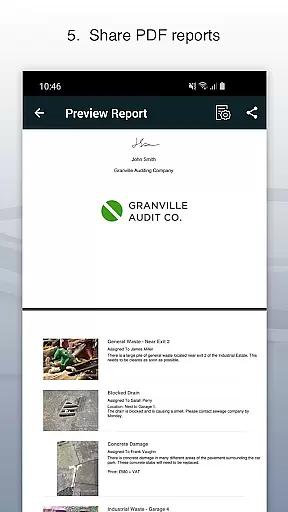
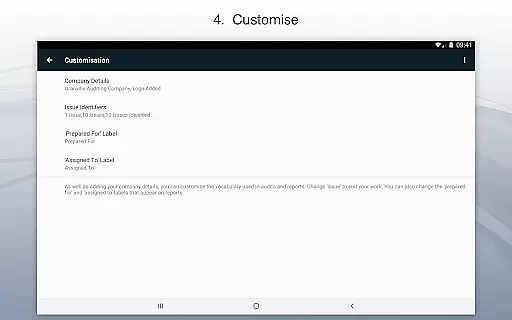
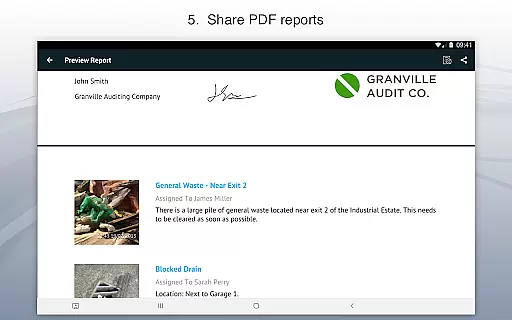
The true value of Site Audit Pro lies in its adaptability and professional touch. It offers multiple report designs and customization options, allowing businesses to incorporate their branding elements such as company logos and auditor signatures. This flexibility ensures that every report not only meets industry standards but also reflects the unique identity of the organization using it. By enabling instant sharing via email or cloud services like Dropbox, Site Audit Pro empowers teams to collaborate effectively without being tied down to office environments.
Site Audit Pro boasts an impressive array of features tailored to enhance the efficiency and professionalism of audit processes. At its core, the app allows users to document issues comprehensively by attaching photos, titles, assignees, and comments. This multifaceted approach ensures that every recorded item is rich with detail, facilitating clearer communication and faster resolution times. Additionally, the photo annotation feature lets users draw attention to specific areas within an image, making it easier to convey complex information visually.
Beyond basic documentation, Site Audit Pro excels in project management capabilities. Users can categorize issues under distinct projects, each with its own set of site and client details. This organizational structure helps maintain clarity and focus, especially when dealing with multiple clients or locations simultaneously. Furthermore, the app supports instant generation and distribution of professional audit reports. These reports can be customized extensively—users have the option to include company names, logos, auditor names, and even signatures, thereby personalizing the output to align with corporate branding guidelines.
Another remarkable aspect of Site Audit Pro is its versatility across different industries. The app provides several predefined templates for common use cases such as audits, inspections, punch lists, snagging, site walks, and checklists. However, it also permits content adjustments to better suit specific sectors. For instance, instead of stating 'Identified 12 issues,' users might prefer phrases like 'Found 12 problems' or 'Examined 12 properties.' Such flexibility underscores the app's commitment to serving diverse professional needs while maintaining high standards of quality and usability.
Effective task management is essential for productivity-focused applications like Site Audit Pro. This app simplifies the process of recording issues, assigning tasks, and managing projects on the go.
Site Audit Pro allows users to record issues with photos, add titles, assignees, and comments, making task delegation clear and efficient. The ability to annotate photos ensures that critical details are not missed during communication.
Users benefit from organized project structures where site and client details can be specified per project. This level of organization enhances clarity and accountability across teams, ensuring everyone knows their responsibilities.
The app's comprehensive approach to task management significantly boosts productivity by streamlining audits and inspections, allowing professionals to focus more on solving problems than managing logistics.
Cross-device synchronization is vital for ensuring that all team members have access to the latest data regardless of their location or device. Site Audit Pro excels in providing reliable synchronization features that keep everyone on the same page.
With Site Audit Pro, users can instantly share professional audit reports without needing to return to the office. Reports can be shared as PDFs via email, Dropbox, and other platforms, ensuring seamless collaboration across different devices.
This reliable synchronization extends to customizable report designs, where users can include company names, logos, and signatures. Such personalization options ensure consistency and professionalism across all communications.
By offering dependable cross-device functionality, Site Audit Pro empowers businesses to operate efficiently and cohesively, no matter where team members are located or what devices they use.
User-friendly interface
Comprehensive reporting tools
Customizable templates
Photo annotation feature
Wide industry applicability
Limited free version
Occasional bugs reported
Subscription costs may add up
Learning curve for new users
Advanced features locked behind paywall

Create study competitions, track your hours, and stay consistent with friends
 4.4
4.4
Smart PDF reader & editor to view, organize and manage PDF documents easily.
3.70
We're working to become the best machining app on the market! www.cncdirt.com
4.80
App lock - lock apps with fingerprint, password, pin or pattern, protect privacy
4.70
Make apps & sites with natural language prompts
4.10
PDF scanner & converter for files, photos, lottery, QR codes. One swipe away!
4.50
The AI assistant that thinks with you - write, code, and solve complex tasks
4.60
Code on-the-go with VScode for Android. Edit,debug and collaborate from mobile!!
3.10
Ultimate Virtual AI Character for immersive Roleplay Chat. Perfect Companion
3.90
8 custom complications. Custom Time Fonts. Beautiful color schemes. A++ Design.
5.00
Mind Map and brainstorm, note taking and idea collection
4.80
The long-awaited modern gallery app for your Nextcloud server
4.70
Calendar 2023 widget for Android. Appointment scheduler, planner, and reminder
4.60
Planet Free VPN - The best Fast Unlimited and Secure VPN Without Logs
4.50
Fill, sign & send docs, forms, agreements & contracts via electronic signature.
4.50
Docker, Kubernetes management over Portainer Mobile
4.40
Automates browsing any website and notifies you of important changes or events
4.30
A customizable calendar for your Wear OS watch
4.20
Customizable calendar widget for seamless event sync, planning & scheduling.
4.00


User Reviews