
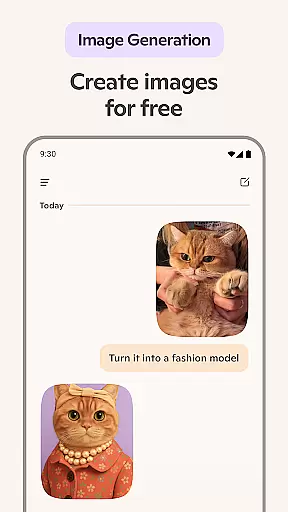






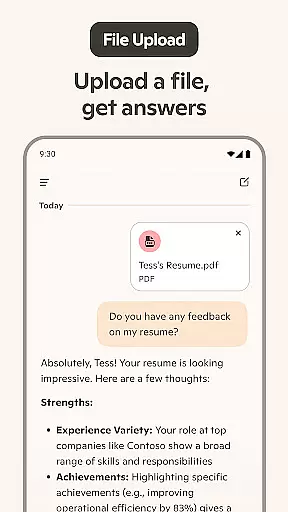
Microsoft Copilot is an advanced AI productivity tool designed to assist users in accomplishing various tasks through smart automation and intuitive interfaces. The app integrates cutting-edge OpenAI and Microsoft AI models, offering features like AI chat assistance, photo generation from text prompts, and multilingual support.
Core functionalities include generating images from textual descriptions, providing summarized answers to complex queries, and assisting with content creation such as emails, cover letters, and resumes. It also supports voice-based interactions, making it versatile for both personal and professional use cases.
Whether you're looking to streamline daily workflows or seeking creative inspiration, Microsoft Copilot serves as a reliable companion that boosts efficiency and fosters innovation across different domains.
Microsoft Copilot stands out with its comprehensive suite of AI-powered tools tailored for productivity enhancement. One notable feature is the AI photo generator, which transforms text prompts into high-quality visuals ranging from abstract designs to photorealistic images.
The app's AI chat assistant provides robust support in multiple languages, enabling users to translate, proofread, and optimize texts efficiently. Additionally, it simplifies routine tasks like creating shopping lists or drafting professional communications by leveraging smart summarization techniques.
Voice chat capabilities further enrich user interaction, allowing seamless composition of stories or scripts while sparking creativity through dynamic conversations with the AI helper.
Microsoft Copilot excels in core task management by integrating advanced AI capabilities to streamline daily activities. The application leverages the latest OpenAI and Microsoft AI models to offer users an intuitive platform for organizing tasks efficiently.
With Copilot, users can create comprehensive to-do lists, manage schedules, and set reminders effortlessly. The AI chat assistant simplifies grocery lists or weekly meal prep through smart suggestions and organization tips, ensuring that users stay on top of their responsibilities without hassle.
The app's ability to draft emails, cover letters, and even update resumes adds another layer of productivity. By automating routine writing tasks, Copilot allows users to focus on more critical aspects of their work or personal life, enhancing overall efficiency.
Moreover, Copilotu2019s multilingual support enables it to translate and proofread content across hundreds of languages, including regional dialects. This feature not only broadens its usability but also ensures that language barriers do not hinder effective communication and task completion.
Cross-device synchronization is a cornerstone of Microsoft Copilot's functionality, ensuring that users have seamless access to their data and tasks across multiple platforms. This reliability is crucial for maintaining productivity in today's fast-paced digital environment.
Copilot employs cutting-edge cloud technology to synchronize information instantly between devices. Whether you're switching from your smartphone to a desktop or tablet, all your conversations, generated images, and task lists remain up-to-date and accessible wherever you go.
This robust synchronization capability extends to collaborative projects as well. Users can share documents, brainstorm ideas, and co-create content with team members in real-time, regardless of the device they are using. Such fluid collaboration enhances teamwork and accelerates project timelines.
Furthermore, Copilotu2019s consistent performance across devices guarantees that users experience no lag or data loss during transitions. This dependable cross-device integration empowers individuals and teams to achieve more, making Microsoft Copilot an indispensable tool for modern productivity needs.
Advanced AI Models
Versatile Text-to-Image
Multilingual Support
Efficient Summarization
Voice Interaction
Complex Interface
Resource Intensive
Limited Free Features
Occasional Glitches
Privacy Concerns

Secure, fast, open-source, VNC and SSH Remote Desktop for Windows, Linux and Mac
 4.70
4.70
Smart PDF reader & editor to view, organize and manage PDF documents easily.
3.70
The upgraded version of Name Wheel with AI and the power to add your own wheels.
4.1
Todo reminder
4.10
Secure, open-source, SPICE and SSH Remote Desktop for QEMU KVM virtual machines
4.00
The ultimate file manager for rooted devices. The original and still the best.
4.00
Scan paperwork into PDF/JPG, generate your own e-signature and send fax or email
4.70
Daily processing of PDF documents.
4.40
Seamlessly read, manage, and organize all your PDF files solution in one place
4.40
Planet Free VPN - The best Fast Unlimited and Secure VPN Without Logs
4.50
Fill, sign & send docs, forms, agreements & contracts via electronic signature.
4.50
Subscribe to Webcal & .ics calendars and keep them up-to-date!
4.50
Device's storage information in a simple and clear graphical form (infographics)
4.10
⏰ Finally a timer app which can run multiple timers simultaneously on your watch
3.90
Mega cloud explorer plugin for Solid Explorer
3.80
All in one sketching tool. Technical and General drawing. Online Maps support.
3.70
ID.me Authenticator is a simple and free Two Factor Authentication solution
3.50
Easiest event planning, volunteer signups & parent teacher conference scheduling
2.20
Ads Free App! Editor, Hide File, Copy, Move, Delete and Rename.. all facility av
1.70


User Reviews