
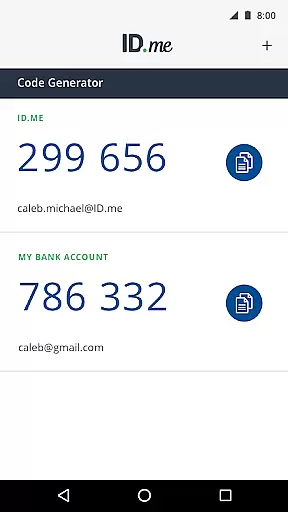
ID.me Authenticator is a productivity-focused app designed to enhance account security through Two Factor Authentication (2FA). The app generates 6-digit Time-Based One-Time Passwords (TOTP) and supports PUSH notifications for one-touch authentication. It ensures secure access to online accounts on websites that support 2FA, providing an essential layer of protection against unauthorized access.
With its TOTP Code Generator feature, users can generate verification codes without needing a network or cellular connection. Additionally, the PUSH-based authentication allows users to approve login attempts via push notifications sent directly to their devices. These features make ID.me Authenticator a reliable tool for safeguarding digital identities in various professional and personal scenarios.
ID.me Authenticator offers several key features that set it apart as a robust productivity tool. Firstly, its TOTP Code Generator provides users with 6-digit verification codes that are refreshed every 30 seconds, ensuring dynamic security for online accounts. This feature eliminates the need for SMS-based codes, making the authentication process more reliable and secure.
The app also supports PUSH-based authentication, allowing users to approve login requests with a single touch. When signing into an account, users enter their credentials and then receive a push notification on their device, which they can approve to complete the login process. This seamless integration enhances both security and user convenience, making ID.me Authenticator an ideal choice for professionals seeking efficient account protection solutions.
ID.me Authenticator excels in core task management by providing a streamlined approach to Two Factor Authentication (2FA). This app ensures that users can efficiently manage their online security through two primary methods. First, it generates 6-digit Time-Based One-Time Passwords (TOTP) which serve as an additional layer of security when accessing supported websites.
Once the app is configured with your ID.me account, it operates seamlessly without requiring a network or cellular connection. This independence from external connectivity enhances its reliability and accessibility. Users can easily generate verification codes on demand, making the authentication process both swift and secure.
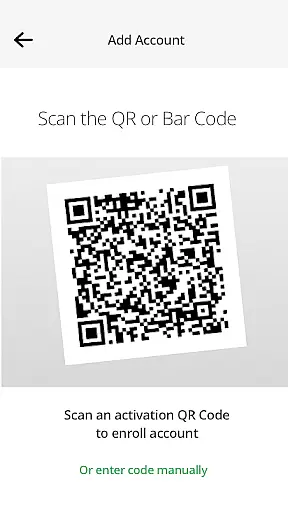
The app simplifies the setup process by allowing users to enroll and connect to their ID.me account via a QR code scan. This straightforward configuration reduces potential barriers to adoption, ensuring that even those with limited technical expertise can enhance their account security with minimal hassle.
Cross-device synchronization is a critical feature of ID.me Authenticator, ensuring that users can maintain consistent security across multiple devices. By supporting PUSH notification-based one-touch authentication, the app allows users to approve login attempts with a simple push notification on their registered mobile device.
This functionality not only streamlines the authentication process but also enhances security by eliminating the need to manually enter codes. When users sign into their accounts, they simply approve the push notification sent to their phone, confirming their identity with minimal effort.
The reliability of this synchronization is further bolstered by the requirement to enroll and connect the app to the user's ID.me account. This enrollment process establishes a secure and persistent link between the user's devices and their account, guaranteeing that authentication requests are received promptly and securely across all connected devices.
Enhanced Security
User-Friendly Interface
Offline Code Generation
Push Notification Support
Free to Use
Limited to ID.me Accounts
No Biometric Login
QR Code Setup Required
Dependent on Device
Occasional Notification Delays

 4.20
4.20
Client for Nextcloud Deck
4.60
Device's storage information in a simple and clear graphical form (infographics)
4.10
Pwnagotchi companion app
4.20
Stay on top of your to-dos with Google Tasks, part of Google Workspace.
4.60
Functional QR scanner and barcode reader that requires little storage space.
4.60
A beautiful digital clock with autostart and many other functions
4.70
Simple notepad & memo. Take notes, to-do list, shopping list with reminders.
4.80
Note taking, handwriting, record audio, PDF annotation, planner & journal
4.20
Native client for Forgejo and Gitea
5.00
The Pro Version of Android's tiniest Notepad app. Just 0.3MB but feature-packed!
4.60
Experience Reading - Night Mode for Documents
4.40
Share files & memories safely. Keep your photos and videos secure.
4.40
⏰ Finally a timer app which can run multiple timers simultaneously on your watch
3.90
A Revolutionary All-in-One Artificial Intelligence Tools
3.80
Find and delete junk files & block unwanted notifications & manage files
3.70
Ads Free App! Editor, Hide File, Copy, Move, Delete and Rename.. all facility av
1.70
Create study competitions, track your hours, and stay consistent with friends
4.1
A comprehensive suite of tools designed specifically for Lactation Consultants
4.3


User Reviews