


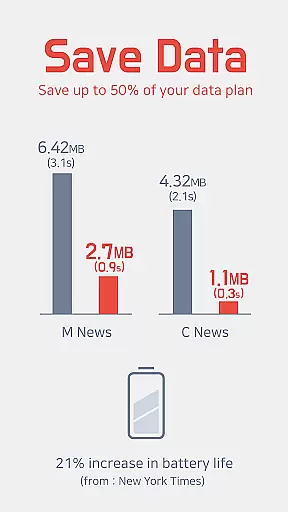
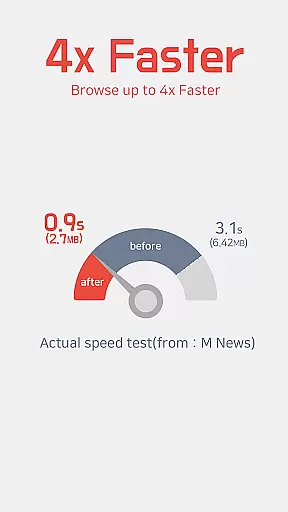



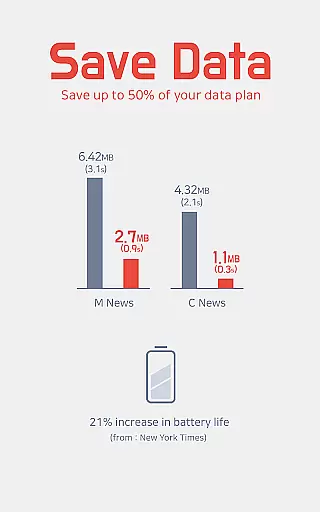
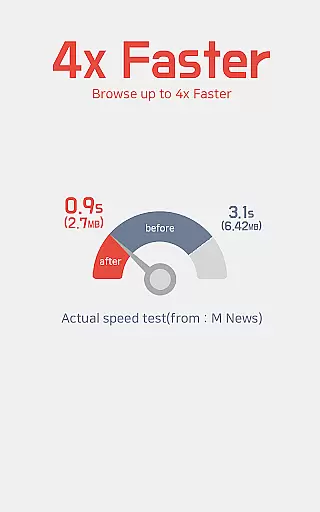
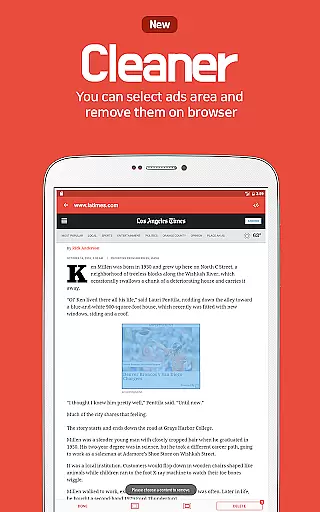


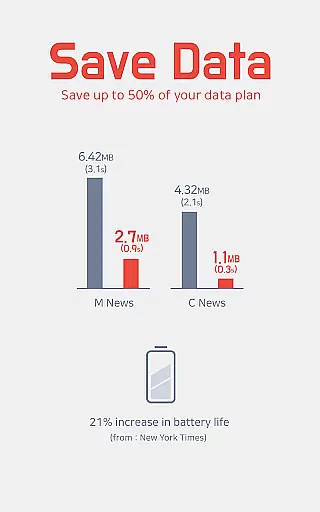
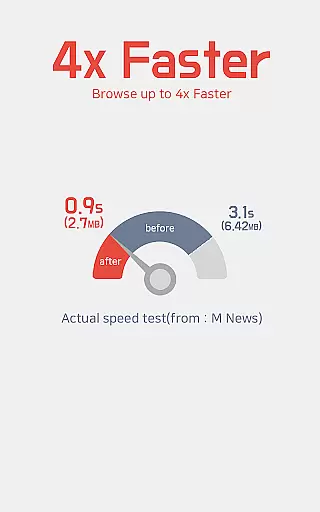
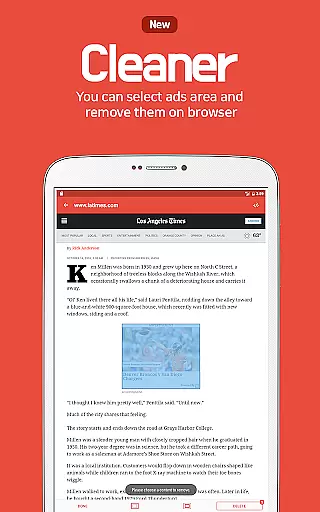
Unicorn Blocker is a powerful ad-blocking application designed to enhance your web browsing experience. The app focuses on saving data expenses by blocking various types of ads, making web surfing up to three times faster and increasing battery life by up to 21%. It supports Samsung Internet 4.0 or higher and Yandex Browser, requiring Android 4.4 (KitKat) or higher.
The app blocks annoying pre-roll video ads, hide-and-appear ads, sudden pop-ups, sexual ads, tracking, forced redirects, and more. By doing so, it saves up to 50% of your data plan and ensures a smoother browsing experience across top websites, communities, blogs, and advertising agencies.
Unicorn Blocker offers a comprehensive set of features tailored to improve productivity and user experience. One of its standout capabilities is the ability to block multiple types of intrusive ads, including pre-roll video ads, pop-up ads, and forced redirect ads. This not only enhances browsing speed but also conserves data usage significantly.
In addition to ad-blocking, Unicorn Blocker provides practical tips for optimizing browser settings. For instance, users can change Facebook settings to open links in the default browser and sync bookmarks from Google Chrome to Samsung Browser. These features ensure that users can customize their browsing experience while maintaining high performance and efficiency.
Unicorn Blocker excels in delivering accurate and effective ad-blocking capabilities, ensuring a seamless browsing experience. The app blocks various types of intrusive ads, including pre-roll video ads, pop-ups, and those that hide and suddenly appear, thus saving up to 50% of your data plan.
By filtering out unwanted content, Unicorn Blocker makes web surfing up to three times faster. This significant improvement in speed not only enhances user satisfaction but also contributes to a more efficient use of time while browsing the internet.
The app's ability to block ads that waste data and battery life is crucial for maintaining device performance. Users can experience an increase in battery life by up to 21%, thanks to lighter web pages that require less processing power. This feature is particularly beneficial for those who rely on their devices throughout the day.
The interface of Unicorn Blocker is designed with simplicity and intuitiveness in mind, making it accessible for users of all technical backgrounds. Upon launching the supported browsers like Samsung Internet or Yandex Browser, the application operates seamlessly in the background without any complex configurations needed.
With clear instructions provided for installation and setup, even novice users can easily activate the ad-blocking features. Tips are included within the app's description to help users optimize settings for popular platforms such as Facebook and sync bookmarks from Google Chrome to Samsung Browser effortlessly.
This straightforward approach extends to its compatibility requirements; Unicorn Blocker works effectively on Android 4.4 (KitKat) or higher with specific browser versions. Such clarity ensures that users understand the prerequisites for optimal functionality, enhancing overall satisfaction with the product.
Blocks various ad types
Saves up to 50% data
Increases battery life
Enhances browsing speed
User-friendly tips
Limited browser support
Requires specific OS
No iOS version
Contact needed for help
Time-limited discount

 4.20
4.20
Secure, fast, open-source, VNC and SSH Remote Desktop for Windows, Linux and Mac
4.70
Auto-shutoff Alarm with Sunrise, Sunset & Fixed Options.
3.50
The Pro Version of Android's tiniest Notepad app. Just 0.3MB but feature-packed!
4.60
Make apps & sites with natural language prompts
4.10
Functional QR scanner and barcode reader that requires little storage space.
4.60
Subscribe to Webcal & .ics calendars and keep them up-to-date!
4.50
Docker, Kubernetes management over Portainer Mobile
4.40
AT&T Internet customers can use this app to personalize their Wi-Fi network.
4.40
Native client for Forgejo and Gitea
5.00
Multilingual translator for text, voice, and image translation!
4.90
Seamlessly integrate data and reports to build your presentation to impress
4.80
Client for Nextcloud Deck
4.60
Lightweight PDF, Word, Excel reader.
4.60
Tally and goal counter for Wear OS & mobile
4.50
Share files & memories safely. Keep your photos and videos secure.
4.40
Pwnagotchi companion app
4.20
Secure, open-source, SPICE and SSH Remote Desktop for QEMU KVM virtual machines
4.00
A simple, portable logger for POTA, SOTA, Field Day, and more
4.1


User Reviews