




Open Browser is a comprehensive mobile web browser designed for fast, secure, and convenient browsing. It combines essential internet tools into one app, eliminating the need to switch between multiple applications. The browser offers rapid page loading even on slower networks, ensuring an optimal user experience.
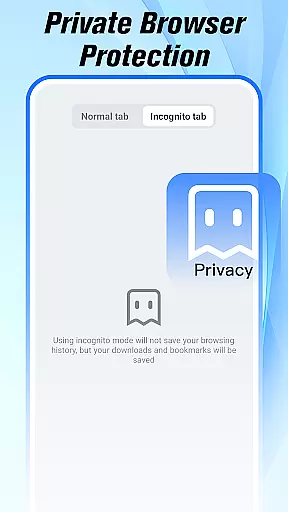
A standout feature is its built-in Incognito Mode that allows private browsing without saving history or cookies. Additionally, users can enjoy seamless video streaming and downloading, real-time news updates, integrated weather forecasts, and simple file management—all within the same intuitive interface.
This makes Open Browser particularly useful for users seeking an all-in-one solution for their daily online activities such as reading news, watching videos, managing files, and staying updated with weather conditions.
Open Browser stands out with its array of practical features tailored for modern mobile users. Its lightweight design ensures pages load quickly while maintaining smooth performance—a crucial advantage for users with limited connectivity.
The Private Browsing Mode protects user privacy by disabling data storage like history and cookies during sessions. For multimedia enthusiasts, the app supports effortless video playback and downloading in various formats through its integrated media player.
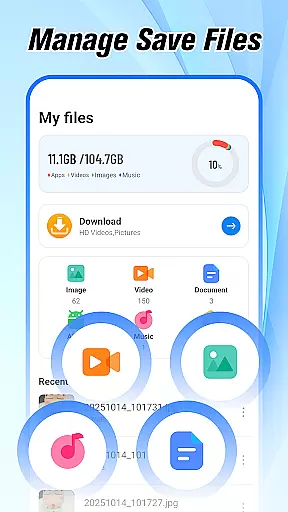
Furthermore, it provides instant access to trending news stories and live weather updates directly from the homepage. The built-in file manager simplifies organization and retrieval of downloaded content, enhancing overall usability.
At the heart of Open Browser lies its commitment to core function accuracy and effectiveness, ensuring users experience seamless web interactions. This browser is engineered for speed and precision, loading pages rapidly even on slower networks. Its lightweight design optimizes performance without compromising functionality.
The browser's efficiency extends to its integrated features such as video downloading and playback, file management, and real-time news updates. These built-in tools are designed to work harmoniously, providing a smooth user experience that eliminates the need to switch between multiple apps. Whether you're streaming videos or organizing files, Open Browser delivers consistent performance.
For users who prioritize privacy, the Incognito Mode offers a secure browsing environment by not saving history, cookies, or cache. This feature ensures that your private browsing sessions remain confidential, adding another layer of effectiveness to your daily web activities.
Ultimately, Open Browser's dedication to accuracy and effectiveness translates into tangible benefits for users. From faster search results to efficient navigation and robust privacy controls, this browser empowers users to browse smarter and more securely, enhancing both productivity and peace of mind.
Open Browser excels in delivering an interface that marries simplicity with intuitiveness, making it accessible for users of all technical backgrounds. The design philosophy centers around reducing complexity while maintaining powerful functionality, resulting in a clean and straightforward user interface.
Navigation within the app is streamlined to ensure users can find and utilize features effortlessly. Key functionalities like the built-in video player, file manager, and weather updates are strategically placed for easy access. This thoughtful arrangement minimizes the learning curve, allowing users to maximize their browsing efficiency from the start.
Moreover, the inclusion of an Incognito Mode underscores the browser's focus on user-friendly privacy controls. Activating this mode is simple, yet it provides advanced protection for private browsing sessions. Such intuitive design choices enhance user confidence in managing their online presence securely.
In essence, Open Browser's interface simplicity and intuitiveness create a welcoming digital environment where users can focus on their tasks without distraction. By prioritizing ease of use alongside essential features, the browser ensures a pleasant and productive browsing experience tailored to modern needs.
Fast page loading
Private browsing
Video downloads
News integration
File management
Limited extensions
No desktop sync
Ads present
Occasional bugs
Basic UI

This app unlocks the Pro features of the Central for DayZ app
 3.60
3.60
eXtended Permission Manager - a small app to manage permissions and AppOps
4.50
Forza Tuning Calculator App for Forza Horizon 5, Motorsport and Earlier Titles
4.40
VESC Tool can monitor and configure VESC-compatible devices over BLE and Wifi
4.20
The one-and-only remote control for PC, Mac, and Linux
4.70
With videos, electrical calculators, and built-in ebook, Ugly’s has your answer.
4.50
The Ultimate Flex Drivers Utility App - Convenient Tapping & Block Filters
4.70
Pro Emulator is an easy to use game console emulator for a range of consoles.
4.40
Your personal health butler
3.60
The ultimate tool for network analysis, wifi scanning and problem detection.
4.90
Bedrock Together: Join any bedrock server on Xbox/PS
4.80
Remote Play with FSR upscaling, low latency & full controller support
4.80
HD Camera captures every special moment.
4.60 4.50
4.50
Quickly switch to an encrypted DNS server on Android TV
4.50
Universal TV remote control all TVs, Roku, LG, Samsung, Fire, Vizio, Sony, TCL.
4.40
Create your own live wallpaper or check out thousands already made presets
3.90
Create your own custom widget with endless possibilities
3.90
Safely recover deleted photos, videos, and files with a single easy tap.
3.70


User Reviews