
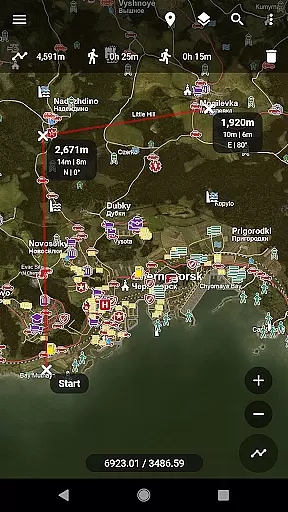
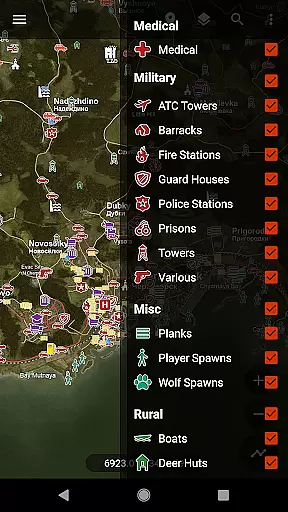
Central for DayZ is a specialized tool designed to enhance the gameplay experience for DayZ enthusiasts. This application serves as a comprehensive resource that unlocks detailed locations of loot and buildings, making in-game navigation more efficient. It meticulously categorizes points of interest such as Coast, Crash Sites, Industrial areas, Landmarks, Medical facilities, Military bases, Rural spots, Urban zones, Vehicles, and Water Sources. By providing precise coordinates and insights, it allows players to strategize their moves effectively, thus maximizing their survival chances in the game.
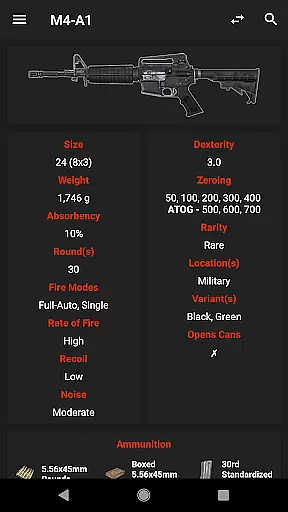
In addition to location data, this app offers a Side-by-Side Compare feature. This functionality enables users to analyze in-game items simultaneously, helping them determine the best gear to take on their missions. With contributions from DayZWiki, the community, and Dan Clarke for logos, Central for DayZ combines collective knowledge into an accessible format. Whether you are a novice or a seasoned player, this tool proves invaluable by streamlining information access and improving overall gaming efficiency.
Central for DayZ stands out with its extensive range of features tailored for the DayZ gaming community. One of its primary functionalities includes unlocking Loot and Building locations across various categories such as Coast, Crash Sites, Industrial, Landmarks, Medical, Military, Misc, Rural, Urban, Vehicles, and Water Sources. Each category contains specific sub-locations like Boat Houses, Construction Sites, Castles, Health Centers, ATC Towers, Planks, Farms, Offices, 4x4 Ada, and Pumps. This granularity ensures that players have pinpointed details to aid their exploration and strategic planning within the game environment.
A notable feature is the Side-by-Side Compare option, which empowers players to evaluate different in-game items concurrently. This comparison capability facilitates informed decision-making regarding equipment selection, thereby enhancing gameplay performance. The app's content is enriched by contributions from reputable sources such as DayZWiki and active community members who continuously support updates and improvements. Furthermore, user engagement is encouraged through direct communication channels like email support for reporting bugs or suggesting enhancements. Overall, Central for DayZ delivers a robust set of tools that significantly augment the gaming experience by providing structured and actionable insights.
Central for DayZ offers an extensive range of functionalities that are crucial for players looking to enhance their gameplay experience. The app provides detailed locations for loot and building sites, categorizing them into specific types such as Coast, Crash Sites, Industrial, and more. This level of detail ensures that users can accurately pinpoint areas of interest on the map.
The effectiveness of Central for DayZ is evident in its Side-by-Side Compare feature, which allows players to evaluate items and make informed decisions about which ones to take. By leveraging data from reliable sources like DayZWiki, the app guarantees that all information provided is both accurate and beneficial for strategic planning during gameplay.
For gamers, this means having a trustworthy companion that enhances decision-making processes while playing DayZ. Whether it's choosing the best location to scavenge or comparing items before making a move, Central for DayZ equips players with precise tools needed for success in the game environment.
A user-friendly interface is essential for any tool designed to improve gaming efficiency, and Central for DayZ excels in this area. The app organizes complex information into easily digestible categories, ensuring that even newcomers can quickly grasp how to use its features effectively. Each category, from Medical to Military locations, is clearly labeled and simple to navigate.
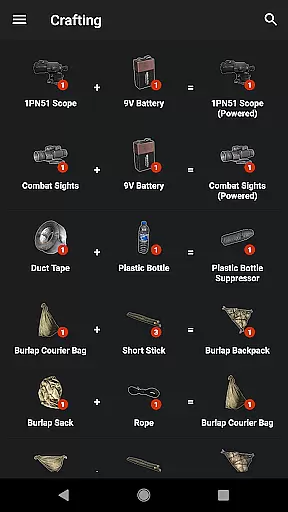
Moreover, the intuitive design extends beyond mere aesthetics; it encompasses practical elements like straightforward navigation paths and logical grouping of related items. For instance, when using the Side-by-Side Compare feature, players find it easy to switch between different items without feeling overwhelmed by unnecessary complexity.
This simplicity translates directly into enhanced gaming performance. Players spend less time deciphering how to operate the app and more time applying its insights within DayZ itself. As a result, Central for DayZ not only simplifies access to critical game data but also significantly boosts overall gaming efficiency through its well-thought-out interface design.
Comprehensive location data
User-friendly interface
Side-by-side item comparison
Community-driven updates
Enhanced strategic planning
Requires separate app download
No official affiliation
Premium version needed
Limited to DayZ game
Dependent on third-party content

 4.10
4.10 4.50
4.50
pdf merge, word to pdf, jpg to pdf, edit pdf, convert to pdf and much more!
4.20
A recovery soft,it features photo recovery, video recovery, file recovery.
3.40
Safely recover deleted photos, videos, and files with a single easy tap.
3.70
App to pay for FUTO Keyboard
4.60
Support Fossify apps with a warm thank you!
5.00
Game Booster, GFX Tool is now compatible with newer game update
4.50
Enjoy a smooth mobile reading experience!
3.60
Enjoy smooth gameplay with Game Booster
4.90
Navigate with Ease and Style
4.90
Powerful collection of electronics tools and reference.A must for any enthusiast
4.90
Fast Video Downloader, Movie Downloader, Torrent Downloader & Adblock Browser
4.70
Head tracking for PC sim games such as MSFS 2024 or Elite:Dangerous. No headset!
4.50
With videos, electrical calculators, and built-in ebook, Ugly’s has your answer.
4.50
Button mapper, mouse toggle, sleep timer and a lot of another features
4.50
An easy-to-use calculator designed to save time calculating and bending conduit
4.30
Screen Mirroring with sound for Samsung TV, LG TV, Sony TV, Smart TV and Browser
4.20
A simple app to back up and restore SMS & MMS messages and call logs.
4.10


User Reviews