
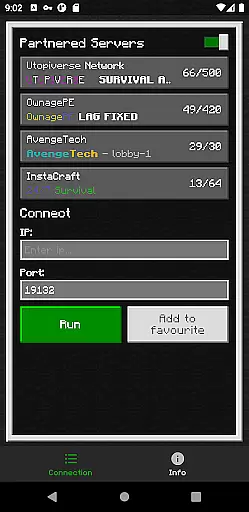
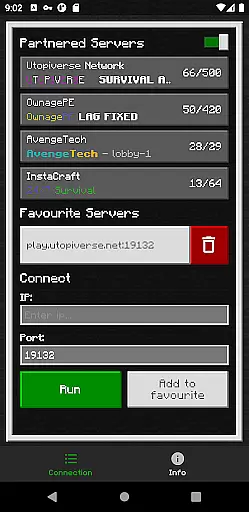
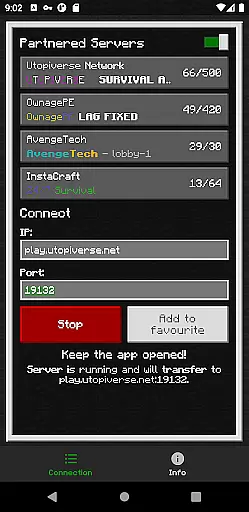
BedrockTogether (Pro) is an innovative networking tool designed for Minecraft Bedrock Edition players. This ad-free version allows any Bedrock server to appear as a LAN server on Xbox or PlayStation clients, enabling seamless connections without DNS rerouting. While Realms and Nintendo Switch compatibility aren't supported, the app provides a straightforward solution for cross-platform LAN gaming.
The application's core functionality lies in its ability to simplify server connections. Users simply input their server IP and port, click 'Run', and connect through the game's Friends tab. The tool automatically handles the necessary network configurations, making it an essential utility for Minecraft enthusiasts who want to play with friends across different devices on the same local network.
BedrockTogether (Pro) offers several distinctive features that enhance the Minecraft multiplayer experience. The application's main advantage is its ability to create virtual LAN connections between different gaming platforms, including Xbox and PlayStation consoles. This is achieved through a simple interface where users can input server details and establish connections quickly.
The tool includes practical troubleshooting guidance and maintains an active support community through Discord and Telegram channels. While operating as a third-party application, it demonstrates technical sophistication by handling complex network protocols without requiring user expertise. The app's lightweight design and straightforward implementation make it a valuable asset for Minecraft players seeking cross-platform connectivity solutions.
BedrockTogether (Pro) delivers exceptional core functionality by enabling Bedrock Edition servers to appear as LAN servers on various gaming consoles, including Xbox and PlayStation. This allows users to connect seamlessly without the need for complex DNS rerouting.
The app's primary feature is its ability to facilitate a simple connection process. Users only need to input their desired server IP and port, click the 'Run' button, and navigate to the 'Friends' tab in their game. The server will then be accessible via the LAN tab, ensuring a smooth and hassle-free experience.
By focusing on accuracy and effectiveness, BedrockTogether (Pro) ensures that users can reliably connect to their desired servers every time. This precision in functionality significantly enhances the user experience, making it an essential tool for Minecraft enthusiasts.
The interface of BedrockTogether (Pro) is designed with simplicity and intuitiveness in mind, providing users with a straightforward way to connect to Bedrock Edition servers. Its clean layout and easy-to-follow instructions ensure that even those new to networking can successfully use the app.
Users are guided through a clear, step-by-step process: entering the server IP and port, clicking the 'Run' button, and accessing the server via the 'Friends' tab in the game. This logical flow minimizes confusion and reduces the learning curve typically associated with network applications.
Overall, BedrockTogether (Pro)'s commitment to an intuitive interface makes it accessible to a broad audience, enhancing user satisfaction and engagement. By removing unnecessary complexity, the app ensures that connecting to your favorite Minecraft servers is as effortless as possible.
Seamless LAN connection
User-friendly interface
Ad-free experience
Active support channels
Simple setup process
No Nintendo support
Limited platform scope
Third-party risks
Network dependency
Premium pricing

 4.50
4.50
Quickly switch to an encrypted DNS server on Android TV
4.50
A powerful, easy-to-use flight computer on your phone or tablet!
3.80
Complete kernel toolbox with features to manage and tweak your rooted device
4.30
Carry a FTP server in your pocket and avoid USB cables for file transfer
4.20
Excellent scientific calculator with symbolic algebra, integrals, derivatives
4.80
The one-and-only remote control for PC, Mac, and Linux
4.70
Fast Video Downloader, Movie Downloader, Torrent Downloader & Adblock Browser
4.70
Fun lie-detection pranks for friends and parties.
3.80
Enjoy smooth gameplay with Game Booster
4.90
NFC Tools can read and write NFC tags.
4.70
Keep track of your Palia friendships, tasks, and inventory with Palia Notebook
4.60
Play your X-Box games remotely in 1080p with any controller and zero latency
4.60
Mirror your screen to Fire TV - Super fast and simple
4.40
Clean up large files and similar photos, fast and easy to use
4.40
Screen Mirroring with sound for Samsung TV, LG TV, Sony TV, Smart TV and Browser
4.20
View detailed information about your Nissan Leaf the dealer never shows you.
4.10
Introducing Smart Printer, your ultimate destination for printing solutions!
4.00
Amateur Radio app for APRS: Track friends, exchange messages, get tactical info.
3.90


User Reviews