
Network Cell Info & Wifi is a comprehensive mobile network monitoring tool that provides detailed insights into cellular and Wi-Fi signals. The app supports multiple network types including 5G, LTE, CDMA, WCDMA, and GSM, making it an essential utility for users seeking to optimize their connectivity. With features like real-time signal monitoring, dual-SIM support, and one-tap speed tests, the app ensures users can troubleshoot reception issues effectively.
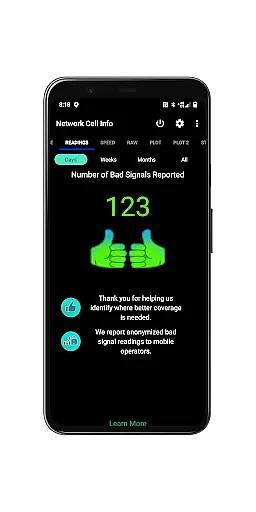
One of the standout features is the Bad Signal Reporter, which allows users to report poor signal experiences directly to mobile network operators. This crowdsourced data helps improve network performance over time. Additionally, the app offers advanced diagnostic tools such as signal plots, band number identification, and personal best signal finder maps, empowering users to locate optimal signal areas and maintain consistent connectivity.
Whether you're a tech enthusiast or simply looking to enhance your mobile experience, Network Cell Info & Wifi delivers actionable insights to help you achieve the strongest possible signal strength in any location.
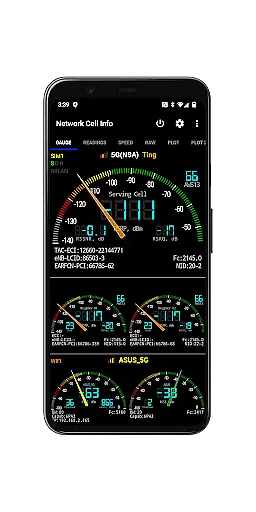
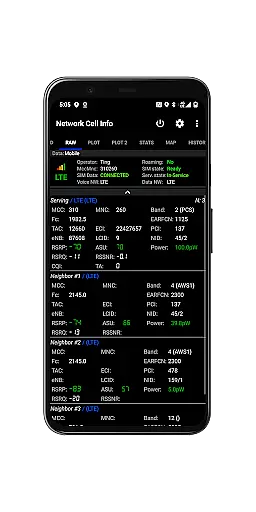
Network Cell Info & Wifi stands out with its extensive range of advanced features tailored for network diagnostics and optimization. One key highlight is the almost real-time (1-second) monitoring of cellular carrier and WiFi signals through intuitive Gauge/Raw tabs. This functionality supports various network standards including 5G, LTE+, LTE, UMTS, GSM, and CDMA, ensuring compatibility across different devices and regions.
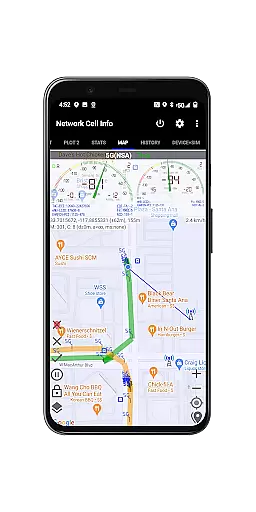
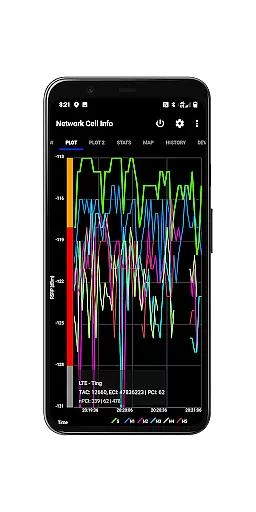
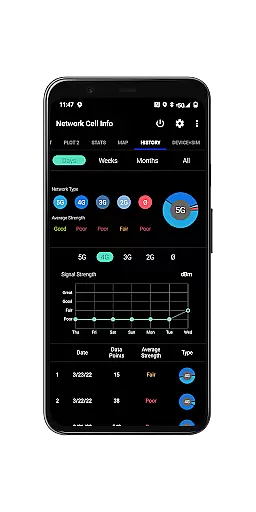
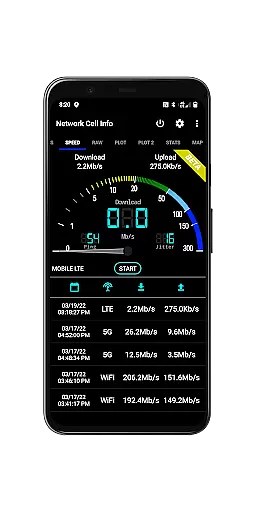
The app also includes practical tools like a one-tap internet performance speed test that measures download, upload, ping, and jitter metrics. Dual-SIM users benefit from dedicated signal-meter gauges for both SIMs alongside WiFi. Additional capabilities include detailed signal plots for up to six cells, historical logging of measurements, and a Personal Best Signal Finder map layer that visualizes signal strength by location. These features collectively enable users to identify weak spots and optimize their connection quality efficiently.
For power users, the app provides exportable databases of measurement histories, raw views of carrier network info, and comprehensive device statistics. Such depth makes it invaluable for anyone aiming to understand and improve their mobile network performance.
Network Cell Info & Wifi delivers exceptional accuracy and effectiveness in its core functions, making it an essential tool for users seeking to optimize their mobile network experience. The app provides almost real-time monitoring of cellular carrier and WiFi signals, updating every second to ensure users have the most current data at their fingertips.
The inclusion of advanced features such as 5G, LTE+, LTE, CDMA, WCDMA, and GSM support demonstrates the app's comprehensive approach to network diagnostics. This wide-ranging compatibility ensures that no matter what type of network you're on, Network Cell Info & Wifi can provide detailed insights into your connection quality.
One of the standout aspects is the one-tap WiFi/mobile internet performance speed test, which measures download, upload, ping, and jitter. This feature empowers users to quickly assess their network's performance and identify potential issues. Additionally, the dual-SIM support and multiple signal-meter gauges offer unparalleled flexibility for users with complex connectivity needs.
By providing these precise measurements and diagnostic tools, Network Cell Info & Wifi enables users to troubleshoot reception and connectivity problems effectively. Whether you're a casual user looking to improve your everyday mobile experience or a network professional requiring detailed analytics, this app delivers the accuracy and effectiveness needed to make informed decisions about your network connections.
Despite its technical nature, Network Cell Info & Wifi maintains an interface that balances simplicity with intuitiveness, ensuring users can navigate its features without feeling overwhelmed. The app organizes its extensive capabilities into clearly labeled tabs such as Gauge and Raw views, allowing users to quickly find the information they need.
The main dashboard presents key metrics through easy-to-read signal-meter gauges for both SIM cards and WiFi connections. This visual representation simplifies complex network data, enabling even novice users to understand their signal strength at a glance. The intuitive layout extends to specialized features like the Personal Best Signal Finder, which uses color-coded maps to display historical signal strength by location.
Advanced functionalities are nested within logical menu structures, preventing the interface from becoming cluttered while still keeping powerful tools readily accessible. For instance, the History Logs and Measurement features are tucked away in the Map tab but remain easy to locate when needed.
This thoughtful design approach makes Network Cell Info & Wifi suitable for both power users who require detailed technical data and casual users who simply want to improve their mobile experience. By combining technical depth with an intuitive interface, the app successfully bridges the gap between complexity and usability, offering a user-friendly experience without sacrificing functionality.
Comprehensive network monitoring
Real-time signal tracking
Dual-SIM support
Free Bad Signal Reporter
Advanced diagnostic tools
Complex for beginners
Requires technical knowledge
No offline mode
Limited CDMA support
Premium features locked

Just swipe the edge to do something!
 4.40
4.40
Learn the vast amount of system information about device and monitor it's state
4.70
Optimize your WiFi network, turn your phone into Wifi Analyzer
4.70
ADB support Android 4.X-Android 13(Support wireless pair mode).No root required!
4.70
Introducing Smart Printer, your ultimate destination for printing solutions!
4.00
Fun lie-detection pranks for friends and parties.
3.80
Clean up your phone, find files, play media, and share files offline
4.50
fast and easy mp3 music downloader
4.80
Enhance your Beats
3.70
The Ultimate Flex Drivers Utility App - Convenient Tapping & Block Filters
4.70
App to pay for FUTO Keyboard
4.60
Universal TV remote control all TVs, Roku, LG, Samsung, Fire, Vizio, Sony, TCL.
4.40
View detailed information about your Nissan Leaf the dealer never shows you.
4.10
A simple app to back up and restore SMS & MMS messages and call logs.
4.10
A convenient photo, video, and file recovery tool.
4.00
Create your own custom widget with endless possibilities
3.90
Smart and comfortable browsing experience.
3.80
This app unlocks the Pro features of the Central for DayZ app
3.60
A recovery soft,it features photo recovery, video recovery, file recovery.
3.40


User Reviews