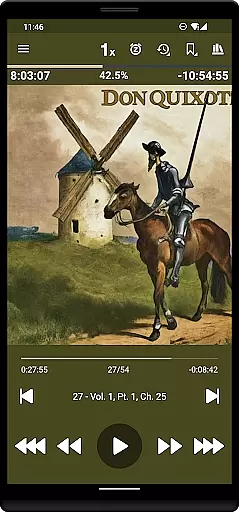
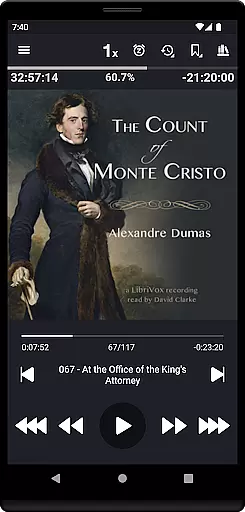
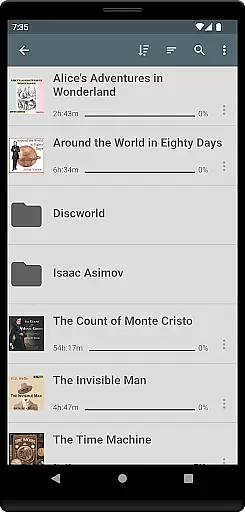
Listen Audiobook Player is a feature-rich audio player designed for audiobook enthusiasts who value flexibility and control. This application allows users to play DRM-free audiobooks from various sources, including personal libraries or curated selections available directly within the app. With support for multiple formats like MP3, M4B, FLAC, and more, it ensures compatibility with a wide range of audio files. The app's folder-based library system automatically syncs with your audiobook folders, making organization seamless while supporting subfolders for better management.
Beyond basic playback, Listen Audiobook Player offers advanced features such as variable playback speed (0.5x to 4x), pitch control, and an equalizer for tailored listening experiences. It also integrates with services like Plex and Audiobookshelf, enabling users to download books from hosted servers directly into their local libraries. Whether you're at home or on the go, this app provides synchronization across devices, bookmarks, sleep timers, and even Bluetooth controls, ensuring convenience and continuity in your listening journey.
Ideal for commuters, travelers, or anyone who enjoys immersive storytelling, this app enhances the audiobook experience by combining powerful functionality with user-friendly design. From adjustable playback settings to customizable interface colors, every aspect is crafted to give users complete control over how they engage with their favorite books.
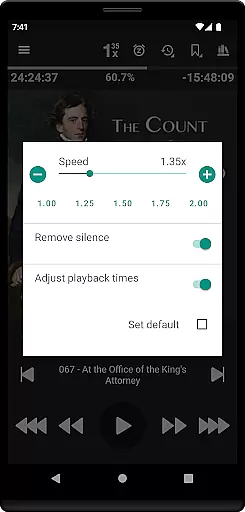
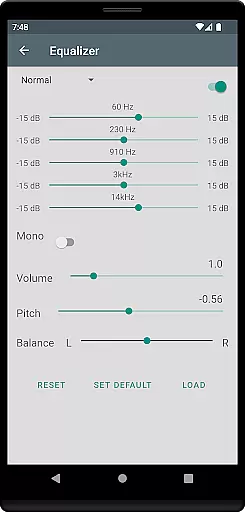
One of the standout aspects of Listen Audiobook Player is its comprehensive feature set that caters to both casual listeners and power users. The app supports embedded chapters in most audio codecs, allowing for precise navigation through audiobooks. Users can customize playback speeds, trim silence, adjust pitch, and apply volume boosts—all of which can be set globally or overridden per book for personalized listening. Additionally, the app includes advanced audio tools like an equalizer and balance controls, giving users professional-grade options to enhance sound quality.
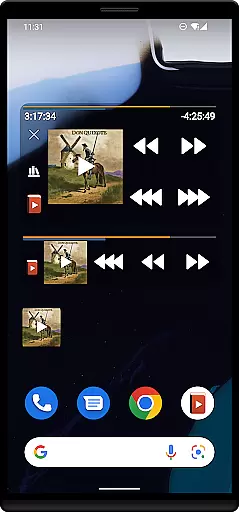
The app excels in accessibility and convenience. With Android Auto support, listeners can enjoy hands-free operation during drives. Integration with external services like Plex and Audiobookshelf makes downloading and managing large libraries effortless. Furthermore, innovative features such as bookmarking, position history, and the ability to create shareable audio clips make it easy to revisit key moments or share insights with others. Widgets and lock-screen controls further streamline the user experience, providing quick access to essential functions without interrupting playback.
Customization is another hallmark of this app. Users can define actions for headset buttons, set custom skip times, and even choose unique color schemes for progress bars and text. These thoughtful touches ensure that the app adapts to individual preferences, offering a truly bespoke experience. Whether you're looking to optimize your workflow or simply enjoy a good story, Listen Audiobook Player delivers unmatched versatility and performance.
Listen Audiobook Player offers an extensive music library by allowing users to import DRM-free audiobooks from various sources. This ensures that the content is legally obtained and respects copyright laws.
The app supports a wide range of audio formats including mp3, m4b, m4a, opus, ogg, aac, flac, and more. By focusing on DRM-free content, it guarantees that all materials within the library are authentic and legally accessible.
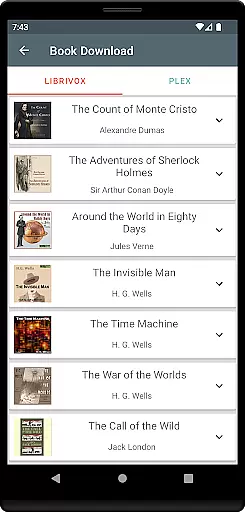
Additionally, users can download curated books directly from Librivox through the app, providing access to classic literature and other public domain works. This feature not only expands the library size but also assures users of the content's copyright authenticity.
With integrations for Plex and Audiobookshelf, Listen Audiobook Player enables users to download books from their hosted servers, further enriching the library while maintaining legal integrity.
One of the standout features of Listen Audiobook Player is its robust audio quality options. The app supports variable playback speed ranging from 0.5x to 4x, allowing users to adjust the tempo to their preference without affecting pitch.
Advanced audio controls include trim silence, pitch control, volume boost, equalizer, and balance settings. These options ensure that users can customize their listening experience to achieve optimal sound quality tailored to individual preferences.
Furthermore, each book can have its own audio settings, overriding global defaults if needed. This flexibility in audio customization enhances user satisfaction by catering to specific auditory needs.
The inclusion of high-quality audio codecs like FLAC and the option to convert books to Opus format ensures minimal loss in sound quality while reducing file sizes. Such features underscore the appu2019s commitment to delivering superior audio experiences.
User-friendly interface
Wide format compatibility
Advanced playback controls
Sync across devices
No ads or in-app purchases
No native cloud storage
Limited language support
Complex for beginners
Occasional bugs reported
Premium price tag

Fun & Easy Voice Changer – Record, Edit & Add Hilarious Effects!
 4.50
4.50
Your HD audio recorder on the go for music, meetings, ambience, animal sounds…
4.30
A synth that really lets you shape your sounds!
4.50
A High-Precision Audio Spectrum Analysis App
4.20
Permanently backup Now Playing. Maps, filters & listening stats.
4.00
The only true audiophile music player with Hi-Fi audio rendering and DSP engine
3.90
Make songs with AI! Any genre, custom lyric, song generator for music creation!
4.80
The iconic iOS metronome app is now on Android.
3.70
MilkDrop for Android TV
3.00
Voice recorder - Audio recorder. Best recorder for recording
4.90
The best music and audio player, with beautiful UI, music search and equalizer.
4.60
AI Music Maker: Generate And Compose AI Tunes & AI Songs & AI Music & AI Melody!
4.60
A complete sound package for the sound engineer or enthusiast
4.60
Play KORG’s revolutionary touch-based instrument on a variety of devices.
4.40
The Music Journey in Your Hands
4.30
Network/Cloud Streaming, Visualization, Graphic Equalizer and Sound Effects.
4.20
USB audio recording and playback finally possible on Android 3.1 or higher!
3.90
Powerful beat maker & DJ mixer to remix tracks, make music, & perform DJ mix
3.70
Slow music down without changing pitch.
3.70


User Reviews