
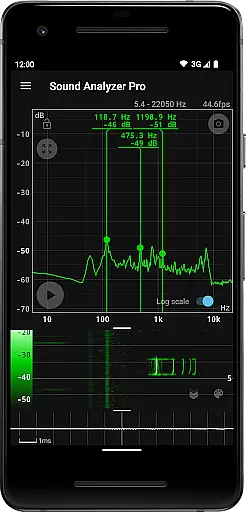
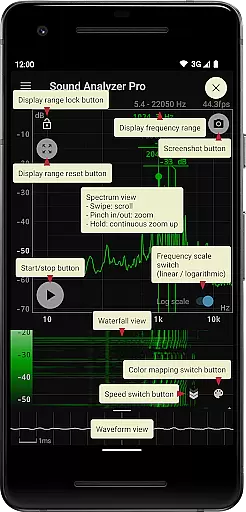
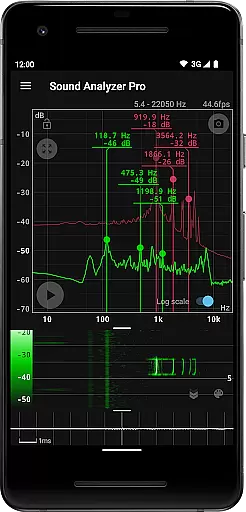
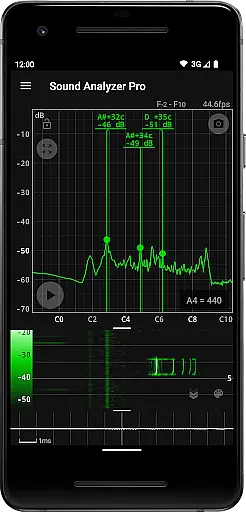
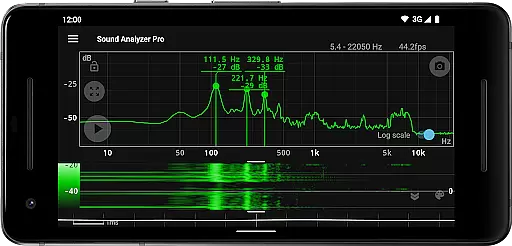
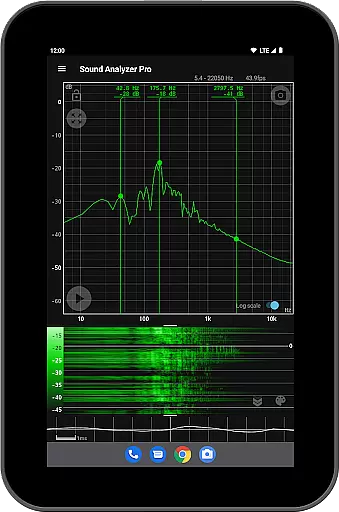
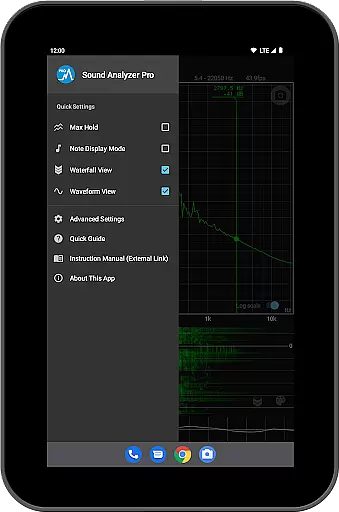
Sound Analyzer is a sophisticated audio analysis tool designed for both professionals and enthusiasts in the Music & Audio field. The app's core functionality lies in its ability to display real-time frequency (Hz) and amplitude (dB) spectra directly on your mobile device, eliminating the need for bulky external equipment. With specialized features like waterfall view for tracking spectral changes over time and waveform view for visualizing sound waveforms, it offers an all-in-one solution for comprehensive audio analysis.
One of the standout capabilities of Sound Analyzer is its high measurement accuracy, with errors typically within 0.1 Hz in low-noise environments. This precision makes it ideal for tasks such as tuning musical instruments or conducting acoustic research. Whether you're an audio engineer, musician, or simply someone interested in sound technology, this app provides the tools necessary to gain deeper insights into audio signals.
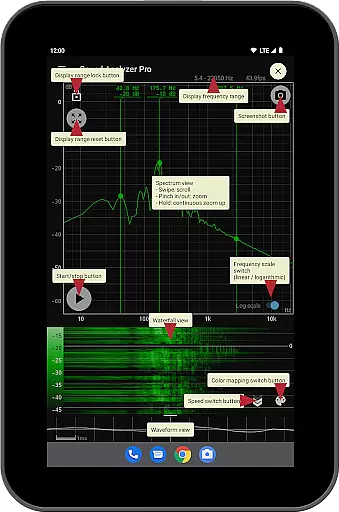
Sound Analyzer boasts an impressive array of features that cater to various audio analysis needs. Among its most notable functions is the peak frequency display, which identifies and showcases prominent spectral components in real time, complete with their corresponding frequencies and amplitudes. Users can easily adjust display ranges through intuitive touch operations and switch between logarithmic and linear scales on the frequency axis, offering flexibility in how data is presented.
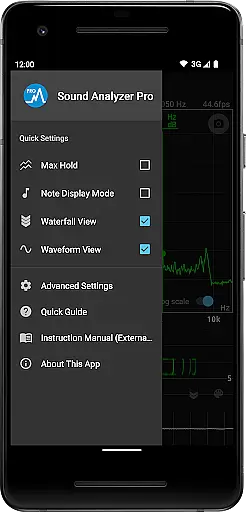
In addition to these core features, the app includes specialized modes such as Max hold function for capturing transient peaks, note display mode for pitch identification using musical note names, and a screenshot function with timer for saving analysis results. The inclusion of both waterfall and waveform views ensures that users can monitor both spectral changes over time and raw sound waveforms. Furthermore, the absence of advertisements enhances the user experience by providing an uninterrupted analysis environment.
Sound Analyzer does not focus on providing a vast music library but rather emphasizes real-time audio signal analysis. The app allows users to analyze any audio input, making it versatile for various sound sources.
The application ensures that all analyzed data is processed with high accuracy and integrity, maintaining the authenticity of the original audio content. This feature is crucial for users who require precise frequency and amplitude measurements for their audio projects.
While it doesn't offer a traditional music library, its ability to display frequency and amplitude spectra in real time provides a unique value proposition. Users can trust the spectral data provided, which is essential for professional audio analysis and processing.
Sound Analyzer excels in delivering top-notch audio quality options by offering high-frequency spectrum settings up to 96 kHz. This feature is particularly beneficial for users with high-performance devices seeking detailed audio analysis.
The app's measurement accuracy is exceptionally high, with errors typically within 0.1 Hz in low-noise environments. This precision ensures reliable and consistent audio quality assessments, which are vital for both amateur and professional audio engineers.
In addition to its impressive frequency range, Sound Analyzer provides multiple viewing modes such as waterfall and waveform views. These options enhance the user experience by allowing detailed examination of spectral changes over time and sound waveforms, contributing to comprehensive audio quality evaluations.
High measurement accuracy
Real-time spectrum analysis
No advertisements
Multiple display modes
User-friendly interface
Limited high-frequency support
Advanced features may overwhelm beginners
Requires compatible devices for optimal performance
Interface could be more visually appealing
Steep learning curve for novices

Your HD audio recorder on the go for music, meetings, ambience, animal sounds…
 4.30
4.30
Over 100 million tracks available for high quality streaming and download
4.60
The Music Journey in Your Hands
4.30
USB audio recording and playback finally possible on Android 3.1 or higher!
3.90
Record, Mix & Master with all n-Track effects, 64-bit audio and Stem Separation.
4.70
Offline Music Player&MP3 Player with themes, equalizer, lyrics, music play mode
4.60
Versatile MP3 recorder with auto-backup to Dropbox and Google Drive
4.10
Full featured mp3 and audio player with Chromecast and Android Auto support.
4.40
Offline Tunes, Unlimited Vibes
3.90
More downloads than any other metronome. Includes drum machine & tempo trainer.
4.80
Music, News & Sports Radio Tuner App. Tune in Live FM & AM Radio Stations.
4.80
Make songs with AI! Any genre, custom lyric, song generator for music creation!
4.80
Unleash your creativity! Turn simple prompts into full fledged songs.
4.70
SqueezePlayer turns your Android phone or tablet into a SqueezeBox on its own!
4.60
A complete sound package for the sound engineer or enthusiast
4.60
Formerly known as Spotistats! View your top tracks, artists, albums and more!
4.40
Network/Cloud Streaming, Visualization, Graphic Equalizer and Sound Effects.
4.20
A sleek, no-frills player designed for true music lovers.
4.20
VB-AUDIO Software / VBAN-Receptor allows listening to any VBAN Streams
4.10


User Reviews