


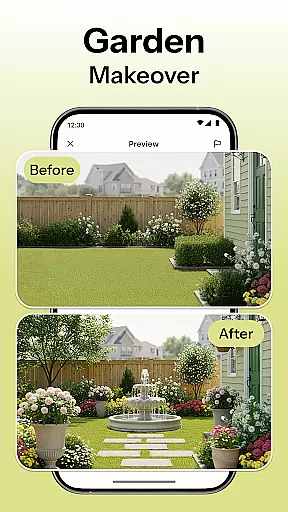
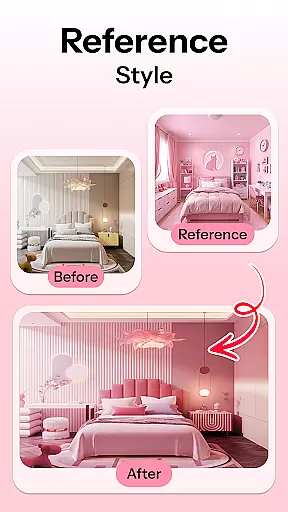
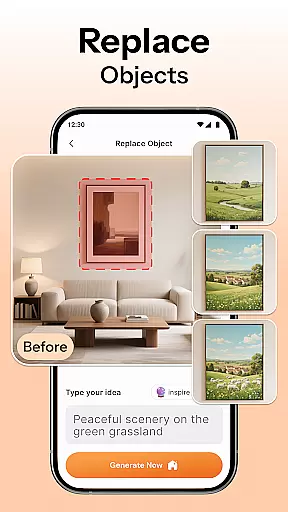
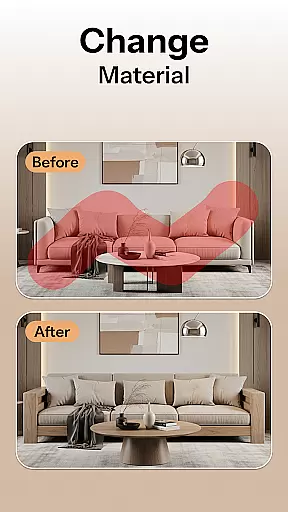
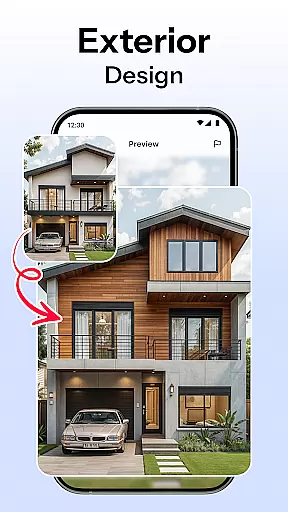

HomeMagic is an innovative AI-powered interior design application that serves as your personal design assistant. The app's core functionality lies in its ability to transform any room space instantly through advanced AI algorithms. Users can capture a photo of their room and select from various design styles including Modern, Retro, Tropical, Bohemian, Vintage, and Cyberpunk. Within seconds, HomeMagic generates beautifully rendered designs tailored to individual preferences.
Beyond basic room transformations, the app offers smart furniture layout planning, decor ideas with style filters, and realistic before-and-after comparisons. These features allow users to visualize complete home makeovers, optimize space utilization, and experiment with different color schemes and textures. Whether you're a homeowner planning renovations, a renter refreshing your space, or a professional interior designer, HomeMagic provides valuable design solutions that cater to both DIY decorators and industry experts.
The app's true value shines through its practical applications - from helping users plan remodeling projects to providing inspiration for quick room refreshes. With its user-friendly interface and powerful AI capabilities, HomeMagic makes professional-grade interior design accessible to everyone, enabling users to bring their dream spaces to life effortlessly.
HomeMagic distinguishes itself through its comprehensive suite of AI-driven design tools. The app's most notable feature is its AI Interior Design Generator, which can process uploaded room photos and apply multiple design styles within seconds. This generator supports various aesthetic themes, from contemporary minimalism to vibrant cyberpunk designs, giving users unprecedented creative freedom.
The Smart Furniture Layout Planner demonstrates another key innovation - it suggests optimal arrangements for furniture, lighting, and wall art based on spatial analysis. Combined with the Home Decor Ideas & Style Filters, users can experiment with different wall colors, flooring materials, and furniture combinations to find their perfect match. The Before & After Comparison tool adds practical value by allowing users to evaluate design changes side-by-side.
Additional features include a personal design gallery where users can save and organize their favorite creations, exporting them in high quality for sharing or professional use. These capabilities make HomeMagic particularly valuable for real estate agents creating property presentations, interior designers developing client proposals, and homeowners documenting their renovation journey. The app's seamless integration of professional-grade tools into a mobile platform represents a significant advancement in accessible home design technology.
When it comes to designing your dream space, having access to a comprehensive set of creative tools is essential. HomeMagic offers an extensive suite of features that cater to every aspect of interior design. From AI-generated room transformations to smart furniture layout planning, the app ensures that no design idea is left unexplored.
The application's AI Interior Design Generator allows users to experiment with various styles such as Modern, Retro, and Bohemian, among others. This versatility empowers users to visualize different aesthetics quickly. Additionally, the Smart Furniture Layout Planner optimizes space by suggesting ideal placements for furniture and decor, ensuring functionality meets style.
Users benefit from practical features like the Before & After Comparison tool, which lets them evaluate changes effectively. With the ability to save and organize designs, HomeMagic becomes not just a design tool but a repository of inspiration and ideas tailored to individual preferences.
Flexibility in design presentation is crucial for both amateur decorators and professional interior designers. HomeMagic excels in providing canvas and format flexibility that adapts to diverse project requirements. Whether you're working on a single room or an entire home makeover, the app accommodates varying scales and complexities seamlessly.
The platform supports high-quality image exports, making it easy to share your visions with friends, family, or clients. Its Room Makeover Preview feature enables realistic visualizations across different roomsu2014be it a bedroom, kitchen, or officeu2014ensuring consistency and coherence in design language throughout the property.
Moreover, HomeMagicu2019s adaptability extends to its style filters and decor options. Users can experiment with wall colors, flooring textures, and trendy furniture sets without limitations. This freedom not only enhances creativity but also aids in making informed decisions about home improvements before any physical changes are made.
User-friendly interface
Wide style variety
Quick rendering
Professional results
Cost-effective solution
Requires good lighting
Internet connection needed
Free version limited
Learning curve present
Device compatibility issues

Discover Cartoon Dream : Unleash Your Creativity with CuttingEdge AI
 4.50
4.50
Learn how to draw with step-by-step tutorials, fun lessons & multiplayer drawing
4.70
AI Assistant, powered by ChatGPT GPT-4 & GPT-4o. Your intelligent companion.
3.50
Art of Combination Wear OS Watch Faces
4.3
Convert image to JPG PNG HEIC PDF, support almost all kinds of image formats
4.70
Photo editor for art, avatars, filters & fun transformations.
4.60
Retouch photos. Create or edit images. Endless capabilities.
2.70
Create amazing pictures and unleash your creative genius with AR Drawing Sketch
4.40
Unleash your inner artist! Sketchar: AR Drawing for Limitless Creativity
4.40
Minecraft & Roblox Clothes
4.70
2D animation studio for Android tablets - unlimited layers, infinite timeline
4.70
Create color palette from Image, RGB & RYB Color wheel harmonies, Color Scheme
4.50
Everything you need to create hand drawn animation, anywhere you go!
4.40
Customizable Outlined Fonts. Watch Face Format. Battery friendly Digital Clock.
4.20
Sketch, plan, take notes and illustrate on an infinite canvas.
4.20
Digital Drawing: Draw & Paint
4.10
Resize photos and print photos in exact size with our powerful photo printer!
3.80
AI Art Generator transforms your words into AI generated art & paintings.
3.70
Your homescreen as an elegant glass with customized blur, lighting, and visuals.
3.70


User Reviews