
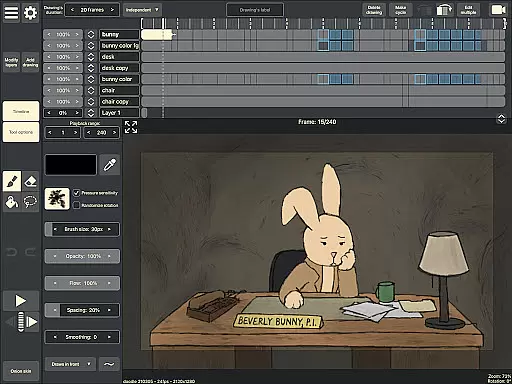
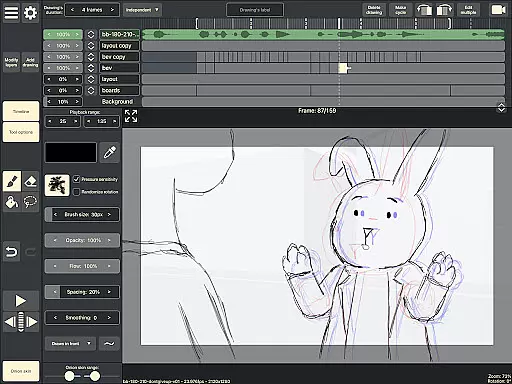
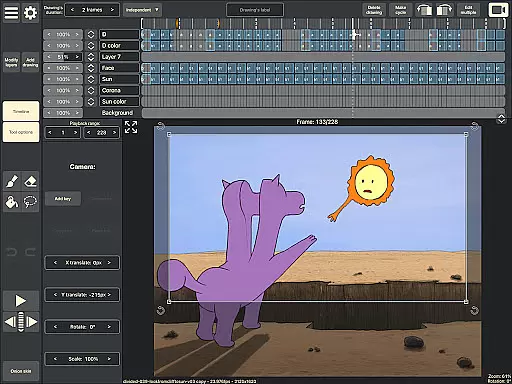
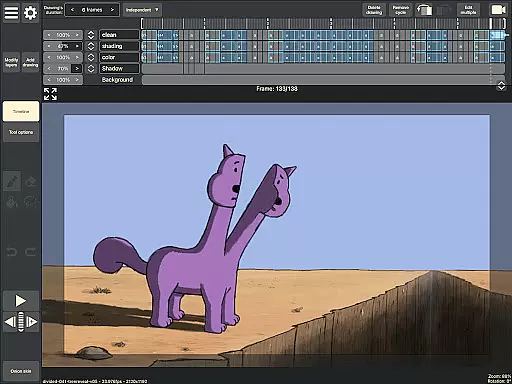
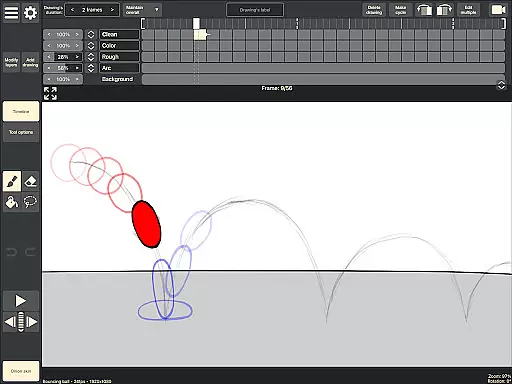
RoughAnimator is a professional-grade hand-drawn animation app designed for both Android and desktop platforms. This powerful tool caters to animators of all levels, from beginners to professionals. The application allows users to create traditional frame-by-frame animations with advanced features like onion skinning, timeline control with unlimited layers, and customizable drawing settings.
One of the standout capabilities of RoughAnimator is its versatility in animation production. Users can import audio for lip-syncing, video for rotoscoping, and even export their projects to industry-standard software like Adobe Flash/Animate and After Effects. Whether you're working on simple character animations or complex projects requiring detailed editing, this app provides all the necessary tools to bring your creative vision to life.
The true value of RoughAnimator lies in its ability to deliver professional-level animation tools in a mobile format. Animators can now work on their projects anywhere they go, without being tied to a desktop workstation. The app's support for pressure-sensitive devices like Samsung S-Pen makes it especially appealing for artists who value precision and control in their drawing process.
RoughAnimator distinguishes itself through its comprehensive set of animation features. The app's timeline system supports unlimited layers with adjustable exposure lengths for individual drawings, making it suitable for both pose-to-pose and straight-ahead animation techniques. Artists can preview their work in real-time and scrub along the timeline for precise frame adjustments.
A key advantage of RoughAnimator is its professional integration capabilities. The app allows seamless project importing to major animation software including Adobe Flash/Animate, After Effects, and Toon Boom Harmony. This feature makes it an ideal tool for professionals who need to incorporate mobile-created content into their main production pipeline. Additionally, the custom brush system and support for pressure-sensitive devices enable artists to maintain their unique drawing style while working digitally.
The app's technical capabilities are equally impressive. Users can control frame rates and resolution settings, ensuring their animations meet specific quality requirements. With multiple export options including Quicktime video, GIF, and image sequences, animators have the flexibility to share their work across different platforms and formats. These features, combined with the ability to import audio and video references, make RoughAnimator a complete solution for digital hand-drawn animation.
Creative tools are essential for artists and designers to bring their visions to life. RoughAnimator offers a comprehensive suite of features that cater to both professional animators and beginners alike. The application provides unlimited layers on its timeline, allowing users to create complex animations with ease.
Onion skinning is another critical feature included in this app, enabling users to see multiple frames at once, which is crucial for maintaining consistency in animation. Additionally, the ability to import audio and video makes lip syncing and rotoscoping possible, expanding the creative possibilities for animators.
The inclusion of custom brushes and support for pressure-sensitive devices like the Samsung S-Pen enhances the drawing experience, making it more intuitive and responsive. These tools collectively ensure that creators have everything they need to produce high-quality hand-drawn animations directly on their Android devices.
Flexibility in canvas size and format options is vital for accommodating different project requirements and artistic styles. RoughAnimator excels in providing users with the freedom to control various aspects of their animations. Users can adjust the framerate and resolution settings, ensuring that their final output meets specific quality standards or file size constraints.
Moreover, the app supports exporting animations in multiple formats, including Quicktime video, GIF, and image sequences. This versatility allows creators to use their work across different platforms and mediums, from social media to professional editing software. The ability to import RoughAnimator projects into industry-standard programs like Adobe Flash/Animate, After Effects, and Toon Boom Harmony further underscores its adaptability.
By offering such a wide range of export options and compatibility with desktop versions, RoughAnimator ensures that artists can seamlessly integrate their mobile creations into larger workflows without losing any fidelity or creative intent.
Professional-grade tools
Unlimited layer support
Cross-platform availability
Industry-standard compatibility
Real-time preview function
Steep learning curve
Requires powerful device
Limited free features
No automatic backup
Complex interface

AI generated images & photos, turn your words into drawing, painting & pictures.
 4.30
4.30
Create trending AI photos & videos with powerful effects and 3D styles.
3.20
Art of Combination Wear OS Watch faces
4.5
Image/ Text to Video Generator
4.40
Powerful home decoration & house design that allows you to design dream home.
3.80
Beauty Camera - Selfie Camera is the ultimate beauty camera and selfie app
4.30
AI Tattoo Generator: Create Tattoo Designs & Get Ideas! Ink & Stencil Maker
4.50
Multiplayer Drawing game, Coloring, Painting・Sketch, Handwriting・Paint, draw
4.30
Unleash your inner artist! Sketchar: AR Drawing for Limitless Creativity
4.40
Create stunning art with AI.
4.80
Draw beautiful mandala's very easily
4.60
Stylish letters, Stylish Keyboard, Symbols, Emojis, Cool nickname
4.40
800+ Drawing, Painting Lessons App to Practice, Sketch & Paint Art.
4.30
Create stylish invitation cards using templates for weddings, birthdays & RSVP.
4.20
Apply cartoon, caricature, and portrait effects to make your photos stand out!
3.60
Create sweet, cool and unique couple avatars easily, in just a few steps!
3.40
Retouch photos. Create or edit images. Endless capabilities.
2.70
Download now for a stylish and functional timepiece
4.5
Android 14 style widgets and wallpapers app.
4.3


User Reviews