
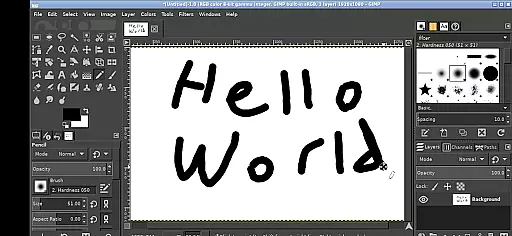
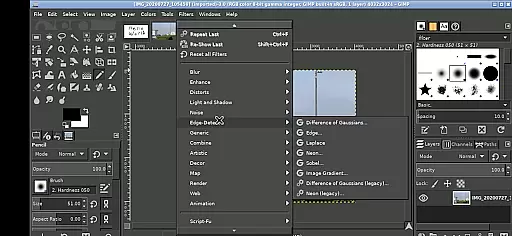
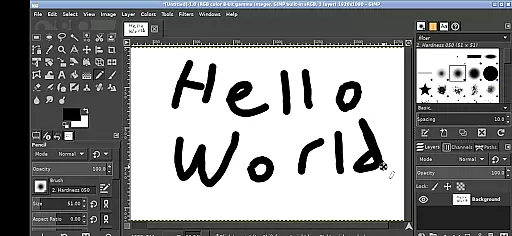
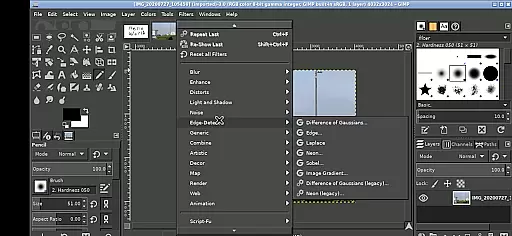
GIMP, the GNU Image Manipulation Program, brings professional-grade image editing to your mobile device. This full-featured application supports a wide array of tools and features expected from desktop-grade software.
Designed for both creative professionals and hobbyists, GIMP on Android allows users to perform complex photo manipulations, graphic design, and digital painting with precision. The intuitive touch-based interface adapts traditional desktop functionalities into seamless gestures.
Whether you're retouching photos, creating digital art, or designing graphics, GIMP provides a robust platform that streamlines workflows while maintaining professional standards directly on your Android device.
GIMP stands out with its comprehensive suite of professional tools tailored for photo retouching, image composition, and image authoring. The app includes advanced selection tools, layers, brushes, and filters that rival industry-standard desktop applications.
Specifically adapted for Android, GIMP utilizes touch gestures such as pinch-to-zoom, pan with a press-and-hold, and two-finger right-clicks. These adaptations ensure an efficient workflow without sacrificing functionality, making it accessible even on smaller screens.
One of the key innovations is its seamless integration with Android's file system, allowing direct access to files across Documents and Pictures directories. This eliminates the need for cumbersome imports or exports, enhancing productivity for users who require quick access to their assets.
In the realm of digital art and design, having a comprehensive suite of creative tools is paramount. GIMP, the GNU Image Manipulation Program, stands out by offering an extensive array of features that cater to both amateur artists and professional designers. This includes advanced photo retouching, image composition, and image authoring capabilities.
GIMP's functionality spans from basic drawing and painting tools to complex color correction and cloning features. Users can leverage layers, masks, filters, and various selection tools to bring their creative visions to life. The program supports a wide range of file formats, ensuring compatibility and flexibility in project workflows.
For users on Android devices, GIMP maintains its robust feature set while adapting to touch interfaces. With gestures like pinch-to-zoom and tap-to-click, it ensures precision and ease of use even on smaller screens. This makes GIMP not just a powerful tool but also an accessible one for creators who are often on the go.
Flexibility in canvas size and format options is crucial for accommodating diverse artistic projects. GIMP excels in this area by providing users with the ability to customize their workspace extensively. Whether you're designing for web, print, or multimedia, GIMP allows precise control over dimensions, resolution, and color profiles.
The application supports everything from small icons to large-scale prints, with resolutions that meet industry standards. Users can define custom canvas sizes or choose from presets tailored for specific mediums. Additionally, GIMP handles different image formats gracefully, enabling seamless transitions between projects without loss of quality.
On Android, GIMP retains these flexible attributes through intuitive touch controls. Artists can easily adjust their workspace using simple gestures, making it possible to switch between detailed illustrations and expansive designs effortlessly. This adaptability empowers creators to focus on their art without being constrained by technical limitations.
Professional-grade tools
Intuitive touch interface
Direct file system access
Open-source flexibility
Cross-device functionality
Steep learning curve
Performance on older devices
Limited stylus support
Complex navigation
Interface scaling issues

Premium version of Shimeji-ee app with no ads & no limit active shimeji
 4.2
4.2
Art of Combination Wear OS Watch faces
4.0
Image/ Text to Video Generator
4.40
Sketch, plan, take notes and illustrate on an infinite canvas.
4.20
Create stunning video, photo & magic from text with FlixAI GPT video generator.
3.10
Turn your drawings into flipbook-style animations with simple creative tools
4.60
Powerful home decoration & house design that allows you to design dream home.
3.80
Android 14 style widgets and wallpapers app.
4.4
How to draw anime step by step for beginner easily by AR drawing sketch & paint.
3.60
2D animation studio for Android tablets - unlimited layers, infinite timeline
4.70
The ultimate tool for creating animations
4.60
Draw beautiful mandala's very easily
4.60
Photo editor for art, avatars, filters & fun transformations.
4.60
Draw glowing spinners, relax, and spin your creative art
4.60
Create color palette from Image, RGB & RYB Color wheel harmonies, Color Scheme
4.50
Create stylish invitation cards using templates for weddings, birthdays & RSVP.
4.20
Easy 3D drawing design maker & creator. Model designing, Sculpting. Create&paint
4.00
AR Anime Drawing: How to draw anime with AR drawing & sketching apps!
4.00
Create trending AI photos & videos with powerful effects and 3D styles.
3.20


User Reviews