


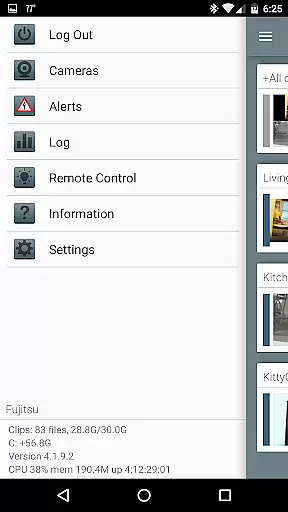


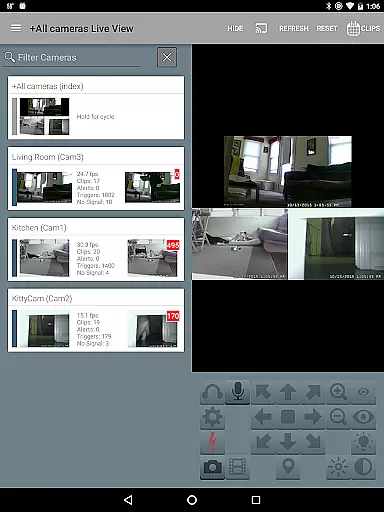
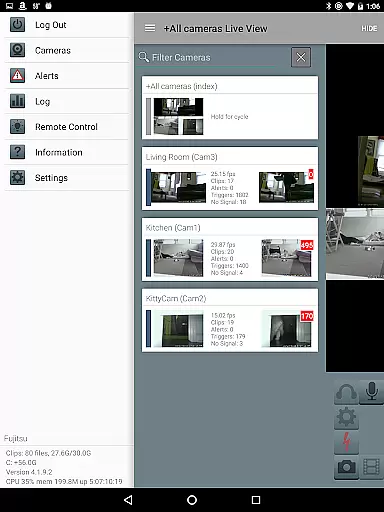
Blue Iris is a specialized client application designed for users who operate the Blue Iris Windows PC software. This app serves as a secure gateway to your home camera network, eliminating the need to expose individual cameras directly to the Internet. By connecting through a session-based protocol, it ensures that no passwords are transmitted in plain text, providing an added layer of security.
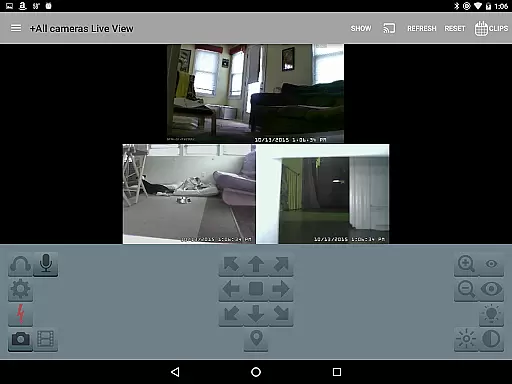
The core functionality of Blue Iris includes managing multiple installations of the software, controlling traffic signals, schedules, and profiles, and enabling fast H.264 streaming. Additionally, users can interact with their cameras by controlling PTZ (pan-tilt-zoom), IR functions, and even engage in two-way audio communication where supported. The app also allows for reviewing recordings at up to 64x speed and selectively deleting stored footage from the connected PC.
For those seeking remote access to their surveillance system without compromising on security, Blue Iris offers a comprehensive solution. Its ability to integrate seamlessly with the existing Blue Iris setup makes it an invaluable tool for enhancing your home or office security infrastructure.
Blue Iris stands out due to its robust feature set tailored specifically for video management and surveillance. One of its key strengths lies in its capacity to manage multiple Blue Iris installations simultaneously, allowing users to switch between different setups effortlessly. The app provides real-time alerts via Android push notifications when any connected camera detects motion or issues critical status updates.
In terms of usability, Blue Iris excels with intuitive controls for PTZ, IR, and other camera functionalities directly from the mobile interface. Users can navigate their camera network by simply tapping and swiping, making it easy to monitor various locations. Furthermore, the app supports high-speed playback of recorded footage at rates up to 64x, facilitating quick review sessions.
Another notable feature is the ability to remotely control DIO output signals on compatible devices, adding another dimension of interactivity and automation potential. With these capabilities, Blue Iris not only enhances convenience but also significantly boosts the overall effectiveness of your surveillance operations.
Blue Iris stands out in video format compatibility, ensuring users can work with a wide range of camera types and models. The app supports H.264 streaming, which is one of the most widely used video codecs in the industry.
This compatibility allows for efficient compression and transmission of video data without compromising quality. Users can remotely access live or recorded videos from their home camera network without the need to insecurely open individual cameras to the Internet.
The application provides seamless integration with multiple Blue Iris installations, making it versatile for various surveillance setups. This ensures that whether you're using basic IP cameras or more advanced models, Blue Iris can handle the video streams effectively.
While Blue Iris does not focus on traditional video editing, it incorporates AI-powered features that enhance the surveillance experience. For instance, the app can receive Android push alerts when a camera is triggered, allowing for immediate review and action.
Users can control PTZ (pan-tilt-zoom), IR (infrared), and other camera functionalities right from their mobile device. This level of control brings an intelligent dimension to video monitoring, as users can easily adjust camera settings based on real-time alerts or scheduled needs.
Additionally, Blue Iris offers fast playback options for reviewing recordings stored on the PC, up to 64x speed. This feature significantly reduces the time required to scan through footage, providing an efficient way to manage and edit video content for security purposes.
User-friendly interface
Secure connection protocol
Comprehensive camera control
Fast video streaming
Remote access capability
Requires Windows PC software
Limited standalone functionality
No iOS version available
Dependent on stable internet
Complex initial setup

Video player, file manager for all formats, 4K/HD media player supports subtitle
 4.30
4.30
Client application for NextPVR software
3.00
Video Player - Unlimited features, 30 days money back guarantee.
4.60
Create photo video with music & template. AI video maker for stunning slideshow.
4.60
All format media Player, no need video converter any more!
4.00
This app was created to edit the metadata of music files.
4.20
Download videos easily & play them all in one smart, powerful video manager.
3.40
This app is an emulator of some specific IPTV boxes
3.50
AI Video Editor with Music, Filter, Slideshow, Effect, Merge & Trim Video.
4.80
A Quick and Pro Video Editor
4.70
Watch a large amount of high-definition short drama content
4.60
Search & download videos from net with all video downloader, auto-detect & safe.
4.60
Browser + Remote for Roku to stream webvideos, online movies and livestreams
4.60
Download website videos fast&privacy
4.40
KMPlayer Plus (Divx Codec) officially support Divx codec.
4.30
HD video & music player - All format support with floating & PIP mode!
3.80
Save photos and videos from social apps in one tap.
3.60
All in one multi protocols stream receiver for AirPlay, Cast and DLNA.
3.60
Browser for Sony TV to stream web videos, online movies and live tv
3.20


User Reviews