
aShell is a specialized mobile application designed for Android users who require direct access to ADB commands without the need for a PC. This tool leverages the Shizuku environment, allowing developers and power users to execute complex operations directly from their devices. With its lightweight design and open-source nature, aShell provides an essential utility for those seeking to manage their device's internal processes with precision.
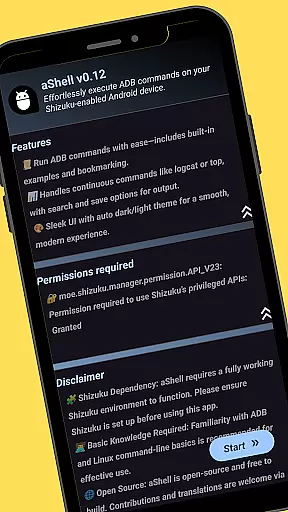
The app supports continuous command outputs like logcat or top, includes preloaded examples for quick start, and offers features such as dark/light mode adaptation and bookmarking frequently used commands. Whether you're debugging applications or managing system-level tasks, aShell delivers a streamlined experience tailored for tech-savvy individuals.
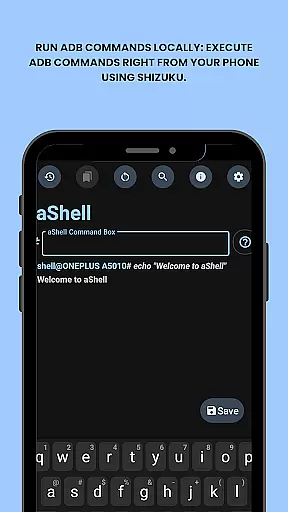
aShell stands out with its unique set of features tailored for advanced Android users. The primary advantage is the ability to run ADB commands locally on your phone through the Shizuku environment, eliminating the dependency on external hardware like PCs. This feature alone transforms how developers interact with their devices, providing unprecedented mobility and convenience.
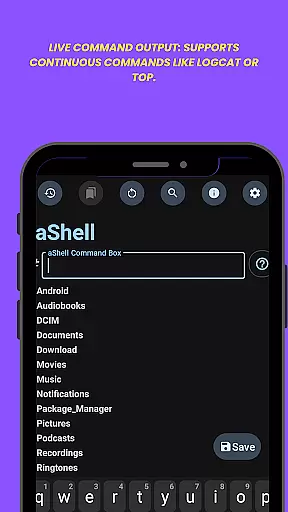
In addition to local command execution, aShell offers practical functionalities such as live command output support, which is crucial for monitoring ongoing processes like logcat sessions. Users can also search within the command output, save results to text files, and switch between dark and light modes based on their preferences. These features collectively enhance productivity and offer a customizable experience that aligns with professional workflows.
aShell delivers exceptional accuracy and effectiveness in executing ADB commands directly on Android devices. By leveraging a fully functional Shizuku environment, the app ensures that each command is processed with precision.
The tool supports continuous commands such as logcat or top, providing live output that allows users to monitor processes in real-time. This feature is crucial for developers who need to track system events or debug applications efficiently.
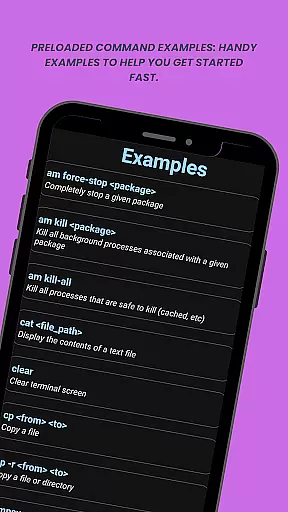
With preloaded command examples and the ability to save output to .txt files, aShell enhances productivity by offering practical utilities that cater to both beginners and experienced users. These functions streamline workflows and ensure outputs are easily accessible for future reference.
Overall, aShell's accurate command execution and effective output management make it an indispensable tool for anyone seeking to control their device's internals without relying on a PC.
The interface of aShell is designed to be simple and intuitive, ensuring users can execute ADB commands with ease. The straightforward layout eliminates unnecessary complexities, making it accessible even for those with basic ADB knowledge.
Key features like dark/light mode support and automatic adaptation to the system theme enhance user experience by providing a visually comfortable environment. This flexibility ensures that users can work under their preferred settings without distraction.
Additionally, aShell offers functionalities such as search within output and bookmarking frequently used commands. These intuitive tools allow users to quickly find specific information and access commonly used commands, significantly improving workflow efficiency.
By focusing on clarity and ease of use, aShell provides an interface that meets the needs of developers and power users while remaining approachable for newcomers exploring ADB operations.
User-friendly interface
Live command output
Dark mode support
Bookmark functionality
Open-source project
Requires Shizuku
ADB knowledge needed
Limited target audience
No iOS support
Paid version only

PDF Reader - Document Viewer: Read, Manage & Organize Your Documents
 3.10
3.10
Unlock your Essential Key. Create custom shortcuts to your favorite apps!
4.5
eXtended Permission Manager - a small app to manage permissions and AppOps
4.50
An easy-to-use calculator designed to save time calculating and bending conduit
4.30
MS-DOS in your pocket. Play old DOS games anywhere you are ;)
4.10
PC precision for mobile gaming: dominate with keyboard and mouse!
4.30
Quickly check the frequency of the Earth
4.30
Fast Video Downloader, Movie Downloader, Torrent Downloader & Adblock Browser
4.70
Clean up your phone, find files, play media, and share files offline
4.50
Connect wirelessly to your computer to watch movies, browse the web, play games
5.00
NFC Tools can read and write NFC tags.
4.70
The Ultimate Bluetooth Keyboard & Mouse. Securely control your PC, Mac, and more
4.50
Button mapper, mouse toggle, sleep timer and a lot of another features
4.50
Universal TV remote control all TVs, Roku, LG, Samsung, Fire, Vizio, Sony, TCL.
4.40
Forza Tuning Calculator App for Forza Horizon 5, Motorsport and Earlier Titles
4.40
Quickly & easily calculate the spacing of handrail balusters
4.20
Introducing Smart Printer, your ultimate destination for printing solutions!
4.00
This app unlocks the Pro features of the Central for DayZ app
3.60
A recovery soft,it features photo recovery, video recovery, file recovery.
3.40


User Reviews