

The Everything Key is a powerful utility tool designed to enhance your Android device's functionality by remapping its hardware button. This app allows users to unlock the full potential of their device's physical key, transforming it into an instant productivity tool. With support for double and triple press actions, you can launch your favorite apps with unprecedented speed and ease.
What sets The Everything Key apart is its clean, minimalist interface inspired by the Nothing aesthetic. The app provides advanced control features, including quick enable/disable options for mapped actions and a 'Toggle All' feature. It works seamlessly without requiring root access or complex setup procedures. The app also offers personalized device integration and maintains strict privacy standards, using Android's Accessibility Service solely to detect hardware key presses.
The Everything Key offers several innovative features that make it stand out in the Tools category. Its most notable capability is powerful remapping functionality, allowing users to assign different apps to both double-press and triple-press actions of their device's hardware button. This feature alone significantly enhances workflow efficiency and personalization.
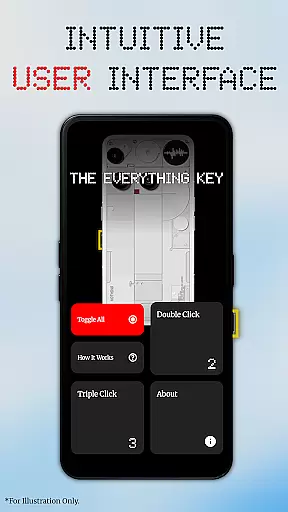
The app's intuitive UI presents a beautiful, minimalist design that integrates perfectly with modern Android devices. Users can easily view and manage their mapped applications through clear visual indicators. Advanced control options include individual enable/disable switches for each mapping, a convenient 'X' icon for permanent un-mapping, and a 'Toggle All' feature for managing multiple mappings simultaneously.
Additional noteworthy features include automatic device model detection for personalized background integration and strict privacy protection measures. The app operates using standard Android features, eliminating the need for root access or complex ADB commands. These characteristics make The Everything Key an essential tool for users looking to maximize their device's potential while maintaining complete control over their hardware button functionality.
The Everything Key excels in providing precise and effective core functionality by allowing users to remap their device's special hardware button. This feature is crucial for users who wish to maximize their device's potential without being limited by default settings.
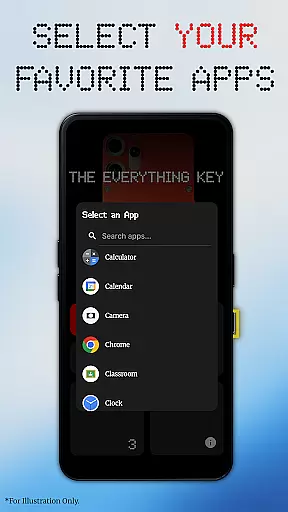
Through an intuitive interface, users can assign specific actions such as launching the camera or a favorite app with simple double or triple presses. The app ensures that these mappings are accurately registered and swiftly executed, enhancing user productivity.
Advanced control options further augment the app's effectiveness. Users can easily enable or disable actions, un-map apps, or toggle all mappings at once. These features ensure that the app remains a powerful tool tailored to individual preferences.
By leveraging standard Android features, The Everything Key delivers its functionality without requiring root access. This approach not only simplifies the user experience but also underscores the app's commitment to accessibility and ease of use.
A standout feature of The Everything Key is its beautifully minimalist and intuitive user interface, inspired by the Nothing aesthetic. This design choice ensures that users can effortlessly navigate and utilize the app's features without a steep learning curve.
The clean layout allows users to quickly see which apps are mapped to specific actions and whether they are active. Such transparency enhances the overall user experience, making it easy to manage and adjust settings on the fly.
Personalization is seamlessly integrated into the interface. Upon first launch, the app assists users in selecting their device model and color, displaying a stunning, integrated background that aligns with their device's aesthetics.
Overall, the app's interface strikes a perfect balance between simplicity and functionality. By prioritizing user-centric design, The Everything Key ensures that even those new to customization tools can harness the full power of their device's hardware button with confidence.
Intuitive minimalist design
Advanced remapping options
No root access required
Quick enable/disable features
Strict privacy protection
Limited device compatibility
Requires accessibility service
No official brand affiliation
Device-specific functionality
Potential battery impact

 4.10
4.10
Change your GPS location instantly. Simulate routes anywhere in the world.
4.90
Fluid navigation gestures for all of us!
4.30
Optimize your WiFi network, turn your phone into Wifi Analyzer
4.70
Smart and comfortable browsing experience.
3.80
Signal Strength, Mobile, Wifi, Speed Test, Bad Signals, Cellular, 5G, LTE, 4G
4.20
Undelete and recover your lost or deleted files with DiskDigger!
3.40
Fast Video Downloader, Movie Downloader, Torrent Downloader & Adblock Browser
4.70
Fast VPN USA for any country. Super secure VPN for calls, streaming, games, TV.
4.40
The ultimate tool for network analysis, wifi scanning and problem detection.
4.90
Easily install aab(Android App Bundle) files on your Android device with our app
4.80
Keep track of your Palia friendships, tasks, and inventory with Palia Notebook
4.60 4.50
4.50 4.50
4.50
Forza Tuning Calculator App for Forza Horizon 5, Motorsport and Earlier Titles
4.40
1-Click close all background apps on Android TV
3.90
Create your own custom widget with endless possibilities
3.90
Safely recover deleted photos, videos, and files with a single easy tap.
3.70
Transfer Files, APK from Phone to Watch & Install.
4.1


User Reviews