
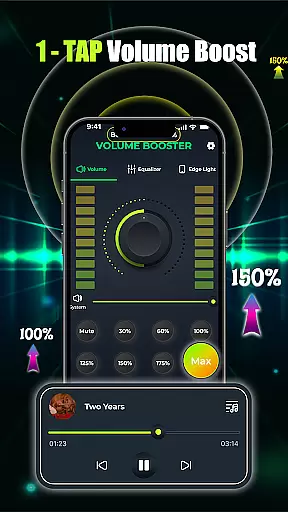
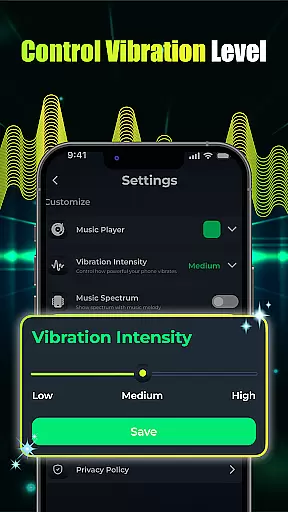
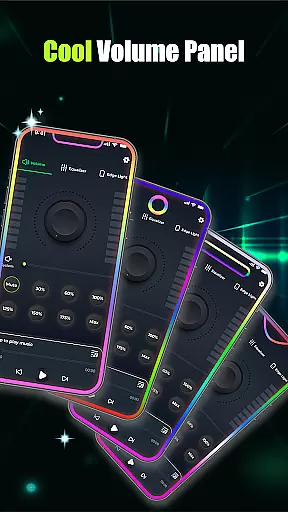
Volume Booster - Music & Sound is a powerful audio enhancement application designed to maximize your device's sound output. This app allows users to boost volume levels beyond the standard limit, providing an immersive audio experience for music, movies, and other media consumption. With its intuitive equalizer controls and customizable presets, it ensures optimal sound quality tailored to individual preferences.
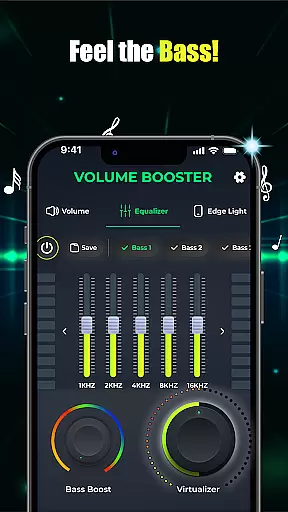
The app features advanced bass boost options and 3D virtualization effects that deliver studio-quality sound. Whether you're using Bluetooth headphones or external speakers, Volume Booster ensures every audio detail is crisp and distortion-free. Its user-friendly interface makes it easy to adjust settings, while the built-in music player supports seamless playback across multiple applications.
Ideal for personal use, this app is perfect for enhancing your audio experience during parties, casual listening sessions, or important conversations. The ability to create custom sound profiles and visual effects makes it a versatile tool for both everyday users and audio enthusiasts who demand superior sound performance from their devices.
Volume Booster - Music & Sound offers a comprehensive suite of audio-enhancing tools that cater to various listening needs. One of its standout features is the one-tap volume boost functionality, which instantly amplifies sound levels with minimal effort. Users can fine-tune their audio experience using the slider volume control and equalizer settings, allowing precise adjustments for different types of content.
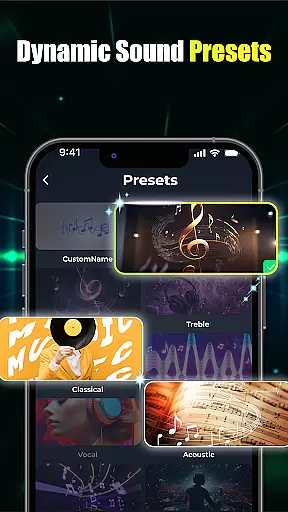
The app includes an advanced equalizer with customizable flat and band presets, enabling users to tailor sound profiles according to their preferences. For those who enjoy deep bass, the built-in bass booster provides enhanced low-frequency effects that bring music to life. Additionally, the crystal-clear custom sound presets with 3D virtualization create a surround-sound effect, making every listening session feel like a professional studio experience.
Another notable feature is the integrated music player, which consolidates multiple audio playback applications into a single interface. This allows users to switch between apps effortlessly while maintaining consistent sound quality. The app also supports edge light visual effects, giving users the option to personalize their listening environment with adjustable colors and animations.
When it comes to music and audio applications, the size and authenticity of the music library are crucial factors. Volume Booster - Music & Sound offers an extensive collection of songs and soundtracks, ensuring users have access to a wide variety of audio content. The app partners with legitimate music providers to ensure all tracks are properly licensed and copyrighted.
The application's vast music library is regularly updated with new releases and popular hits, catering to diverse musical tastes. Whether you're into classical symphonies or the latest pop sensations, this app has something for everyone. Its comprehensive database ensures that users can find their favorite tracks without worrying about copyright infringement issues.
Moreover, the app provides high-quality audio streams for each track in its library, enhancing the listening experience. Users can enjoy crystal-clear sound whether they're using Bluetooth headphones or loudspeakers. This commitment to quality and legal compliance makes Volume Booster a reliable choice for audiophiles who demand both variety and authenticity in their music sources.
Audio quality is paramount when selecting a music and audio app, and Volume Booster - Music & Sound excels in providing top-notch audio quality options. The app supports various audio formats and bitrates, allowing users to choose the best quality that suits their listening preferences and device capabilities. From standard MP3s to high-fidelity FLAC files, the app ensures every note sounds as the artist intended.
One of the standout features of this app is its advanced equalizer settings, which let users fine-tune their audio experience. With customizable flat equalizer and band equalizer presets, listeners can adjust bass, treble, and mids to create a personalized sound profile. Additionally, the app includes 3D virtualization technology for studio-quality sound, making every listening session immersive and engaging.
Furthermore, the built-in music player integrates seamlessly with the appu2019s volume booster functionality, delivering louder and clearer audio without distortion. Whether you're enjoying a quiet evening at home or hosting a lively party, Volume Booster ensures your music always sounds its best. This dedication to superior audio quality sets the app apart from competitors in the Music & Audio category.
Powerful volume boost
Customizable equalizer
Advanced bass enhancement
User-friendly interface
Versatile sound presets
Potential battery drain
Occasional distortion
Limited free features
Interface complexity
Device compatibility

 4.70
4.70
The Music Journey in Your Hands
4.30
Taal player that lets you sing any Indian & Western song with Tabla & Tanpura
4.60
Full-featured, High-Quality Groovebox Workstation, perfect for Live Performance!
4.80
A High-Precision Audio Spectrum Analysis App
4.20
Your song collections with lyrics and chords on Android smartphones and tablets.
4.80
The best music and audio player, with beautiful UI, music search and equalizer.
4.60
Learn the notes on the guitar fretboard fast with this easy and fun app
4.60
Melody Beat: Great for travel, workouts, offline vibes, play your tunes anytime.
4.10
Offline Music Player & MP3 Player.Powerful equalizer, Lyrics, Themes, Tag Editor
4.80
Brian Eno and Peter Chilvers’ acclaimed music app Bloom, radically reinvented.
4.80
Gorgeous UI, Powerful music Search and Equalizer, the great choice for you!
4.70
A synth that really lets you shape your sounds!
4.50
Formerly known as Spotistats! View your top tracks, artists, albums and more!
4.40
Ringtone Maker is free app create ringtone from music files or your recording.
4.40
Powerful 10-Band equalizer pro with sound booster improves Android audio quality
4.30
Smart piano keyboard, Classical to Pop, Real-time multiplayer connection!
4.20
Versatile MP3 recorder with auto-backup to Dropbox and Google Drive
4.10
Remove ads permanently from Music Visualizer
4.2


User Reviews