
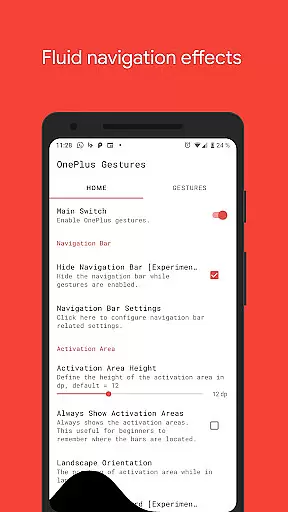
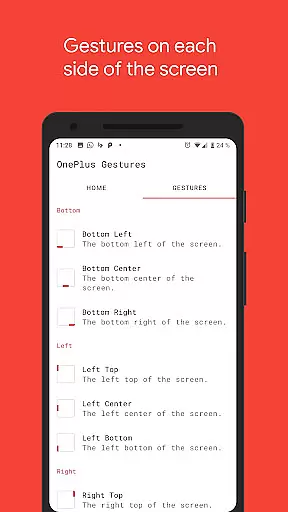
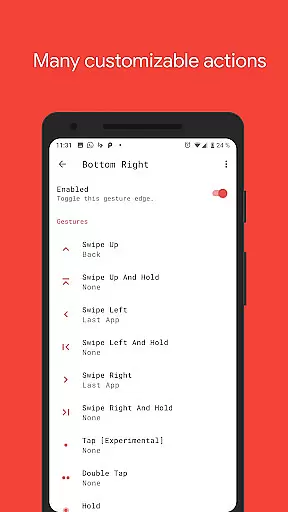
Vivid Navigation Gestures is a powerful tool that revolutionizes the way you interact with your Android device. This app allows users to control their devices through intuitive gestures, eliminating the need for traditional button presses. With compatibility across various Android versions and devices, it brings next-generation navigation to everyone.
The app features fluid visual effects during gesture interactions, enhancing both functionality and aesthetics. Whether you want to launch Google Assistant, toggle split screen, or take screenshots, Vivid Navigation Gestures provides a comprehensive set of customizable actions. Its ability to hide the stock navigation bar (with ADB or Root) further optimizes screen real estate, making it an ideal solution for power users seeking efficiency and modern usability.
One of the standout features of Vivid Navigation Gestures is its support for multiple gesture triggers from virtually any screen edge. Users can swipe up, down, left, or right, double tap, or even hold to execute specific commands tailored to their preferences. These gestures are highly versatile, enabling actions like opening notifications, switching apps, controlling media playback, and more.
In addition to its rich gesture library, the app integrates seamlessly with Android's accessibility services to perform system-level tasks such as navigating back, returning home, or accessing quick settings. The inclusion of advanced options like ADB permission grants ensures flexibility for tech-savvy individuals who wish to maximize functionality. Overall, this app empowers users by transforming how they navigate their devices while maintaining ease of use.
Gestures are revolutionizing the way we interact with our devices, and Vivid Navigation Gestures brings this innovation to your fingertips. The app's core functionality lies in its ability to replace traditional button presses with intuitive gestures, allowing for seamless device control.
With multiple gesture triggers spread across different screen areas, users can execute a wide range of actions such as launching Google Assistant, navigating back, accessing recent apps, or even taking screenshots. Each gesture is precisely mapped to ensure accurate response, making daily tasks faster and more efficient.
The effectiveness of Vivid Navigation Gestures is further enhanced by fluid visual effects that provide real-time feedback during each interaction. This not only makes the experience visually pleasing but also helps users learn and remember their custom gestures more effectively.
By integrating accessibility services, the app ensures that essential functions like back navigation, home key, and quick settings are always accessible without compromising security or performance. This comprehensive approach to gesture-based control delivers both precision and practicality, significantly enhancing the overall user experience.
Vivid Navigation Gestures excels in simplifying device interaction through an intuitive interface that requires minimal learning. Instead of relying on physical buttons or complex menus, users can perform simple swipes and taps to execute frequently used commands.
The app offers an impressive variety of available gestures, including swipe directions, holds, and taps, all easily recognizable and natural to perform. This intuitive design allows users to quickly adapt to gesture controls without needing extensive tutorials or practice sessions.
Furthermore, the ability to hide the traditional navigation bar creates an uncluttered screen space, emphasizing the clean and straightforward interface philosophy. Users can focus on their content without visual distractions while still maintaining full control through customizable gestures.
Even advanced features like ADB integration for navigation bar removal maintain this commitment to simplicity, providing clear instructions and logical steps for implementation. The combination of easy-to-learn gestures and thoughtful interface design makes Vivid Navigation Gestures an exceptionally user-friendly solution for modern device control.
Intuitive gesture controls
Customizable action assignments
Beautiful fluid effects
Wide range of supported gestures
No reliance on hardware buttons
ADB setup required for some features
Root access may be necessary
Learning curve for new users
Limited iOS compatibility
Potential conflicts with other apps

 4.50
4.50
Learn the vast amount of system information about device and monitor it's state
4.70
Family Locator, Share location, StayConnect with your family in real time
3.90
Canon PRINT is a companion app for your Canon printer.
4.60
Keep track of your Palia friendships, tasks, and inventory with Palia Notebook
4.60
The one-and-only remote control for PC, Mac, and Linux
4.70
The ultimate tool for network analysis, wifi scanning and problem detection.
4.90
Download any file easily and quickly with Downloader
4.5
Fast VPN USA for any country. Super secure VPN for calls, streaming, games, TV.
4.40
Powerful collection of electronics tools and reference.A must for any enthusiast
4.90
ADB support Android 4.X-Android 13(Support wireless pair mode).No root required!
4.70
Game Booster, GFX Tool is now compatible with newer game update
4.50
Mirror your screen to Fire TV - Super fast and simple
4.40
Clean up large files and similar photos, fast and easy to use
4.40
Carry a FTP server in your pocket and avoid USB cables for file transfer
4.20
Quickly & easily calculate the spacing of handrail balusters
4.20
Create your own live wallpaper or check out thousands already made presets
3.90
Clean the junk files on your device
3.40
PDF Reader - Document Viewer: Read, Manage & Organize Your Documents
3.10


User Reviews