
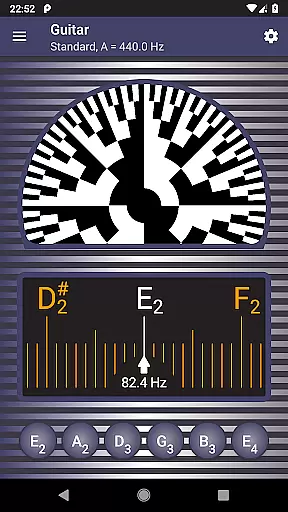
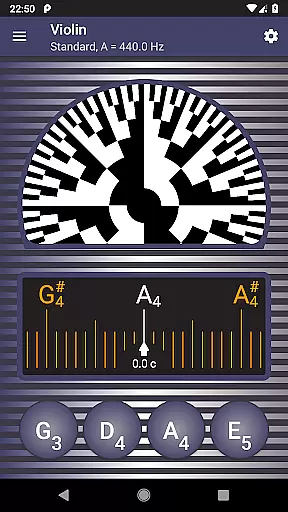
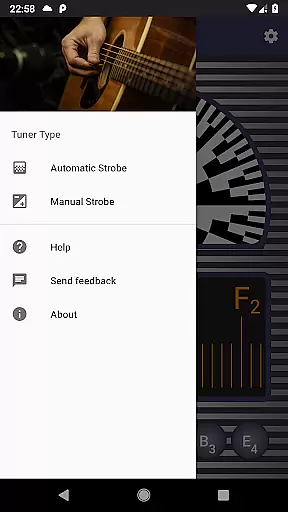
Strobe Tuner Pro is a highly accurate tuning application designed for musicians of all levels. This app offers both chromatic and strobe tuners that work independently but utilize the same input from your device's built-in microphone. The chromatic tuner helps in detecting the frequency of the tone played on your instrument, highlighting target strings on the chromatic scale, and indicating how far the tone is from being in tune. Once you're close to the correct pitch, the strobe tuner allows for fine-tuning by showing a stroboscopic effect that guides you to adjust accordingly.
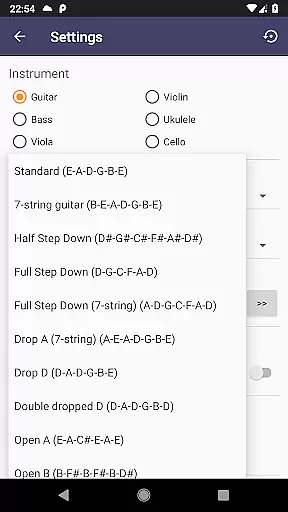
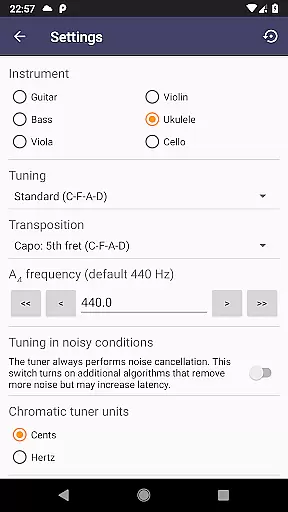
Beyond its primary tuning capabilities, Strobe Tuner Pro also features a built-in metronome, making it an all-in-one tool for practice sessions. It supports various instruments including guitar, violin, bass, ukulele, viola, cello, banjo, and shamisen. With advanced noise cancellation, support for alternate tunings, and reference tones for tuning by ear, this app provides a comprehensive solution for maintaining your instrument's intonation.
Whether you are a professional musician or a beginner, Strobe Tuner Pro caters to your tuning needs with precision and ease. Its user-friendly interface includes a first-start tutorial and built-in help, ensuring that users can quickly learn to tune their instruments properly. By offering features typically found in expensive physical tuners, this app saves you money while delivering exceptional accuracy and reliability.
Strobe Tuner Pro stands out with its dual-tuner system, combining a chromatic tuner and a strobe tuner. The chromatic tuner uses Fast Fourier Transformation algorithms to accurately detect frequencies and display them on a chromatic scale, guiding users to their desired pitch. Meanwhile, the strobe tuner emulates the stroboscopic effect, providing visual feedback through patterns that indicate whether the tone is too high or low, allowing for precise adjustments.
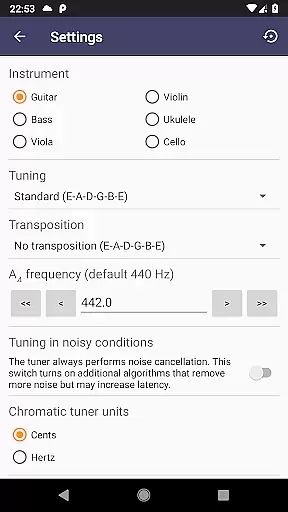
In addition to its core tuning functionalities, the app includes a metronome integrated with the chromatic tuner, enabling musicians to control timing and check intonation simultaneously. Advanced noise cancellation ensures reliable performance even in noisy environments. Users can choose from various note naming conventions (English, European, Solmization) and switch between equal temperament settings. The app also supports quick access to settings for switching between different instruments.
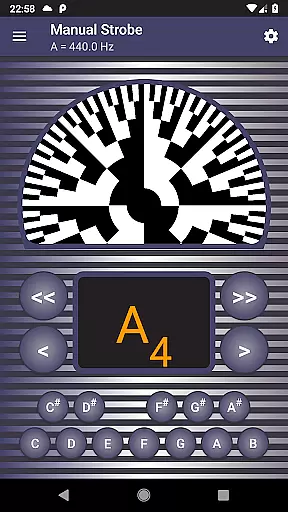
Designed for versatility and ease of use, Strobe Tuner Pro caters to a wide range of instruments and skill levels. Its manual mode mimics a physical strobe tuner, offering professionals the accuracy they demand. Beginners benefit from the app's user-friendly design, which includes a first-start tutorial and built-in help. With features like concert pitch frequency setting, favorite alternate tunings, and synthesized reference tones, Strobe Tuner Pro delivers a robust and flexible tuning experience.
Strobe Tuner Pro offers a comprehensive music library that caters to a wide array of instruments including guitar, violin, bass, ukulele, viola, cello, banjo, and shamisen. This extensive selection ensures that musicians of all kinds can find their instrument of choice within the app.
The app's dedication to copyright authenticity is evident in its meticulous approach to providing reference tones and tunings. These are synthesized with precision, respecting the concert pitch setting, which guarantees users are receiving legally sound and accurate musical information.
Furthermore, Strobe Tuner Pro has been tested with numerous instruments, ensuring reliable performance across different types. Its algorithms have been refined through real-world use, enhancing the authenticity and reliability of its music library.
By incorporating advanced noise cancellation and two independent tuning algorithms, the app not only provides an extensive music library but also ensures that each note is produced with the utmost accuracy and respect for original works, thus upholding copyright integrity.
Audio quality in Strobe Tuner Pro is exceptional due to its advanced tuning algorithms. The chromatic tuner uses Fast Fourier Transformation for precise frequency detection, while the strobe tuner employs an algorithm similar to those found in oscilloscopes, computed directly on the deviceu2019s GPU for unparalleled accuracy.
This application supports various audio formats and settings, allowing users to adjust the concert pitch frequency according to their preference or regional standards. Such flexibility ensures optimal audio output tailored to individual needs.
Moreover, the inclusion of a metronome feature alongside the chromatic tuner enhances practice sessions by enabling simultaneous rhythm control and intonation checks. This dual capability significantly improves the overall audio experience during practice.
With features like manual mode emulating a physical strobe tuner and support for multiple note naming conventions, Strobe Tuner Pro delivers high-quality audio options that cater to both professional musicians and beginners alike, making it an indispensable tool for anyone serious about their musical craft.
Highly accurate tuning
User-friendly interface
Advanced noise cancellation
Supports multiple instruments
Integrated metronome
Requires good microphone quality
May drain battery quickly
Interface could be complex for beginners
Limited offline functionality
Premium price point

Performance-Synthesizer & Multi-Track-Sequencer, polyphonic + multi timbral!
 4.70
4.70
VB-AUDIO Software / VBAN-Receptor allows listening to any VBAN Streams
4.10
Record, Mix & Master with all n-Track effects, 64-bit audio and Stem Separation.
4.70
Super Sound Editor, Song Maker & Mixer, Vocal Remover, Voice Recorder & Changer!
4.60
Help you quickly get started with Shokz headphones
4.40
Sheet music reader, piano & music note player. Play music score & learn to read.
3.90
Responsive piano with great sounds, graphics, and songs
4.80
Full featured mp3 and audio player with Chromecast and Android Auto support.
4.40
Turn Every Moment into Music
3.60
24,000 free audio books and no ads!
4.90
Your song collections with lyrics and chords on Android smartphones and tablets.
4.80
Offline Music Player & MP3 Player.Powerful equalizer, Lyrics, Themes, Tag Editor
4.80
Most Advanced AI Song Generator and Music Creator. Rap, Pop, Rock, Gospel & more
4.70
Unleash your creativity! Turn simple prompts into full fledged songs.
4.70
Taal player that lets you sing any Indian & Western song with Tabla & Tanpura
4.60
Your HD audio recorder on the go for music, meetings, ambience, animal sounds…
4.30
A High-Precision Audio Spectrum Analysis App
4.20
The alternative folder based music player.
4.20
Versatile MP3 recorder with auto-backup to Dropbox and Google Drive
4.10


User Reviews