
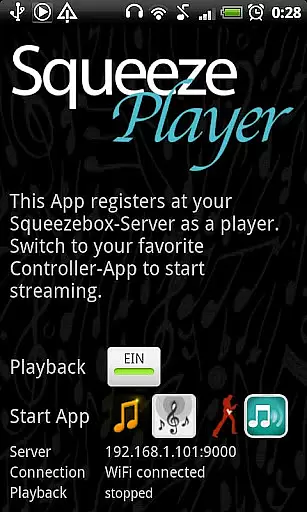
SqueezePlayer is a powerful music streaming application that transforms your Android device into a virtual Logitech Squeezebox. It allows users to stream their entire music library, including local files, internet radio stations, and content from popular music services like Last.FM and Deezer. The app supports high-quality audio formats such as FLAC, MP3, WAV, and PCM, ensuring an exceptional listening experience.
Designed for music enthusiasts who want to enjoy their collection anywhere, the app works seamlessly over WiFi or mobile data connections. By integrating with a Squeezebox Server (Logitech Media Server), it provides access to a vast array of music sources while maintaining excellent sound quality. Whether you're at home, in your car, or traveling, SqueezePlayer keeps your music accessible.
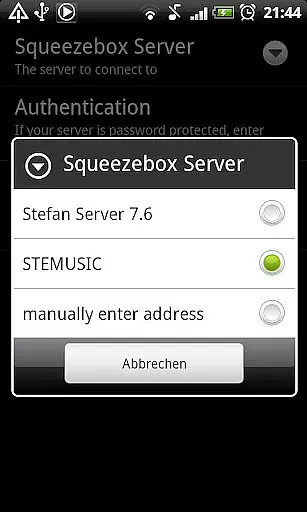
The app's standout feature is its ability to function as a standalone Squeezebox player without requiring dedicated hardware. It achieves this by connecting to your Squeezebox Server, which handles music management and streaming duties. This setup enables advanced capabilities like format conversion - the server can transcode unsupported file types to compatible formats on the fly.
SqueezePlayer offers flexible connectivity options, supporting both local network streaming and remote access via 3G/4G networks. For remote access, users can configure their router with port forwarding and DynDNS services. While primarily a playback application, it integrates smoothly with various control apps, creating a comprehensive music ecosystem. The app maintains compatibility with multiple server versions (7.5-7.7) and works with both dedicated servers and Squeezebox Touch devices.
When it comes to streaming music, the size and authenticity of the library are crucial factors. SqueezePlayer excels in this area by offering users the ability to stream a vast array of content directly from their Logitech Squeezebox Server to their Android device.
This app supports an extensive range of music formats including FLAC, MP3, WAV, and PCM natively, ensuring that your audio experience is both rich and diverse. Additionally, the Squeezebox Server can transcode other file types like Ogg and mp4 into FLAC or MP3 on the fly, further expanding the available library.
The emphasis on copyright authenticity is evident as SqueezePlayer streams content legally through your own server setup, avoiding licensing issues that plague some services. This means you can enjoy tracks from platforms such as Last.FM, Deezer, or WiMP without concern over unauthorized distribution.
With these capabilities, SqueezePlayer not only provides access to a potentially limitless personal music collection but also ensures peace of mind regarding the legitimacy of the streamed content.
Audio quality is paramount for any music enthusiast, and SqueezePlayer delivers exceptional sound fidelity. By supporting high-quality formats such as FLAC and WAV natively, it ensures that the nuances of your music collection are preserved during playback.
For those with discerning ears, the ability to stream lossless audio formats means that every note and instrument is reproduced with precision. The app leverages the power of your Android device to decode these files directly, providing an uncompromised listening experience.
Moreover, if your Squeezebox Server is properly configured, it can handle transcoding of additional file types, allowing you to enjoy even more of your music without sacrificing quality. This flexibility guarantees that regardless of the original file format, you'll receive optimal sound output.
SqueezePlayer's dedication to delivering pristine audio makes it an ideal choice for audiophiles who demand nothing less than the best when enjoying their favorite tunes.
User-friendly interface
High-quality audio support
Remote access capability
Wide format compatibility
Regular updates
Requires separate server
No standalone control
Limited format support
Complex setup process
Premium features cost

Equalizer, Bass Booster and Volume Booster (Eq & Bass) improve sound quality
 4.30
4.30
Most Advanced AI Song Generator and Music Creator. Rap, Pop, Rock, Gospel & more
4.70
Walkout Song DJ is the most intuitive app to manage your sports music.
4.70
Permanently backup Now Playing. Maps, filters & listening stats.
4.00
The ultimate media player for Android devices
3.90
Music, News & Sports Radio Tuner App. Tune in Live FM & AM Radio Stations.
4.80
Sheet music reader, piano & music note player. Play music score & learn to read.
3.90
Full featured mp3 and audio player with Chromecast and Android Auto support.
4.40
Get alarms that fit your lifestyle and wake up to the sounds you love.
4.80
Brian Eno and Peter Chilvers’ acclaimed music app Bloom, radically reinvented.
4.80
Play your hearts out on TouchTunes jukeboxes & connect with fellow music lovers.
4.80
Reverse your voice & songs instantly! Fun singing challenge with cool effects.
4.60
Save hundreds of dollars for a physical strobe tuner and instead use this app.
4.50
The Music Journey in Your Hands
4.30
A sleek, no-frills player designed for true music lovers.
4.20
The official Sonos app
4.10
Sing, record, and create music together — enhanced by smart voice tools.
4.00
Offline Tunes, Unlimited Vibes
3.90
Simple mp3 and mp4 player with advanced features.
3.40


User Reviews