
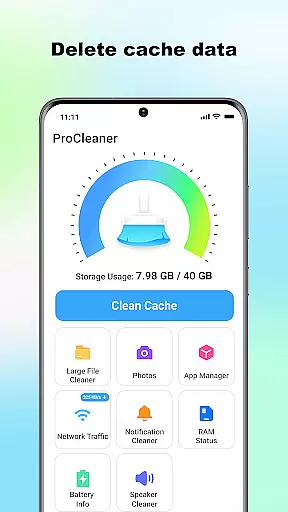
ProCleaner is a comprehensive device optimization tool designed to help users efficiently manage their smartphone storage. The app's core functionality revolves around scanning and cleaning various types of unnecessary files, including cache, residual, and junk files that accumulate over time.
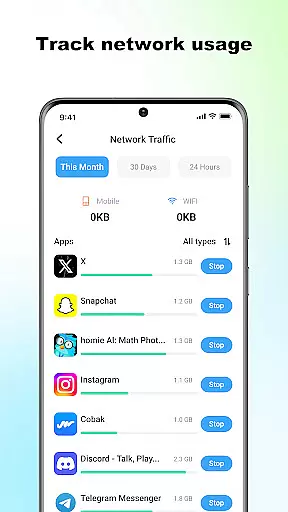
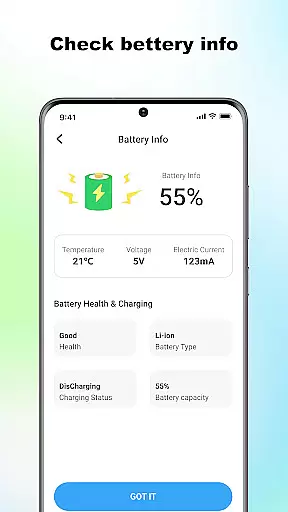
Beyond basic cleaning capabilities, ProCleaner offers advanced features for managing large files and uninstalling multiple applications simultaneously. Users can also monitor their network speed and check battery status, providing a complete solution for device maintenance and performance optimization.
This application is particularly useful for individuals who frequently encounter storage issues or wish to maintain optimal device performance. By providing both basic and advanced tools for file management and system monitoring, ProCleaner delivers significant value to users looking to maximize their device's efficiency and lifespan.
ProCleaner distinguishes itself through its comprehensive suite of device management tools. The application's primary feature is its powerful scanning engine, which can detect and clean various types of unnecessary files across the device's storage system.
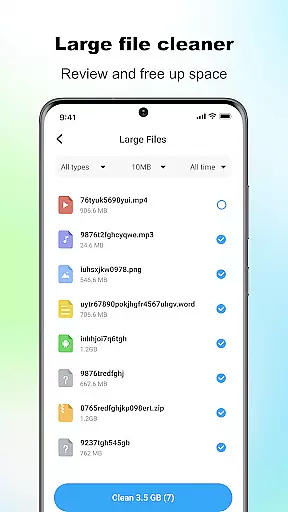
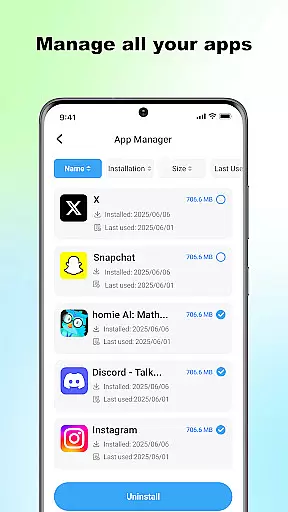
The app implements several innovative solutions for storage optimization. Its multi-selection uninstallation feature allows users to remove multiple applications simultaneously, while the large file manager helps identify and delete space-consuming files. The network speed monitor and battery status checker provide real-time system information, enhancing user control over device performance.
All operations are performed locally on the device, ensuring maximum privacy protection. The application requires only necessary permissions for storage access and app management, maintaining a balance between functionality and security. This approach provides users with peace of mind while optimizing their device's performance.
ProCleaner excels in delivering accurate and effective core functions that are essential for device optimization. The app's scanning engine thoroughly examines the device to identify cache files, residual data, and junk files that can be safely removed.
With its intuitive interface, users can easily locate and manage large files consuming significant storage space. The application also provides a streamlined process for uninstalling multiple apps simultaneously, ensuring efficient storage management.
The network speed monitoring and battery status checking features further enhance the user experience by providing real-time insights into device performance. These tools empower users to make informed decisions about their device usage.
All operations are performed locally, guaranteeing privacy and security while maintaining high performance standards. This approach ensures that ProCleaner remains a reliable tool for optimizing your device without compromising personal data.
A simple and intuitive interface is crucial for ensuring a seamless user experience, and ProCleaner delivers precisely that. The layout is designed to guide users effortlessly through various storage management tasks without overwhelming them with complex options.
Each feature, from cache cleaning to app uninstallation, is presented with clear labels and straightforward controls. This design philosophy minimizes the learning curve, making it accessible even for those who may not be tech-savvy.
Moreover, the app consolidates all necessary tools into a single dashboard, allowing users to monitor network speed and battery status alongside storage optimization tasks. This cohesive presentation enhances usability and saves time.
By focusing on clarity and ease of navigation, ProCleaner ensures that users can quickly achieve their device management goals without unnecessary complications or confusion.
Comprehensive cleaning tools
Multi-app uninstallation
Local data processing
Network speed monitoring
Battery status tracking
Limited advanced features
No cloud backup option
Basic UI design
Occasional scan errors
Ads in free version

 4.10
4.10
Change your GPS location instantly. Simulate routes anywhere in the world.
4.90
FV File Manager Pro, Fast and powerful file manager for Android
4.60
App that Recover your pictures, videos or files after you delete them.
4.20
Create your own live wallpaper or check out thousands already made presets
3.90
Signal Strength, Mobile, Wifi, Speed Test, Bad Signals, Cellular, 5G, LTE, 4G
4.20
Screen Mirroring for Roku Sticks, Roku TCL TV and Roku Hisense TV
4.50
Pro Emulator is an easy to use game console emulator for a range of consoles.
4.40
fast and easy mp3 music downloader
4.80
ADB support Android 4.X-Android 13(Support wireless pair mode).No root required!
4.70
Mirror your screen to Chromecast and Android TV - Super fast and simple
4.60 4.50
4.50
Mirror your screen to Fire TV - Super fast and simple
4.40
Complete kernel toolbox with features to manage and tweak your rooted device
4.30
PC precision for mobile gaming: dominate with keyboard and mouse!
4.30
Quickly & easily calculate the spacing of handrail balusters
4.20
A simple app to back up and restore SMS & MMS messages and call logs.
4.10
Introducing Smart Printer, your ultimate destination for printing solutions!
4.00
Unleash gamepad precision for ultimate mobile gaming dominance.
3.90


User Reviews