
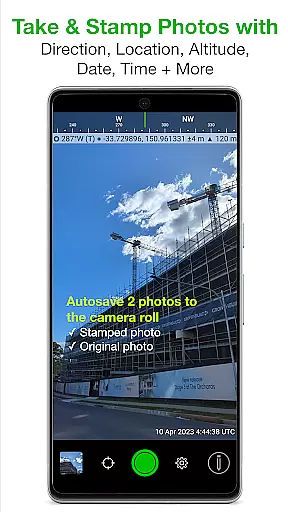
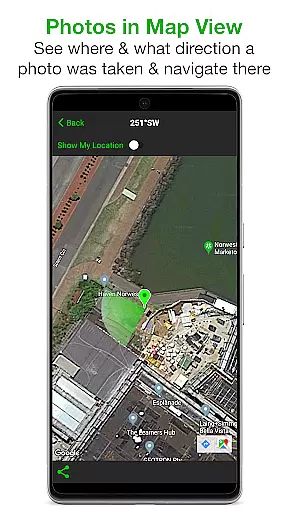
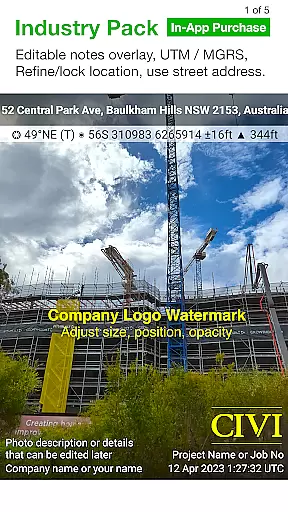
Solocator is a professional GPS camera app designed for fieldwork and photo documentation across various industries. It allows users to overlay and stamp photos with critical metadata such as location, direction, altitude, date, and time. With the optional Industry Pack, users can capture additional field notes like project names and descriptions.
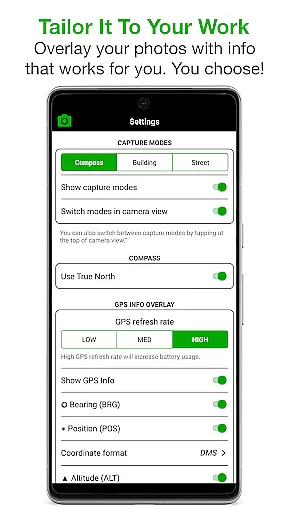
The app is widely used by professionals globally for its ability to tailor overlay information to specific needs. Whether it's for geotagging, site surveys, or asset management, Solocator provides accurate and customizable data stamps that enhance photo documentation workflows.
Solocator offers an extensive range of features tailored for both basic and advanced users. The app supports multiple coordinate formats including UTM/MGRS, compass direction, tilt and roll angles, and more. Its autosave functionality ensures two versions of each photo are saved: one with overlays and one original.
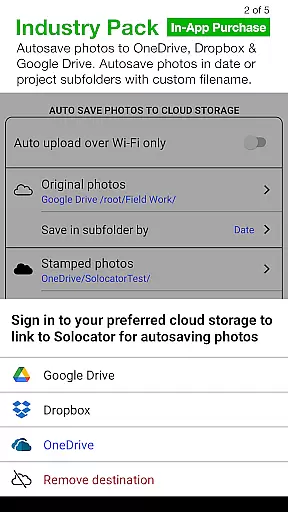
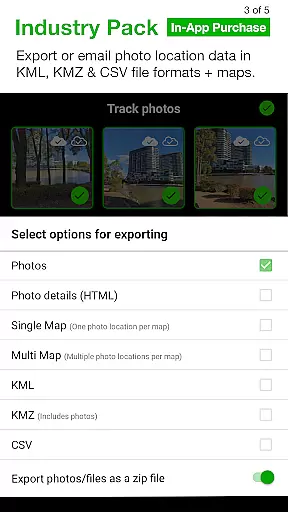
For professionals requiring advanced capabilities, the Industry Pack provides editable notes overlays, custom export filenames, batch editing, and cloud storage integration with services like Google Drive and Dropbox. Additional features include photo data export in KML, KMZ, and CSV formats, GPS location refinement, and a compact view mode for streamlined usability.
Solocator excels in real-time capture and preview, allowing users to overlay critical information directly onto photos as they are taken. This feature is particularly valuable for professionals who require accurate documentation in fields such as construction, surveying, and environmental monitoring.
The app provides a comprehensive set of data points that can be stamped onto images, including GPS coordinates, compass direction, altitude, and more. Users can customize the overlay to display only the information relevant to their specific needs, ensuring clarity and precision in every photo.
With support for both front and back cameras, Solocator ensures flexibility in capturing images from any angle. The inclusion of pinch zoom and standard camera controls enhances the user experience, making it easy to capture detailed and well-composed photos with all necessary data included.
While Solocator is primarily designed for professional photo documentation rather than aesthetic enhancements, it incorporates features that ensure the naturalness and authenticity of captured images. The emphasis is on maintaining the integrity of the original photo while adding valuable metadata overlays.
The Industry Pack offers advanced functionalities like UTM/MGRS coordinate formats and street address overlays, which add layers of detail without compromising the image's authenticity. These features cater to industries where precise location data is crucial, ensuring that enhancements serve a practical purpose.
Additionally, Solocator allows users to refine and lock GPS locations, which is ideal for photographing assets in challenging environments. This capability not only enhances the accuracy of the captured data but also contributes to the overall reliability and professionalism of the documented information.
User-friendly interface
Comprehensive metadata options
Wide industry adoption
Customizable export settings
Cloud storage integration
Industry Pack is paid
Limited on devices without compass
Occasional GPS inaccuracies
Advanced features may overwhelm new users
Requires learning curve for full utilization

A collection of tools and reference tables for DPs, ACs, DITs and Operators.
 4.70
4.70
Gallery show photo, video, slideshow, is perfect 3D effect private photo albums.
4.80
Long exposure camera with computational photography
2.60
Trendy TikTok time warp scan funny filter app brings you unique photos & videos.
4.40
1M influencer's special filter
4.60
Photobooth mini FULL app will allow you to add more fun to your parties
4.00
Perfect body tune & face app - photo retouch, makeup, slim body & beautify face.
4.80
AI photo editor with hair editor, retouch tools, hair color changer & filters!
4.50
Movie camera, supports pro recording settings for filming. Try it and be amazed!
4.50
Amazing Photo Effects - The most fun you can have with your photos!
4.70
Transform photos into videos! Create realistic or anime-style images easily!
4.50
Safe & smart flight with Go Fly drone controller for 40+ drone camera, zone map
4.50
AI photo enhancer with Sora 2! Enhance, descratch, and colorize your old photos.
4.50
Easily stitch panoramas from multiple photos or video.
4.40
AI portrait generator and polaroid AI selfie, fun AI generated AI photo creator!
4.30
Shooting photos and records video easily and efficient with professional Camera
4.30
All-in-One Editor & AI Photo Enhancer, Beautify & Retouch, Collage, Cartoonify
4.20
Create AI Photos, Improve and restore quality of blurry, old or damaged pics.
4.20
Turn photos into cartoons & avatars! - Photo Editor, Cartoon Face!
3.90


User Reviews