
MusiChic is a premium offline music player designed for discerning music enthusiasts who demand the highest quality listening experience. This sophisticated application transforms your device into a personal concert hall, delivering lossless audio playback with support for multiple formats.
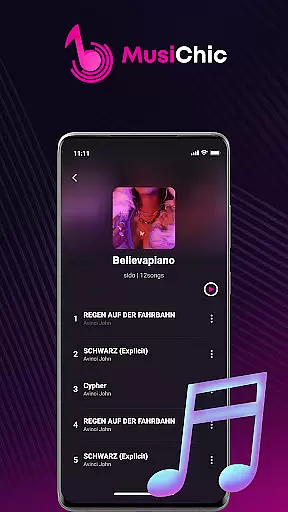
The app's intelligent features include automatic library organization by album, artist, and genre, along with smart scanning capabilities that instantly build your local music collection. Whether you're relaxing at home or traveling abroad, MusiChic ensures your favorite tracks are always available without internet connection.
With its elegant interface and powerful functionality, MusiChic caters to both casual listeners and serious audiophiles, making it the perfect companion for enjoying professional-grade sound on the go.
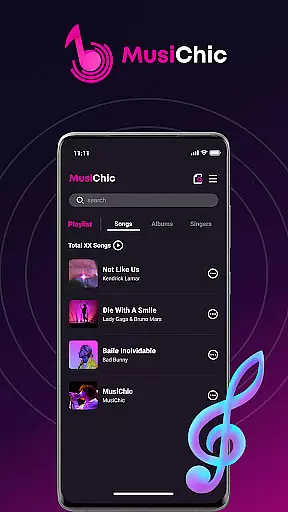
MusiChic distinguishes itself through innovative music management tools that enhance user experience. The app's smart scanning system automatically detects and organizes audio files, creating a comprehensive library structure that's easy to navigate.
Advanced playback features enable seamless offline listening with pristine sound quality. Users can create unlimited custom playlists while managing their collections through an intuitive interface that supports various audio formats including MP3, FLAC, and WAV.
The application's intelligent curation capabilities extend to its search function, allowing quick access to specific tracks or albums. These sophisticated features combine to create a personalized music salon experience, bringing professional-grade audio playback to any mobile device.
When it comes to music applications, the size and authenticity of the music library are crucial. MusiChic-Offline Music Player offers an extensive local library that is instantly accessible, ensuring users have a vast array of music at their fingertips.
The application supports numerous major audio formats, allowing for a diverse collection of tracks without any concern over copyright infringement, as all music is intended for personal, offline use.
With smart audio file scanning, users can quickly add their music files to the library, making it easy to manage and enjoy a rich and varied playlist tailored to individual tastes.
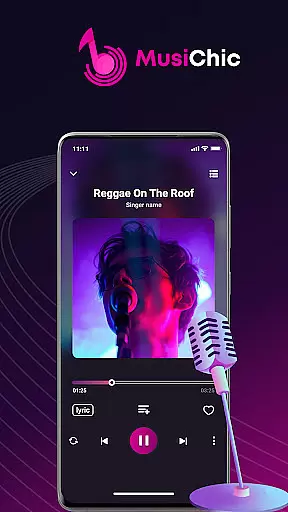
For audiophiles, the quality of audio playback is as important as the music itself. MusiChic takes pride in delivering concert-hall quality sound, supporting lossless audio playback which ensures that every note and harmony is preserved in its purest form.
Whether you're enjoying a quiet evening at home or embarking on global adventures, the app maintains high-quality sound output, elevating your listening experience to new heights.
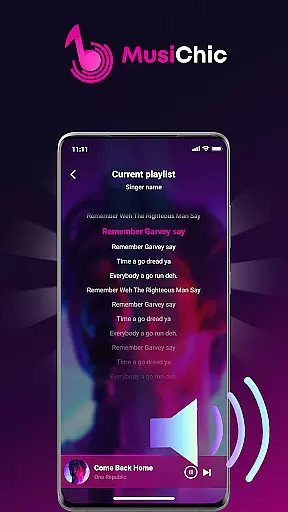
Moreover, with personalized playlists and exclusive collection management features, users can indulge in their most refined musical moments, experiencing their favorite tunes exactly as the artists intended.
Lossless audio quality
Intuitive interface design
Smart library management
Offline playback capability
Multi-format support
Limited social features
No cloud integration
Premium price point
Android only
Steep learning curve

Simply convert wav to mp3. Clear. Reliable. Safe.
 4.5
4.5
Equalizer, Bass Booster and Volume Booster (Eq & Bass) improve sound quality
4.30
Gorgeous UI, Powerful music Search and Equalizer, the great choice for you!
4.70
Background pads for your band
3.80
DJ Music Mixer - DJ Remix: remix songs, make beat music & record mix of DJ.
4.40
Unleash your creativity! Turn simple prompts into full fledged songs.
4.70
Smart piano keyboard, Classical to Pop, Real-time multiplayer connection!
4.20
Responsive piano with great sounds, graphics, and songs
4.80
Get alarms that fit your lifestyle and wake up to the sounds you love.
4.80
Full-featured, High-Quality Groovebox Workstation, perfect for Live Performance!
4.80
Music, News & Sports Radio Tuner App. Tune in Live FM & AM Radio Stations.
4.80
Offline Music Player & MP3 Player.Powerful equalizer, Lyrics, Themes, Tag Editor
4.80
A complete sound package for the sound engineer or enthusiast
4.60
Reverse your voice & songs instantly! Fun singing challenge with cool effects.
4.60
Help you quickly get started with Shokz headphones
4.40
Advanced 10-Band Audio Graphic Equalizer Sound Booster Pro
4.30
Bass Booster Pro takes auto-equalizing to the next level!
4.30
Versatile MP3 recorder with auto-backup to Dropbox and Google Drive
4.10
Learn to play the piano using falling notes!
3.80


User Reviews