
AutoPad is a versatile ambient pad loop application designed to enhance live performances and recordings with seamlessly looped drones. The app provides musicians with an easy way to incorporate tasteful soundscapes into their mixes, simply by tapping a key. It supports natural crossfades between keys, ensuring smooth transitions during performances.
The app comes equipped with 10 expertly crafted pad sounds that create unique atmospheres in all 12 musical keys. Additionally, users can expand their sound library through in-app purchases or by importing custom WAV files. AutoPad also features a built-in metronome, MIDI compatibility, and adjustable settings like crossfade time, filters, reverb, pan, and volume, making it a comprehensive tool for musicians on stage or in the studio.
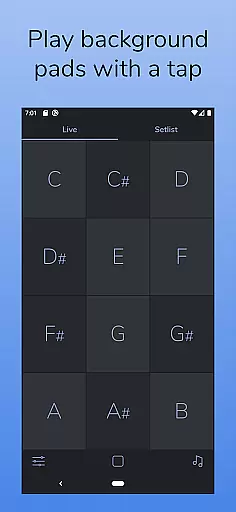
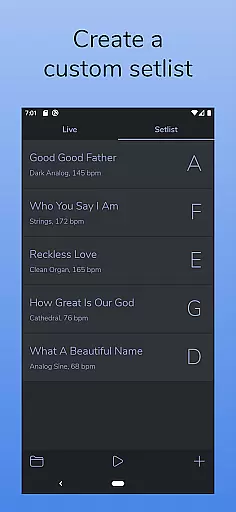
AutoPad offers two distinct modes tailored to different performance needs. LIVE mode grants instant access to all twelve musical keys, perfect for spontaneous performances, while SETLIST mode allows musicians to prepare a customized sequence of songs for planned events. This flexibility ensures that AutoPad adapts to both impromptu and structured performances.
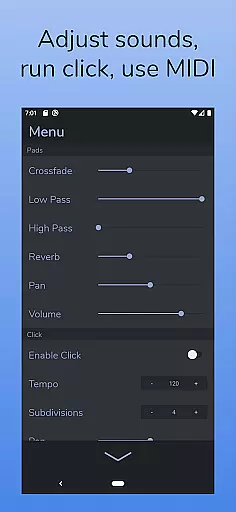
In addition to its core functionality, AutoPad includes advanced features such as a built-in metronome to keep bands in sync without additional equipment. Users can control various audio parameters including crossfade time, filters, reverb, pan, and volume via an intuitive menu. Furthermore, MIDI support enables triggering pads with external controllers, although Android users should note the lack of virtual or Bluetooth MIDI support at this time.
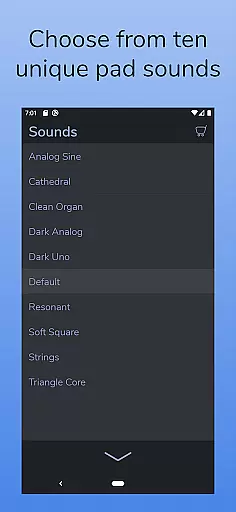
AutoPad offers a robust music library that includes 10 carefully designed pad sounds, each providing a unique atmosphere in all 12 keys.
These sounds are crafted to be played softly and continuously behind live musicians, making them versatile for both major and minor musical contexts.
The app also supports expansion of the sound library through in-app purchases or by importing personal pad files, although currently limited to wav format on Android.
All included sounds are copyright-authentic, ensuring users can use them without legal concerns, thus enhancing the creative freedom within professional boundaries.
AutoPad ensures high audio quality with features like natural crossfades between keys, handled automatically to maintain seamless playback.
Users have control over audio parameters such as crossfade time, two filters, reverb amount, pan, and volume via the app's menu, allowing precise adjustments tailored to specific performance needs.
Additionally, AutoPad responds to MIDI controllers, enabling users to trigger pads with a keyboard for an enhanced live performance experience.
This combination of automatic handling and manual controls provides a flexible audio environment suitable for various musical settings, from studio recordings to live performances.
Seamless looping
Customizable sounds
MIDI compatibility
User-friendly interface
Built-in metronome
Limited file format support
No virtual MIDI on Android
Basic free sound pack
Interface may feel dark
Learning curve for beginners

The Music Journey in Your Hands
 4.30
4.30
Full-featured, High-Quality Groovebox Workstation, perfect for Live Performance!
4.80
Next generation modular control surface
4.10
Bass Booster & Volume Equalizer Pro improves your music and video sound quality
4.60
Enjoy singing any song, no matter how high or low it is
4.30
Offline Tunes, Unlimited Vibes
3.90
One-tap booster for max volume - enjoy powerful sound with this audio booster
4.50
Listen to offline music and sounds from all categories
4.70
Customize Your Favorite Songs and Videos with booster.
4.70
Make songs with AI! Any genre, custom lyric, song generator for music creation!
4.80
Play your hearts out on TouchTunes jukeboxes & connect with fellow music lovers.
4.80 4.70
4.70
Record, Mix & Master with all n-Track effects, 64-bit audio and Stem Separation.
4.70
Super Sound Editor, Song Maker & Mixer, Vocal Remover, Voice Recorder & Changer!
4.60
Enhance the sound quality of your devices, listen to what you want
4.50
Formerly known as Spotistats! View your top tracks, artists, albums and more!
4.40
Network/Cloud Streaming, Visualization, Graphic Equalizer and Sound Effects.
4.20
PowerAudio is a powerful offline music player.
4.20
The Skullcandy App Experience
3.20


User Reviews