
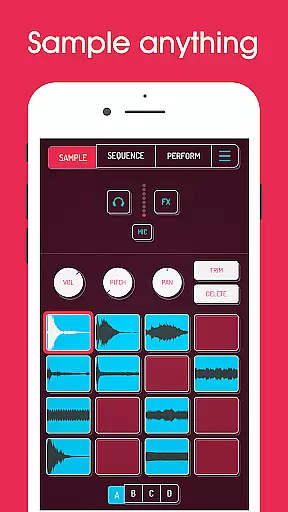
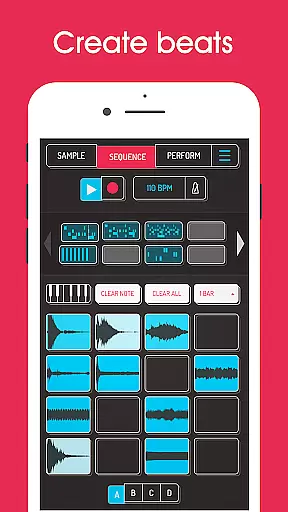
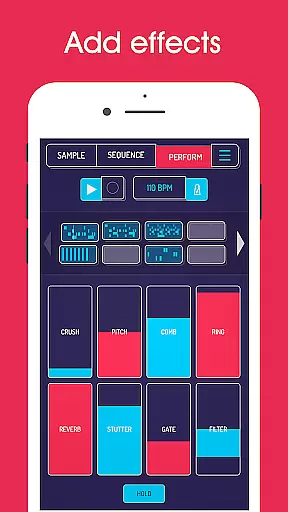
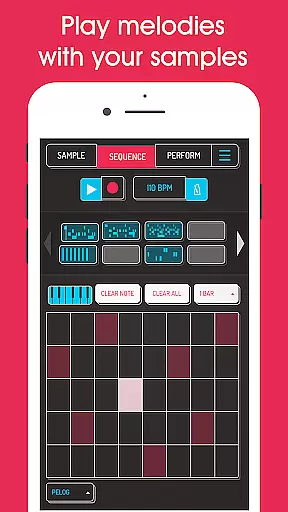
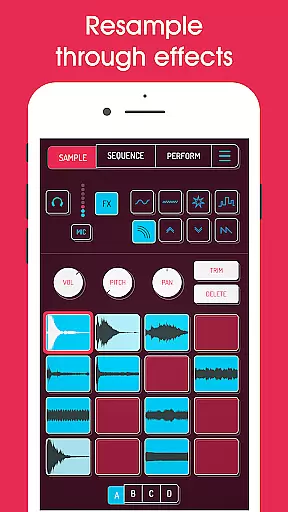
Koala Sampler is a pocket-sized music production tool that allows users to record sounds through their phone's microphone or import existing samples. The app provides an intuitive interface for creating beats, applying effects, and producing tracks with ease.
With features like resampling, professional WAV export, and AI-powered sample separation, Koala Sampler streamlines the music-making process while maintaining creative freedom. Its design eliminates complex parameter adjustments, keeping users engaged in a seamless and enjoyable workflow.
Ideal for both beginners and experienced producers, this app transforms your mobile device into a powerful music studio, enabling you to create high-quality compositions anytime, anywhere.
Koala Sampler offers a robust set of tools for music creation. Users can record up to 64 unique samples using the built-in microphone and apply one of 16 built-in effects such as reverb, fuzz, and synthesizer transformations. The app also supports advanced functionalities like AI-driven instrument separation and MIDI control for external keyboards.
The sequencer provides precise beat-making capabilities, including quantization, swing adjustment, and multiple playback modes (normal, one-shot, loop, reverse). Each sample can be fine-tuned with attack, release, and tone controls, while mix-wide effects enhance the overall sound quality.
Additional premium features available via in-app purchase include pro-quality timestretching, piano roll editing, and auto-chop functions, making Koala Sampler a versatile choice for all levels of audio production.
Koala Sampler offers an extensive music library that includes a variety of built-in effects and the ability to import your own samples, ensuring a rich and customizable audio experience. With 16 superb built-in FX for transforming your voice or any other sound, users can explore endless sonic possibilities.
The app emphasizes copyright authenticity by allowing users to record their sounds with a phone's mic or load personal audio files, thus avoiding copyright infringement. This feature is crucial for creators who wish to maintain originality in their music while using digital tools.
Furthermore, Koala supports AI technology to separate samples into individual instruments such as drums, bass, vocals, and others, enhancing the creative process without legal concerns over sample clearance. This ensures that all musical elements are authentic and legally usable.
Creators also benefit from professional-quality WAV file exports, which preserve the integrity of their work when sharing or publishing tracks made within Koala Sampler. By focusing on user-generated content, Koala maintains both a vast library size and absolute copyright authenticity.
Audio quality is paramount in Koala Sampler, offering users multiple options to ensure their creations meet professional standards. The app provides high-resolution sequencing and adjustable attack, release, and tone settings on each sample, delivering precise control over the audio output.
With features like Pro-quality Timestretch included in SAMURAI In-App Purchase, users can choose from four modes: Modern, Retro, Beats, and Re-pitch, tailoring the sound to fit their artistic vision without compromising quality. These advanced options allow for detailed editing that caters to both contemporary and nostalgic audio aesthetics.
Koala Sampler also includes 16 DJ Mix FX such as Bit-crusher, Pitch-shift, Comb filter, and more, enabling intricate manipulation of tracks while maintaining clarity and depth. Such comprehensive audio processing capabilities guarantee that the final mix stands out with pristine quality.
In addition to its robust feature set, Koala supports MIDI controllability, letting musicians play samples on a keyboard with various effects applied. This level of integration ensures that whether you're creating beats or performing live, Koala Sampler delivers top-notch audio fidelity adaptable to any setup or preference.
Intuitive Interface
Powerful Effects
AI Sample Separation
MIDI Compatibility
Professional Export Options
Premium Features Locked
Microphone Input Issues
Complex for Beginners
Limited Free Content
Occasional Bugs

Tune in to the greatest hits on UK Radio | The home of Capital, Smooth & Heart.
 4.90
4.90
The Cubase remote control app
3.60
DJ Music Mixer - DJ Remix: remix songs, make beat music & record mix of DJ.
4.40
Network/Cloud Streaming, Visualization, Graphic Equalizer and Sound Effects.
4.20
Bass Booster Pro takes auto-equalizing to the next level!
4.30
A sleek, no-frills player designed for true music lovers.
4.20
Play KORG’s revolutionary touch-based instrument on a variety of devices.
4.40
Master Salsa Rhythm quickly and with a lot of fun!
4.30
Be a true music maker: create beats, mix and make music like a real DJ!
4.30
Voice recorder - Audio recorder. Best recorder for recording
4.90
Simple & Intuitive Metronome
4.70
The best music and audio player, with beautiful UI, music search and equalizer.
4.60
Offline Music Player&MP3 Player with themes, equalizer, lyrics, music play mode
4.60
A synth that really lets you shape your sounds!
4.50
Visualize the guitar fretboard, master scales & play through changes like a pro!
4.50
The alternative folder based music player.
4.20
Next generation modular control surface
4.10
Sheet music reader, piano & music note player. Play music score & learn to read.
3.90
Remove ads permanently from Music Visualizer
4.1


User Reviews