





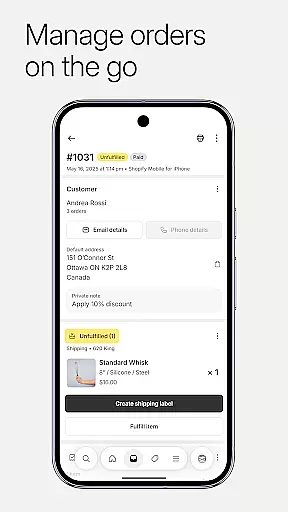
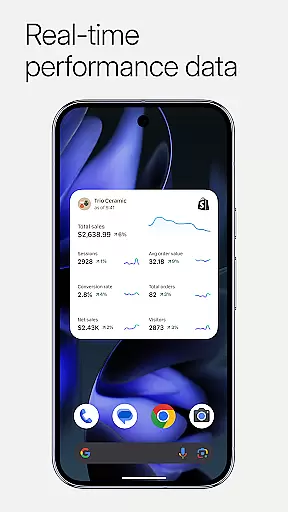

Shopify stands as a comprehensive commerce platform tailored for entrepreneurs who aim to sell both online and offline. It empowers users to manage their entire business operations from a mobile device, including order processing, inventory tracking, and marketing campaign launches. The app eliminates the need for coding or design skills, making it accessible for anyone to start an ecommerce business.
One of the key highlights is its AI-powered tools that simplify product management, order fulfillment, and customer relationship management. Users can upload product photos, adjust pricing, and organize collections with ease. Moreover, Shopify enables selling across multiple channels, integrating seamlessly with social media platforms like Instagram and Facebook, which helps synchronize inventory and orders in real time.
The app's versatility extends to financial management, offering features such as Balance accounts, funding options through Shopify Credit, and secure payment processing. This makes it not only a tool for sales but also a robust system for maintaining healthy business finances, ensuring entrepreneurs can focus on growth while managing all aspects efficiently from anywhere.
Shopify offers a rich set of features designed to streamline the complexities of running an ecommerce business. One standout feature is its dropshipping management capability, which allows users to automate orders and optimize inventory efficiently. This ensures smooth operations and maximizes profitability without requiring extensive manual oversight.
Another notable aspect is the app’s powerful marketing tools. Users can launch Google Smart Shopping campaigns, create ads for Facebook and Instagram, and track performance metrics directly from their mobile devices. These tools are complemented by real-time business insights, such as live sales tracking and instant order notifications, enabling merchants to make data-driven decisions quickly.
Additionally, Shopify provides customization options for storefronts, access to professional themes, and seamless integration with various sales channels. This flexibility allows businesses to maintain brand consistency while reaching customers wherever they shop—online or offline. With these capabilities, Shopify positions itself as an indispensable tool for modern entrepreneurs looking to scale efficiently.
Effective collaboration tools are essential for modern businesses, enabling teams to work together seamlessly regardless of location. Shopify's mobile app excels in this area by providing a comprehensive suite of features that support real-time teamwork.
The platform allows business owners and their teams to manage orders, track inventory, and analyze sales data from any location. With instant order notifications and team communication features, users can ensure that everyone stays informed and aligned. This level of connectivity helps streamline operations and maintain consistency across all business activities.
Shopify goes beyond basic collaboration by integrating with popular marketing channels like Instagram, Facebook, and Google Smart Shopping. This enables teams to launch and optimize marketing campaigns directly from their mobile devices, ensuring that promotional efforts remain coordinated and effective.
Furthermore, the app's customer relationship management features allow teams to view and update customer information on the go. The ability to add timeline comments to orders and communicate directly with customers through the app creates a unified approach to customer service, enhancing both team productivity and customer satisfaction.
Efficient task management is crucial for maintaining productivity and achieving business goals. Shopify's mobile application offers robust tools that help entrepreneurs organize and prioritize their daily operations effectively.
The app provides a centralized dashboard where users can process orders, manage inventory levels, and track conversion details. These features are designed to simplify complex business processes, allowing users to fulfill, refund, or archive orders with just a few taps. The intuitive interface ensures that even those new to ecommerce can navigate and utilize these tools efficiently.
One of Shopify's standout features is its barcode scanning capability, which enables users to adjust inventory on the fly. This functionality, combined with real-time business insights such as live sales tracking and visitor traffic monitoring, creates a powerful system for managing multiple aspects of an ecommerce business simultaneously.
Additionally, the app supports seamless integration with various sales channels, helping users maintain synchronized inventory and order information across platforms. This comprehensive approach to task management empowers business owners to focus on growth while maintaining operational efficiency.
User-friendly interface
Extensive integration options
Real-time analytics
Mobile order management
AI-powered tools
Subscription costs may add up
Limited free theme selection
Transaction fees apply
Steep learning curve for beginners
Advanced features require paid plans

Zoom built for Chrome OS
 3.90
3.90
Find jobs and make money fast with JobStack.
4.60
Formerly Facebook Ads Manager. Manage and create ads on the go.
4.20
Scan Business Cards & Conference Badges - Capture Leads at Events & Tradeshows
4.20
FaxCover - Create fax cover pages. Works with any app or fax machine.
4.90
BuildCalc - the easiest AND the most advanced construction calculator app.
4.80
Take the stress out of storage with the all-in-one app to manage your space.
3.70
enjoy effortless PDF reading anytime, anywhere
3.90
Job search app that finds jobs for you! Takes the work out of looking for a job!
4.90
TurboScan turns your phone into a full-featured PDF document scanner.
4.80
Mobile POS for any business: sales, invoices, retail, restaurants & appointments
4.60
Collaborate seamlessly with Google Chat, part of Google Workspace
4.50
All Your Gig Work. One App.
4.30
FX Plus adds media, networking, and cloud capabilities to FX File Explorer.
4.10
All document reader, pdf viewer app, read docs & excel files
3.80
viewing and sharing of PDFs
3.60
view, manage, and share every PDF file you have
3.60
Roadie connects people with stuff to send with drivers already going that way.
3.50
Access All PDF Files
3.40


User Reviews