
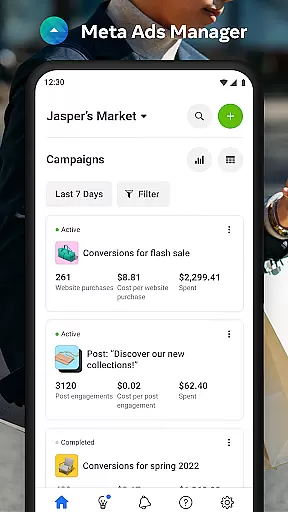

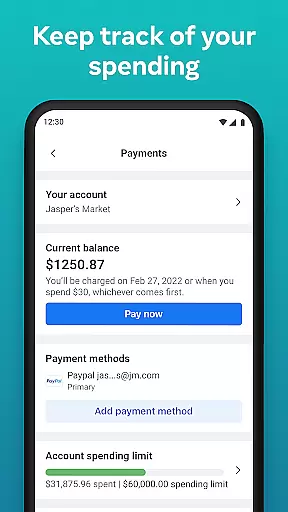
Meta Ads Manager is a comprehensive business tool designed to help advertisers manage their advertising campaigns across Meta's family of apps and technologies, including Facebook, Instagram, Messenger, and WhatsApp. The app enables users to create and edit ad campaigns, access real-time performance insights, and control campaign statuses with ease. With its robust functionality, advertisers can efficiently oversee their marketing efforts while on the go, ensuring optimal campaign performance at all times.
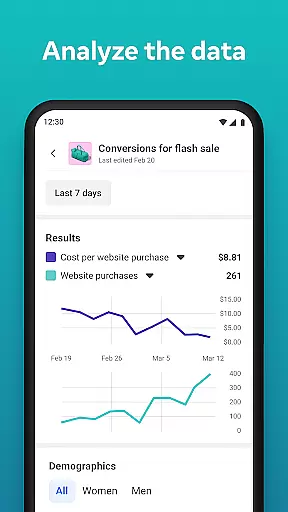
A key feature of Meta Ads Manager is its ability to provide detailed analytics and reporting. Users can view comprehensive data about their campaigns' reach, engagement, and conversion metrics in real time. Additionally, the app offers quick alerts that notify users of significant changes or opportunities within their ad accounts. This ensures that marketers can respond promptly to any developments in their advertising strategy.
This application is particularly useful for digital marketers who need to stay connected with their advertising efforts regardless of location. Whether you're monitoring campaign performance during a commute or making critical adjustments while traveling, Meta Ads Manager provides the tools necessary to maintain effective ad strategies from anywhere in the world.
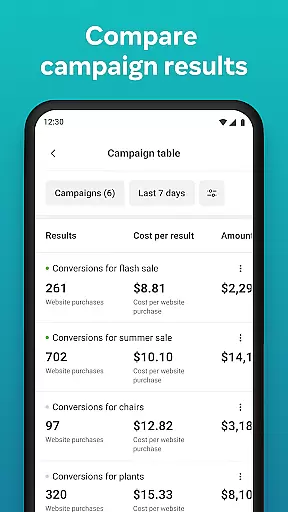
Meta Ads Manager stands out with its extensive set of features tailored for efficient ad management. One notable capability is the side-by-side comparison view, which allows users to analyze different campaigns and ad sets simultaneously. This feature helps advertisers make informed decisions by providing clear visual comparisons of various metrics such as cost per click (CPC), return on ad spend (ROAS), and more.
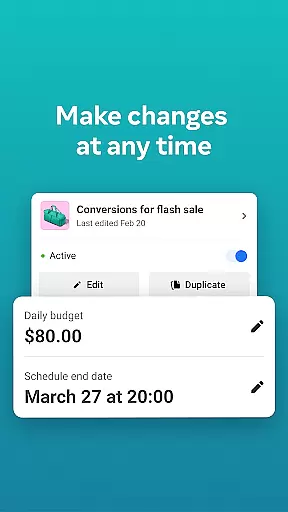
In addition to comparative analysis, Meta Ads Manager offers seamless control over campaign statuses. Users can easily turn campaigns on or off based on current needs or strategic shifts. The app also supports switching between multiple Pages and ad accounts, streamlining the workflow for agencies managing several clients or businesses running diverse marketing initiatives.
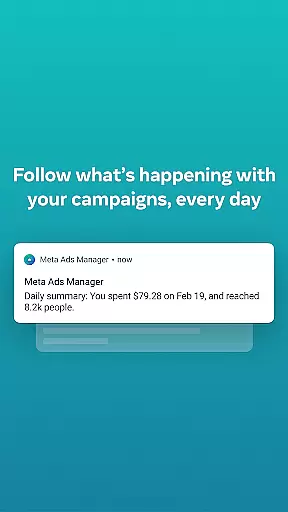
The app's alert system is another standout feature, delivering timely notifications about important events related to your ads. These alerts range from budget depletion warnings to suggestions for optimization opportunities, ensuring that users are always aware of critical updates. By combining these powerful features, Meta Ads Manager empowers businesses to maximize their advertising ROI through precise control and insightful analytics.
Collaborative work features are essential for modern business applications, enabling teams to work together efficiently regardless of location. Meta Ads Manager excels in this area by providing a centralized platform where marketing teams can manage campaigns across multiple Meta technologies.
The application allows users to create and edit ad campaigns for platforms like Facebook, Instagram, and WhatsApp from a single interface. This unified approach ensures that all team members have access to the same information and can make real-time adjustments to campaigns as needed.
One of the key benefits is the ability to receive quick alerts about campaign performance. This feature keeps all stakeholders informed about important changes or issues, allowing for rapid response and optimization of advertising strategies.
Additionally, the side-by-side view for comparing campaigns and ad sets enhances collaboration by providing clear visual comparisons. Teams can analyze performance metrics together and make data-driven decisions to improve their advertising effectiveness.
Effective task management is crucial for successful campaign execution, and Meta Ads Manager provides robust tools for organizing and monitoring advertising tasks. The application enables users to view detailed real-time insights from all their campaigns in one place.
With the ability to turn campaigns on and off directly from the app, users can quickly respond to market changes or budget constraints. This level of control streamlines task management and helps optimize advertising spend across different platforms.
The application's interface allows for easy switching between different Pages and ad accounts, making it simple to manage multiple projects simultaneously. This feature is particularly valuable for agencies handling campaigns for various clients or large companies with multiple product lines.
Furthermore, the quick alerts system serves as a task management aid by highlighting important events or anomalies in campaign performance. This ensures that users never miss critical moments when adjustments might be necessary, leading to more efficient use of resources and better overall campaign results.
User-friendly interface
Real-time analytics
Multi-platform support
Quick alerts system
Side-by-side comparison
Limited offline functionality
Occasional sync delays
Advanced features require learning
Dependent on stable internet
Some options are account-specific

Find jobs and make money fast with JobStack.
 4.60
4.60
The Penny Puss app with DG penny finder
4.10
BuildCalc - the easiest AND the most advanced construction calculator app.
4.80
Take the stress out of storage with the all-in-one app to manage your space.
3.70
A secure, all-in-one team collaboration app
4.30
Deliver and earn money
4.30
All your team communication in one place
4.70
The app that lets you deliver with Amazon.
4.50
Work happy with AI Companion
4.10
Start earning fast. Apply Today.
4.80
Use Generative Summary to understand your rental or insurance docs in seconds.
4.70
Grow your business and connect with more people with Meta Business Suite.
4.60
Earn money with the driver & delivery partner app for Uber, UberEats & Postmates
4.60
Amazon A to Z is the place to manage your work-life at Amazon.
4.50
Drive and earn extra money
4.50
Find jobs near you and temp work in minutes, from your phone.
4.50
ADP Mobile Solutions is an employee self service app
4.50
Make money as a delivery driver with DoorDash and work when you want as a Dasher
4.30
Find part-time earning opportunities near you that pay within days.
3.20


User Reviews