
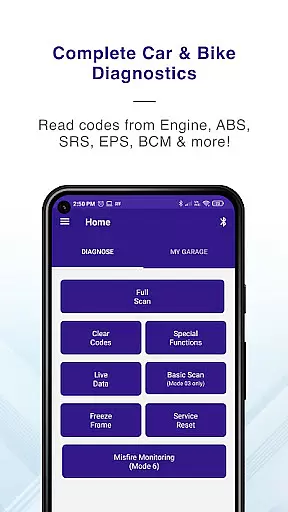
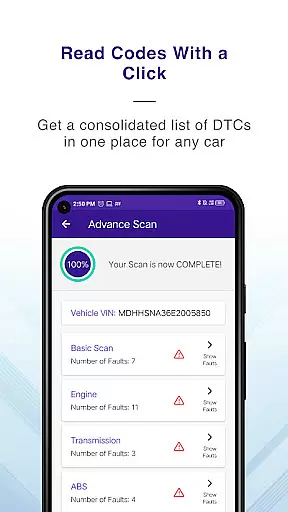
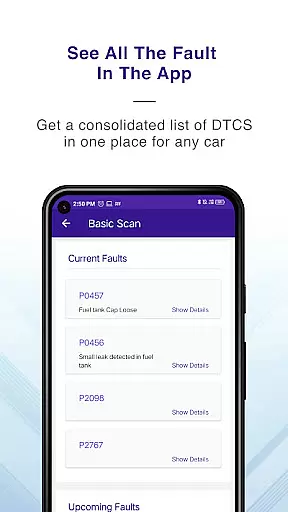
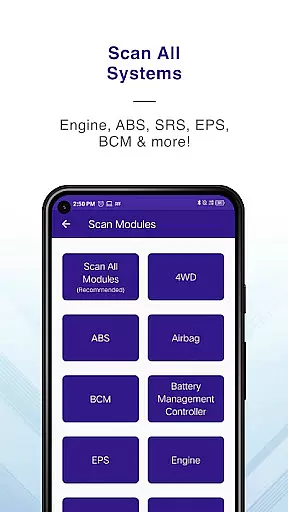
GaragePro is a comprehensive OBD scanning app designed for vehicle owners, repair shops, and DIY enthusiasts. It provides access to over 200 diagnostic functions across cars, bikes, and heavy vehicles, working seamlessly with most OBD2 scanners like ELM327. The app allows users to scan real-time data, retrieve trouble codes, and perform advanced vehicle diagnostics from multiple systems such as Engine, ABS, SRS, and more.
One of the standout features of GaragePro is its ability to offer special functions like Injector coding, DPF regeneration, Throttle Reset, and Steering angle reset. These capabilities make it an invaluable tool for both professional mechanics and car enthusiasts who want deeper control over vehicle maintenance. Additionally, the app supports live data monitoring, PDF reporting, and wireless Bluetooth connectivity, ensuring a seamless and modern diagnostic experience.
Whether you're troubleshooting dashboard warning lights or performing complex tasks like brake bleeding or smog checks, GaragePro ensures that you have all the tools needed at your fingertips. Its compatibility with a wide range of vehicles and user-friendly interface makes it suitable for both personal and professional use, saving time and money on repairs.
GaragePro stands out with its extensive feature set tailored for automotive diagnostics. The app offers advanced OBD scanning capabilities, retrieving real-time data and trouble codes from various vehicle systems, including Engine, ABS, Airbag, and Transmission. This multi-system coverage ensures users can diagnose issues across all critical vehicle components, providing a holistic view of vehicle health.
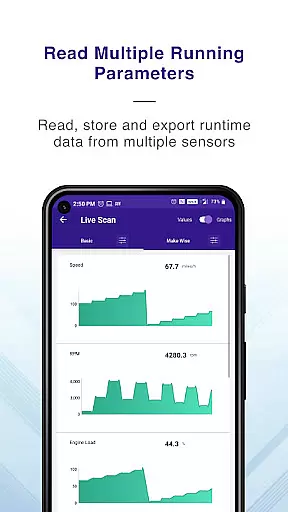
In addition to basic diagnostics, GaragePro includes specialized functions such as Injector coding, DPF regeneration, and Steering angle reset. These features are particularly beneficial for advanced users who need to perform complex maintenance tasks. The app also supports live data monitoring with customizable displays and graphs, allowing users to track crucial sensor data like RPM, coolant temperature, and fuel trim in real time.
Other notable features include wireless Bluetooth connectivity, PDF report generation, and compatibility with a wide range of OBD2 scanners. With support for over 200 diagnostic functions and additional tools like Track mode for acceleration tests, GaragePro delivers professional-grade diagnostics in a user-friendly mobile app, making it an essential tool for anyone involved in vehicle maintenance.
Access to comprehensive vehicle diagnostics is essential for both professional mechanics and DIY enthusiasts. GaragePro provides detailed insights into a vehicle's health by retrieving real-time data from multiple systems, including Engine, ABS, SRS, EPS, BCM, Transmission, HVAC, and more.
The app goes beyond basic OBD scanning by offering advanced features such as Injector coding, DPF regeneration, Throttle Reset, ABS bleeding, and Steering angle reset. With over 200 diagnostic functions, users can access crucial information about their car, bike, or heavy vehicle with ease.
One of the standout features is the ability to monitor over 100 sensor data points in real-time. This includes critical metrics like RPM, speed, coolant temperature, and fuel trim. The intuitive graphs and customizable displays allow users to track vehicle performance and make informed maintenance decisions.
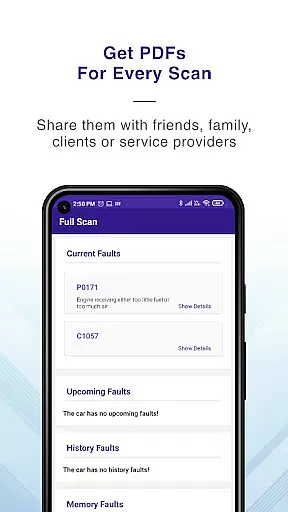
By providing detailed PDF reports with code descriptions, GaragePro ensures that users can share diagnostic results with technicians or store them for future reference. This level of detailed vehicle information empowers users to understand their vehicle's condition better and take proactive maintenance actions.
When it comes to automotive diagnostic tools, price transparency is crucial for user satisfaction. GaragePro offers a clear pricing structure that makes it accessible to a wide range of users. The basic scanning and live data features are available for free, allowing users to perform essential diagnostics without any cost.
For more advanced functions, GaragePro provides affordable paid plans starting at just $10. These plans include special features such as Injector coding, DPF regeneration, and various system resets. The transparent pricing model ensures that users know exactly what they are paying for and can choose a plan that suits their needs.
In addition to its core features, GaragePro offers compatibility with a wide range of OBD2 scanners, including generic ELM327 devices. While the app itself is free to download and use for basic functions, users can enhance their experience with recommended scanners like GaragePro's own device, VGate, OBDLink, and others.
This transparent approach to pricing, combined with the app's extensive functionality, makes GaragePro an attractive choice for anyone looking to maintain their vehicle without hidden costs or unexpected expenses.
User-friendly interface
Wide vehicle compatibility
Advanced diagnostic tools
Wireless convenience
Comprehensive live data
Paid features required
Bluetooth connection issues
Complex for beginners
Limited free functionality
Device compatibility varies

Take Control of Your Car
 4.80
4.80
Theme for Car Launcher
4.0
* This app needs an adapter cable and a certain OBD2 adapter to work *
4.20
Buy and sell your boat
4.70
myAudi offers users services and Audi connect services for Audi drivers
4.10
Your car is talking. Start listening.
4.30
Trip computer+car diagnostic tool with widest variety of features and dashboard!
4.70
PayByPhone: A quick and easy way to pay for parking.
3.80
Shop, finance, or sell today.
4.80
OBD1 ECMs application. Data log or tune directly from your phone or tablet!
4.60
Automotive Electrical Wiring Diagrams
4.40
Your Path to Driving Licensing Success Begins Here! Develop your driving skills.
4.40
Ultimate OBD2 Car Scanner: Diagnostics, Service and Modification Tool
4.30
OBD2 car scanner and diagnostics: read Check Engine, DTC, economy....
4.30
Car Sounds Engine Sounds app welcomes Auto Lovers to feel Car Simulator Sound
4.20
Blink Charging Mobile app makes finding an EV charger an intuitive experience.
3.80
Theme for Car Launcher
4.4
Ferrari inspired analog & digital watch face with quick access and premium style
4.5
DIY Vehicle Wheel Alignment
4.2


User Reviews