
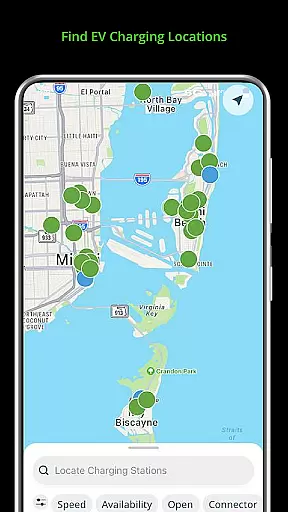
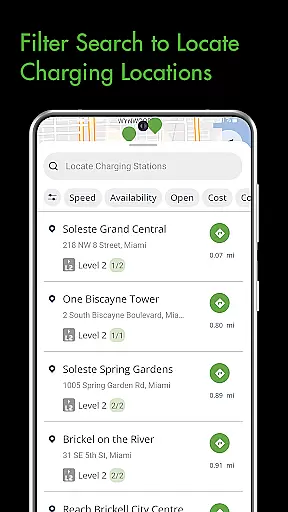
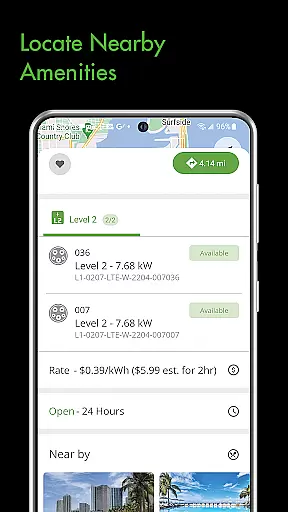
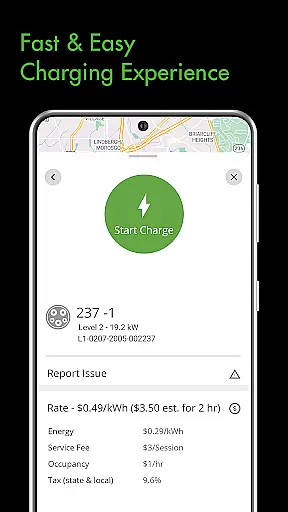
Blink Charging Mobile App is a comprehensive solution for electric vehicle (EV) owners, designed to simplify and enhance the EV charging experience. The app allows users to locate public EV charging stations with ease, using various search criteria such as zip code or business name. Additionally, it provides real-time monitoring of charge sessions, including energy delivered and costs, ensuring users have all necessary information at their fingertips.
One standout feature is the ability to manage home charging stations like the HQ 200 directly from the app, allowing users to configure settings and track charging history conveniently. With an expanding network that now includes SemaConnect stations, Blink continues to broaden its reach, offering drivers more options and greater flexibility. This integration ensures that EV drivers can efficiently manage all aspects of their charging needs through one unified platform.
The Blink Charging Mobile App offers a robust set of features tailored for EV owners. Users can easily locate nearby charging stations by entering specific details such as zip codes or addresses, streamlining the process of finding a place to charge. The app also supports real-time session management, providing detailed insights into each charging session, including occupancy times, costs, and energy delivery rates.
Another significant feature is the ability to receive status updates and notifications about your charging sessions. Whether your car has finished charging or if there's a fault, you'll be promptly informed. Furthermore, the app allows users to set up and manage home charging stations like the HQ 200, enabling them to control everything from charging schedules to payment methods. This level of customization and control makes the Blink Charging app an indispensable tool for modern EV drivers.
Understanding your vehicle's charging needs is essential for efficient electric vehicle ownership. The Blink Charging mobile app provides detailed information about your EV's charging specifications and requirements.
Through the app, users can access real-time data during charging sessions, including energy delivered, current vehicle charging speed, and estimated costs. This ensures that EV drivers are well-informed about their vehicle's performance and energy consumption patterns.
The app also allows management of home charging stations like the HQ 200, enabling users to configure station settings, track charging history, and monitor ongoing sessions from the convenience of their homes.
By delivering precise vehicle information and charging metrics, the Blink app empowers users to optimize their charging routines, ultimately extending battery life and enhancing overall EV performance.
One of the key concerns for EV owners is understanding the cost associated with charging their vehicles. The Blink Charging mobile app addresses this by providing clear and transparent pricing information for every charging session.
Users can view detailed breakdowns of charging costs, including occupancy time and energy delivered, ensuring they know exactly what they are paying for each session. This level of transparency helps users manage their expenses more effectively.
In addition to public charging costs, the app also allows users to monitor expenses related to home charging through the HQ 200 station. This includes tracking energy usage and associated costs over time.
With comprehensive price transparency, the Blink app enables EV drivers to make informed decisions about where and when to charge, ultimately saving money while maintaining optimal vehicle performance.
User-friendly interface
Real-time charging data
Home charger management
Expanded network coverage
Convenient notification system
Limited to EV owners
Occasional connectivity issues
Requires account setup
Some features are premium
Dependent on station availability

Ultimate OBD2 Car Scanner: Diagnostics, Service and Modification Tool
 4.30
4.30
Practice the drills within MotoJitsu Master Riding Program Volume 1 & 2!
4.80
Better fuel to help keep you on the road
3.20
A full featured, real-time transit locator system
4.30
myAudi offers users services and Audi connect services for Audi drivers
4.10
Digital Car Key/Launcher, Screen Mirror, Android Dashboard, Remote Wireless Link
4.40
Shop cars & see your financing
4.60
MySubaru: Download. Connect. Love.
4.70
Shop, finance, or sell today.
4.80
The ExtraMile App allows you to pay for fuel from the comfort of your car!
4.70
Your go-to app for car, truck & SUV parts, DIY tools, and expert repair help.
4.70
CVT diagnostics with ELM327 for Nissan-based vehicles
4.40
Your car is talking. Start listening.
4.30
Boost profits and hit your goals faster with GigU's amazing tools for gigworkers
4.00
Available in select states.
4.00
Discover new and used cars in Syria easily! Browse ads and connect with sellers.
3.70
Wonder how much horsepower and torque your car/truck makes? Look no further.
3.40
Club Car Wash Mobile App—the fast lane to managing your wash membership.
3.30
App Mirroring for Tesla Car's Browser
2.80


User Reviews