
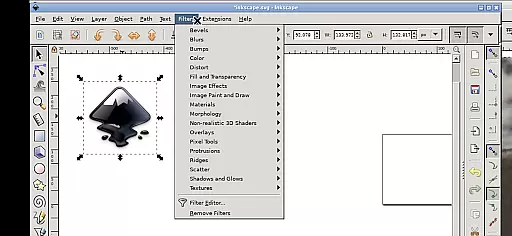
Inky is a powerful vector graphics editor that brings the full functionality of Inkscape to Android devices. This app allows users to create and edit vector images in Scalable Vector Graphics (SVG) format, with support for importing and exporting other file types. It offers professional-grade features including primitive vector shapes, text tools, color gradients, and raster image tracing.
The application supports various transformations such as moving, rotating, scaling, and skewing of created shapes. Its intuitive touch-based interface enables users to perform actions like zooming, panning, and scrolling through simple gestures. With access to Android's file system, Inky makes it easy to work on projects without the need for manual file transfers. Whether you're a designer or illustrator, this app provides a complete mobile solution for vector graphic design.
Inky stands out with its comprehensive set of vector editing tools adapted for mobile use. The app implements a unique touch interface that translates common desktop actions into intuitive gestures. Users can left-click by tapping, zoom using pinch gestures, pan by pressing and holding, and right-click by tapping with two fingers.
Advanced design capabilities include creating primitive shapes, applying color gradients, and manipulating objects with adjustable transparency. The app also supports working with files across the Android system through useful directory links. Unlike traditional mobile apps, Inky maintains the full feature set of desktop Inkscape while optimizing for mobile workflows. This combination of professional-grade tools and mobile convenience makes it an exceptional choice for designers on the go.
Inky offers a comprehensive suite of creative tools that cater to both professional designers and hobbyists. The app provides full-featured vector graphics editing capabilities, enabling users to create intricate designs with ease.
With Inky, you can render primitive vector shapes such as rectangles, ellipses, polygons, arcs, spirals, stars, and 3D boxes. Text creation is also supported, allowing for versatile design options. These objects can be filled with solid colors, patterns, radial or linear color gradients, and their borders may be stroked with adjustable transparency.
The app supports embedding and optional tracing of raster graphics, which means you can transform photos and other raster sources into scalable vector images. This feature expands the creative possibilities by bridging raster and vector graphic design.
Shapes created within Inky can be manipulated through various transformations including moving, rotating, scaling, and skewing. Such flexibility ensures that your creative vision is not limited, providing an intuitive and powerful platform for bringing ideas to life on mobile devices.
Inky stands out in its ability to offer canvas and format flexibility, accommodating a wide range of design needs. Whether you're working on small icons or large-scale illustrations, Inky's adaptable canvas size allows for precision and customization.
The app primarily uses Scalable Vector Graphics (SVG) format but also supports importing and exporting other formats. This versatility ensures compatibility across different platforms and projects, making it easier to integrate your work into various media.
Designers will appreciate the seamless access to files from the broader Android environment. Useful links in the home directory connect to locations like Documents and Pictures, eliminating the need for cumbersome file imports or exports.
Moreover, Inky's interface is optimized for touchscreens, supporting gestures such as pinch-to-zoom and pan with a press-and-hold action. These features enhance usability on tablets and phones alike, ensuring that creativity isn't hindered by device limitations.
User-friendly touch interface
Full-featured vector editor
Direct file system access
Professional design capabilities
Open-source and free to use
Steep learning curve
Small screen limitations
Requires manual restarts
Limited stylus support
No native Android UI

Pose and morph realistic male and female models! 3D poser app
 3.00
3.00
Customizable Outlined Fonts. Watch Face Format. Battery friendly Digital Clock.
4.20
Sketch, plan, take notes and illustrate on an infinite canvas.
4.20
Digital Drawing: Draw & Paint
4.10
Make your phone cooler and have a fantastic experience
4.80
A luxurious gold watch face for an elegant and refined look.
4.5
Bring One UI 8.5 Icons to life -elegant dark icons with a modern, premium touch.
4.30
Kling AI is an image and video generation and editing studio powered by AI.
4.50
Sketch and paint on your device with the feel and freedom of drawing on paper
4.00
Digital, Abstract, Classic - all types of color wheels in one app!
4.60
AI Tattoo Generator: Create Tattoo Designs & Get Ideas! Ink & Stencil Maker
4.50
Stylish letters, Stylish Keyboard, Symbols, Emojis, Cool nickname
4.40
Nano Banana AI Image Generator, Anime Filter, AI Portrait, AI Photo Generator
4.30
Beauty Camera - Selfie Camera is the ultimate beauty camera and selfie app
4.30
Apply cartoon, caricature, and portrait effects to make your photos stand out!
3.60
Experience next-gen icons with a modern liquid glass look.
3.60
Art of Combination Wear OS Watch Faces
3.30
Download now for a stylish and functional timepiece
4.1
Art of Combination Wear OS Watch faces
4.2


User Reviews