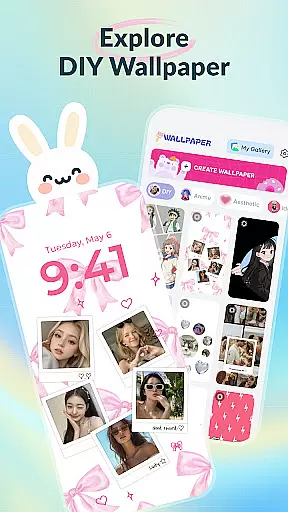
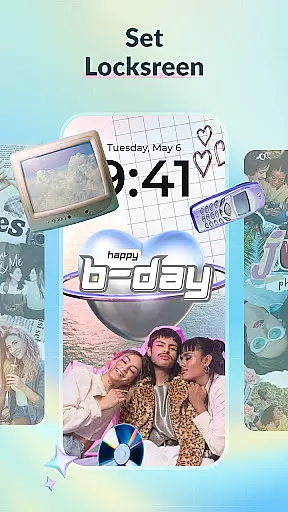
DIY Wallpaper & Collage Craft is a creative app that allows users to design personalized wallpapers and collages. With features like DIY Frame Wallpaper, Collage Wallpaper Craft, and a Curated Wallpaper Gallery, it offers tools for creating unique phone backgrounds.
The app provides dynamic and static frames, custom backgrounds, and stickers for photo enhancement. Its collage feature supports freeform creation with unlimited photos, text, and drawing tools. Additionally, the curated gallery offers trendy, ready-to-use wallpapers across various themes.
Perfect for those looking to express individuality, this app ensures your phone reflects your personal style while offering an enjoyable creative outlet.
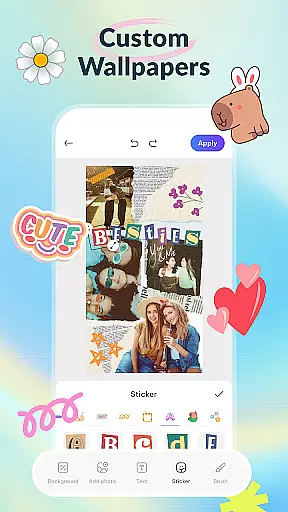
DIY Wallpaper & Collage Craft stands out with its robust set of creative tools tailored for personalization enthusiasts. The DIY Frame Wallpaper feature includes dynamic and static frames, easy photo import, customizable backgrounds, and a diverse library of stickers.
The Collage Wallpaper Craft section offers complete creative freedom, enabling users to import unlimited photos, add text, apply artistic filters, and utilize a brush tool for doodles. It also features an extensive sticker collection updated regularly.
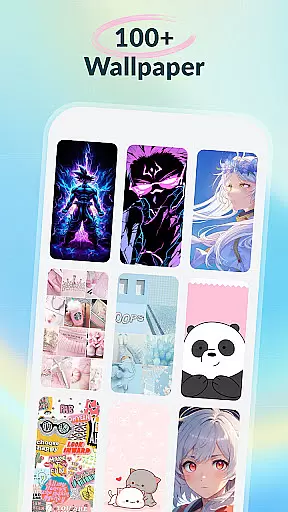
Additionally, the Curated Wallpaper Gallery provides a wide selection of pre-designed wallpapers spanning aesthetic, anime, animal, dark mode, and fun categories. These are consistently refreshed to align with current trends, ensuring fresh content for users.
DIY Wallpaper & Collage Craft offers an extensive range of customization options that cater to diverse user preferences. With features like DIY Frame Wallpaper, users can choose from dynamic and static frames to create a personalized look.
The app provides the ability to import photos seamlessly, ensuring that personal memories can be transformed into captivating wallpapers. Users can experiment with different backgrounds, adding colors, patterns, or textures to reflect their mood and style.
In addition to frames, the sticker library adds another layer of personalization. Users can incorporate fun, trendy stickers into their designs, making each wallpaper a unique expression of individuality.
Theme compatibility is a standout feature in DIY Wallpaper & Collage Craft, allowing users to match their device's aesthetics effortlessly. Whether you prefer cute aesthetics, dark vibes, cool anime, or lively animals, this app has something for everyone.
The Curated Wallpaper Gallery showcases a variety of themes, from dreamy pastels and minimalist designs to iconic anime characters and adorable animals. This ensures that users can find wallpapers that align perfectly with their preferred themes.
Moreover, the app stays updated with the latest mobile culture trends, such as TikTok aesthetics and meme crazes, ensuring that your device remains stylish and trendy at all times.
User-friendly interface
Extensive customization options
Vast sticker and frame library
Free to use
Frequent content updates
Limited advanced editing tools
Some features may feel overwhelming
Occasional ads in the free version
Design quality varies
Heavy on system resources

3D, live, and moving wallpapers & themes in 4K and HD for your device.
 4.50
4.50
Prank your friends with realistic broken screen and cracked HD effects!
4.2
Personalize your phone with stunning HD and 4K wallpapers!
4.70
One 8 icons glass color version
4.80
200+ Material Inspired Widgets
4.50
Transform your device in a game console
4.40
set a new experience for the Android mobile phone
4.20
Customize phone with anime themes, 3D icons, aesthetic widgets & wallpapers
4.80
Transform your phone with stylish zipper lock themes and 4D live wallpaper
4.10
Over 28,000 high quality icons to bring color & homogeneity to your phone.
4.60
Zip lock screen with magic wallpaper to decorate your phone with fun zipper lock
4.60
Choose your keyboard with RGB colors effect, themes, fonts, emojis.
4.60
Handcrafted pixel art icons, widgets & wallpapers
4.60
Vibrant Adaptive Icons with Material You and Enhanced Monet Colors.
4.50
Romantic Kiss Stickers App. Start romantic messaging now!
4.30
Wear Os Watch Face - Seasonal - Animated Snow Effect - 9 Animals
4.20
Your go to Weather App & Home Screen. Get your weather at a swipe of a finger!
3.80
Struggling to find apps? Use this app to locate and open any app on your phone!
2.20
Custom edge gestures for volume control, brightness, apps, and shortcuts.
4.1


User Reviews