
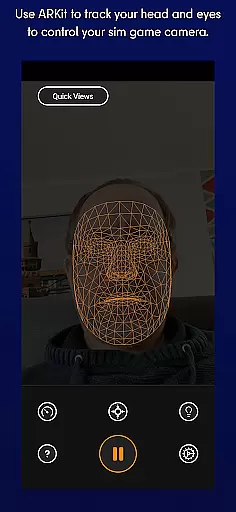
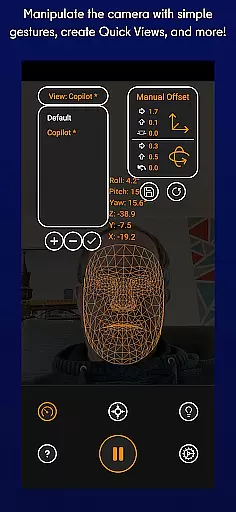
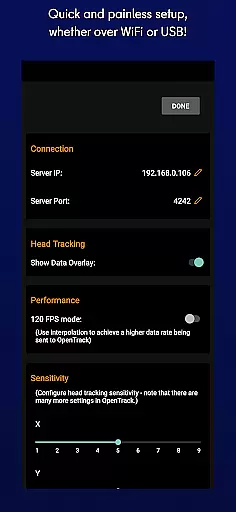
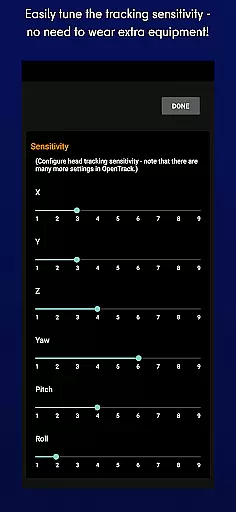
SmoothTrack is an innovative tool that revolutionizes the way you interact with simulation games by providing precise 3D head tracking. This app leverages the AR capabilities of your device to intuitively control the in-game camera, offering a near-magical experience where slight head movements translate into immediate perspective changes within supported games like Microsoft Flight Simulator and Elite: Dangerous.
The application supports any device compatible with Google AR services and requires no additional equipment such as headsets. By simply setting up your device to capture your face, you can use natural head motions to explore cockpits, panels, or space stations in games that support TrackIR or FreeTrack protocols. SmoothTrack enhances immersion while saving battery life with its dark mode feature.
SmoothTrack stands out with its advanced AR-based head tracking technology, enabling gamers to control their sim game's camera effortlessly. The app magnifies your real-world head movements for an exaggerated yet intuitive in-game perspective shift, allowing you to peek around corners or inspect detailed cockpit controls without needing physical input devices.
In addition to supporting numerous popular simulation titles, SmoothTrack offers customization options including dark mode for OLED screens and bright mode for low-light environments. With dedicated Discord and email support channels available, users can easily seek assistance or suggest new features, ensuring a responsive and evolving user experience tailored specifically for simulation enthusiasts.
SmoothTrack delivers precise 3D head tracking functionality, revolutionizing how users interact with simulation games. By leveraging the AR capabilities of your device, it ensures accurate detection and translation of your head movements into in-game camera perspectives.
The app supports any game compatible with TrackIR, providing an intuitive and seamless control experience. With minimal physical movement required, users can effortlessly change their viewpoint within supported games like Microsoft Flight Simulator or Elite: Dangerous.
This level of precision not only enhances immersion but also offers a competitive edge in gameplay. Whether you're navigating an aircraft or exploring space, SmoothTrack's responsive tracking provides immediate visual feedback, making virtual experiences more engaging.
SmoothTrack boasts an intuitive interface that requires no additional equipment such as headsets. Users simply need to position their device to capture their face, allowing for effortless interaction through natural head movements.
The application simplifies perspective control by magnifying in-game movements, enabling slight head motions to result in significant viewpoint changes. This design choice makes looking out of a cockpit window or checking instruments as easy as shifting your gaze.
In addition to its straightforward setup, SmoothTrack includes thoughtful features like dark mode for battery savings on OLED screens and bright mode for visibility in low-light conditions. These options ensure comfort during extended gaming sessions while maintaining ease of use.
Intuitive head tracking
No extra equipment needed
Wide game compatibility
Battery-saving dark mode
Responsive customer support
Requires Google AR services
Limited to compatible devices
Dependent on stable lighting
Potential learning curve
May not suit all gamers

Fluid navigation gestures for all of us!
 4.30
4.30
Enjoy smooth gameplay with Game Booster
4.90
card-reader app
2.20
Best leveling tool for your Android device. Hang paintings like a pro.
4.90
Screen Mirroring for Roku Sticks, Roku TCL TV and Roku Hisense TV
4.50
Mobile Security with Scam Protection | Malware & Virus Cleaner | Safe Browser
4.70
Enjoy a smooth mobile reading experience!
3.60
Your personal health butler
3.60
fast and easy mp3 music downloader
4.80
HD Camera captures every special moment.
4.60
Mirror your screen to Chromecast and Android TV - Super fast and simple
4.60
Play your X-Box games remotely in 1080p with any controller and zero latency
4.60 4.50
4.50
Game Booster, GFX Tool is now compatible with newer game update
4.50
App that Recover your pictures, videos or files after you delete them.
4.20
An open-source APK explorer for Android!
4.10
A convenient photo, video, and file recovery tool.
4.00
Family Locator, Share location, StayConnect with your family in real time
3.90
Smart and comfortable browsing experience.
3.80


User Reviews