
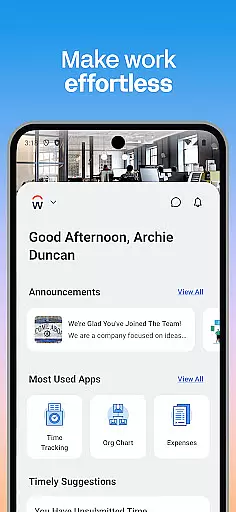
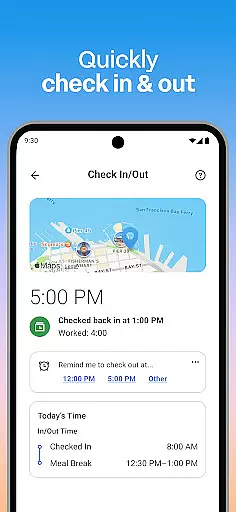
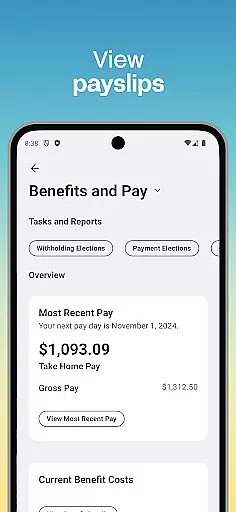
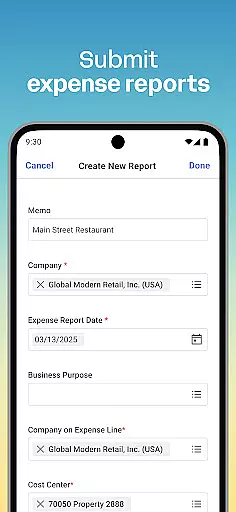
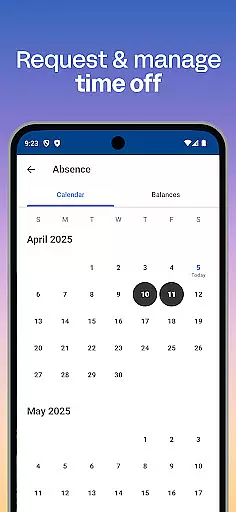
Workday is a comprehensive business management application designed to enhance workplace productivity through its all-in-one platform. The app provides users with instant access to a wide array of Workday tasks, including time tracking, expense submissions, and team communication. It serves as an essential tool for both employees and managers, offering features like push notifications for task reminders, viewing payslips, requesting time off, and even learning new skills via training videos.
For managers, Workday offers additional HR functionalities such as approving employee requests, managing payroll, conducting performance reviews, and accessing detailed reports and dashboards. Its intuitive interface ensures that users can easily navigate through their tasks, while the app's security measures, including biometric authentication and cloud-based data storage, guarantee that sensitive information remains protected. Whether you're an employee looking to manage your work-life balance or a manager overseeing team operations, Workday provides the necessary tools to maintain efficiency and organization.
Workday stands out due to its extensive feature set tailored for both individual contributors and managerial staff. For everyday users, the app simplifies routine tasks by providing quick access to functions such as checking in and out of work, submitting timesheets and expenses, and requesting time off. Additionally, it fosters professional growth by offering training videos and internal job opportunities within the organization.
Managers benefit from advanced capabilities that streamline human resource management. These include approving employee requests with a single tap, adjusting roles, managing compensation changes, and conducting performance evaluations. The app also supports interactive reporting, allowing managers to make informed decisions based on real-time data. With its focus on usability, flexibility, and security, Workday ensures that users can personalize their experience while maintaining the highest standards of data protection. This makes it an invaluable asset for businesses aiming to optimize their operational workflows.
Collaboration is at the heart of workplace productivity, and the Workday app excels in providing robust collaborative work features. The app allows users to connect with teammates effortlessly, fostering a cohesive work environment. Through integrated communication tools, employees can share insights, updates, and feedback in real-time.
The Workday Mobile App goes beyond basic communication by enabling managers to approve employee requests with a simple tap. This streamlined process ensures that teams can maintain momentum without unnecessary delays. Additionally, interactive reports and dashboards provide valuable data visualization, empowering teams to make informed decisions quickly.
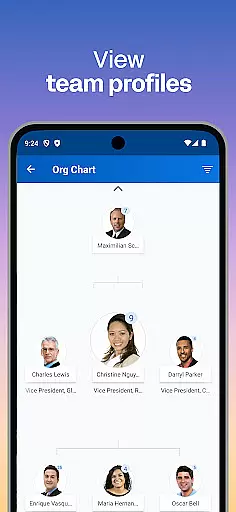
For managers, the ability to view team and employee profiles adds another layer of collaboration. This feature facilitates better understanding and management of team dynamics, ultimately enhancing overall productivity. With these collaborative tools, Workday ensures that every team member is aligned and equipped to contribute effectively.
Effective task management is crucial for maintaining productivity, and the Workday app offers comprehensive tools to manage tasks efficiently. Users can submit timesheets and expenses, request time off, and check in and out of work seamlessly. These features ensure that employees can focus on their core responsibilities without getting bogged down by administrative tasks.
Managers benefit from advanced task management capabilities, such as the hours tracker and the ability to view employee timesheets. These tools provide transparency and accountability, ensuring that projects stay on track. Moreover, the performance review feature allows managers to give constructive feedback, promoting continuous improvement within the team.
The app's intuitive design organizes all necessary tasks in one place, making it easy for users to stay on top of their responsibilities. With push notification reminders for important tasks, employees can ensure nothing falls through the cracks. By integrating these task management features, Workday empowers users to maintain high levels of productivity and efficiency.
User-friendly interface
Comprehensive task management
Advanced HR functionalities
Secure data handling
Real-time updates and notifications
Limited customization options
Occasional syncing issues
Requires stable internet connection
Premium features may require subscription
Steep learning curve for new users

Get your benefits on-the-go.
 3.80
3.80
Manage work life on the go
4.50
Take the stress out of storage with the all-in-one app to manage your space.
3.70
Finance, Investing, Stocks, Trading and Stock news
4.60
Delivery Track App - Tracking with Fedex, USPS, UPS, DHL. Monitor your Orders.
3.20
We are a dynamic team of creatives people of design, marketing, web & apps
3.00
Mobile POS for any business: sales, invoices, retail, restaurants & appointments
4.60
Access to Paylocity, empowering employees with information they need 24/7.
4.70
Permission Guard is a security app that helps you manage app permissions.
4.80
FaxCover - Create fax cover pages. Works with any app or fax machine.
4.90
BuildCalc - the easiest AND the most advanced construction calculator app.
4.80
Employee Management Made Easy
4.80
Paychex Flex - Save Time and Stay Connected
4.60
Master crypto trading with real-time simulations and exciting challenges!
4.50
Collaborate seamlessly with Google Chat, part of Google Workspace
4.50
Deliver and earn money
4.30
Make money as a delivery driver with DoorDash and work when you want as a Dasher
4.30
FX Plus adds media, networking, and cloud capabilities to FX File Explorer.
4.10
Simple, Fast & Lightweight
3.90


User Reviews