
Lithium Pro is an advanced upgrade package for the free Lithium app, designed specifically for book enthusiasts who demand more customization and functionality. This app unlocks a suite of professional features within the main Lithium application, enhancing your reading experience significantly.
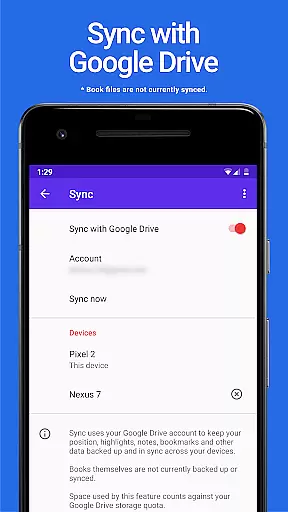
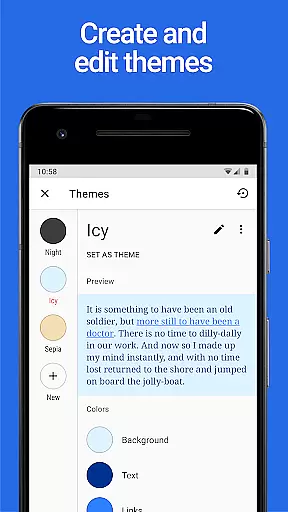
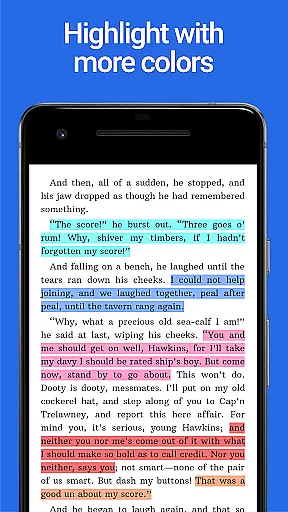
Key functionalities include automatic data synchronization across devices via Google Drive, allowing you to maintain seamless continuity in your reading habits. Additionally, users can create personalized themes by adjusting background, text, and link colors, offering a tailored visual experience. The app also provides extended highlight color options, giving readers more tools to annotate and organize their content effectively.
Ideal for avid readers and students, Lithium Pro transforms your basic reading app into a powerful study companion that adapts to various learning styles and preferences.
The Lithium Pro app offers several distinguishing features that set it apart from standard reading applications. First and foremost is the synchronization capability, which uses Google Drive to keep all your reading progress, bookmarks, and notes updated across multiple devices. This ensures you can switch between your phone, tablet, or other gadgets without losing track of your last read page.
Another standout feature is the custom themes option. Users have the freedom to design their own display settings by modifying page background color, text color, and hyperlink hues. This level of personalization allows for a comfortable and enjoyable reading session, especially during long hours. Moreover, the app includes additional highlight colors beyond the standard options, enabling more nuanced organization of key passages and ideas.
These features collectively provide an enriched reading experience, making it easier to manage extensive libraries and detailed study notes efficiently.
When it comes to e-books, the size of the library and the authenticity of copyrights are crucial factors for any avid reader. Lithium Pro understands this need and offers a seamless solution through its advanced Sync feature.
This application employs Google Drive to ensure that your entire e-book collection is backed up and synchronized across all your devices. This means you can start reading on one device and continue on another without missing a beat. Although book files themselves aren't synced, the ability to maintain a consistent library across devices emphasizes the app's commitment to delivering an expansive and accessible e-book experience.
Moreover, Lithium Pro guarantees peace of mind regarding copyright issues. By purchasing this Pro license, users support authors and publishers, ensuring that the content they love remains available. The app strictly adheres to copyright laws, providing only legally acquired books within its ecosystem.
The combination of a robust synchronization system and stringent adherence to copyright regulations makes Lithium Pro a reliable choice for managing extensive e-book libraries while respecting intellectual property rights.
Format compatibility is a significant aspect of any e-reading application, determining how versatile and user-friendly the platform can be. Lithium Pro excels in this area by offering extensive support for various file formats, thus catering to diverse reading preferences.
Upon upgrading to Lithium Pro, users gain access to custom themes that allow them to personalize their reading environment. This includes adjusting page background colors, text colors, and link colors. Such customization not only enhances readability but also ensures compatibility with different document styles and formats.
In addition to visual adjustments, Lithium Pro provides more highlight colors, enabling readers to annotate and emphasize text effectively. These features collectively contribute to a more inclusive format compatibility, accommodating everything from simple text documents to complex publications requiring specific formatting.
By focusing on these details, Lithium Pro ensures that no matter what type of e-book or document you're reading, the app will present it accurately and attractively, enhancing both usability and overall satisfaction.
Enhanced Sync
Custom Themes
More Highlight Colors
Google Drive Integration
Seamless Cross-Device Use
No Book Backup
Separate Install Needed
Paid Upgrade
Limited Free Features
Complex Setup

Flora of Virginia Project (www.floraofvirginia.org)
 5.00
5.00
Powerful Bible study tools linked to every verse in an easy-to-use Bible reader!
4.60
Daily Devotional Widgets & Hourly Verses. Listen to Bible & Watch Holy Stories
4.70
Enjoy daily devotionals, Bible verses, audio courses, and more.
4.80
A KJV Bible with Apocrypha and precept-based study concordance
5.00
Read the Quran in Arabic alongside its translation, with color coded Tajweed.
4.50
Premium reader for ePub, PDF, and more. TTS and translation. Great on any screen
3.50
A highly sophisticated app for all of your mobile reading—any format, any time
4.50
Learn to tie more than 200 knots in 3D!
4.90
Read books PDF, EPUB, WORD, KINDLE, MOBI! Your ebook reader among reading apps.
4.80
The dynamic dictionary/reference app for piano chords and scales!
4.80
My Bible offers a comprehensive app by providing offline access, daily verses.
4.80
Watch real short episodes in just minutes— addictive, you won't be able to stop!
4.70
Find, discuss, and organize your world of books and shows.
4.60
The Original & Authentic Crystals, Gemstones, Rocks & Minerals Encyclopedia.
4.60
Full text, sheet music, and recordings of the print edition
4.60
7 Languages, Google, Wiki, Vocabulary.com, Cambridge & Urban Dictionary!
4.50
Bible Spiritual Companion
4.40
Pretty Moon information App with Complications and Tile
4.30


User Reviews