



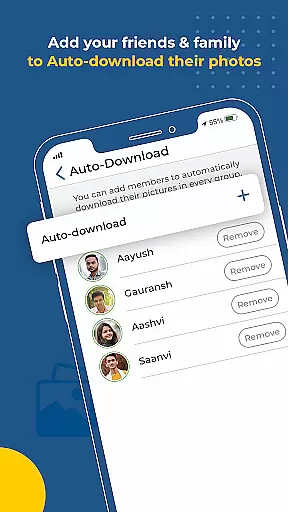
Kwikpic is an innovative photo management solution designed specifically for event organizers, photographers, and attendees who need efficient ways to handle large volumes of photos. The app's core functionality revolves around AI-powered face recognition technology that allows users to instantly match, tag, and notify individuals in photos. This feature streamlines the process of sorting and delivering images to their respective owners, eliminating the tedious manual work typically associated with event photography.
Beyond its primary face-matching capability, Kwikpic offers additional valuable features such as high-quality photo sharing without any loss in resolution, analytics tracking for impressions and downloads, and seamless integration with various cloud storage platforms including Google Drive. These capabilities make it particularly useful for professional event coverage, where multiple photographers need to collaborate and share images efficiently while maintaining maximum quality.
The application stands out through its comprehensive set of features tailored for event photography management. At its heart lies the sophisticated AI-driven face recognition system that can process and sort thousands of images, automatically matching faces with previously tagged individuals. This system not only saves tremendous amounts of time but also ensures accuracy in photo distribution that would be impossible to achieve manually.
Additional notable features include advanced analytics tools that provide detailed insights into photo engagement metrics, a robust notification system that alerts users when they appear in new photos, and universal cloud compatibility that enables direct uploads from various storage sources. The app maintains original image quality throughout all operations, ensuring professional-grade results every time. These features collectively create a powerful ecosystem for managing event photography that serves both professional photographers and casual users alike.
Task creation and detail customization are essential features for any event management application. Kwikpic excels in this area by providing users with the ability to effortlessly upload photos from various sources, including gallery and cloud storage platforms like Google Drive. This ensures that every moment captured can be easily imported into the app for further management.
The level of detail customization in Kwikpic is impressive. Users can tag individuals in photos using face recognition technology, ensuring that each picture is correctly associated with the right person. This feature not only saves time but also enhances the accuracy of photo sorting, making it easier to find specific images later on.
Furthermore, Kwikpic allows users to add additional information to their photos, such as captions or notes, which adds a layer of personalization and context to each image. This functionality is particularly useful for events where multiple people are involved, as it helps everyone keep track of shared memories.
By integrating these detailed customization options, Kwikpic empowers users to create a more organized and personalized photo album. This leads to a better overall user experience, as individuals can relive their special moments with minimal effort and maximum enjoyment.
Reminder settings play a crucial role in ensuring that users never miss an important moment or deadline. In Kwikpic, this feature is designed to notify individuals once their photos have been processed and sorted. This immediate feedback loop keeps users engaged and informed about the status of their uploads.
Beyond simple notifications, Kwikpic's reminder system extends to alerting users when new photos are available for viewing or download. This is especially beneficial in group settings where multiple people contribute to a shared album, ensuring that everyone stays up-to-date with the latest additions.
The app also provides analytics such as total impressions and downloads, which serve as reminders of the reach and impact of shared photos. These insights encourage continued use of the platform and help users understand the value of their contributions.
Overall, Kwikpic's reminder settings enhance user engagement by maintaining a constant connection between the user and their photos. This thoughtful approach to notifications ensures that users remain actively involved in the photo-sharing process, leading to a more dynamic and interactive experience.
User-friendly interface
High-quality photo sharing
Advanced face recognition
Comprehensive analytics
Cloud platform integration
Requires stable internet
Premium features costly
Privacy concerns possible
Learning curve present
Occasional bugs reported

An App for Bhutanese
 4.0
4.0
The Ultimate Tournament Hub
4.70
Some connections are better kept private
4.3
Rocket Monkey - Space rocket launch schedule for launch sites around the world
4.20
Listen Full Quran MP3 Offline - Qibla Compass, Salah Timing & 99 Names of Allah
4.60
ETH Mining provides secure way to mine Ethereum & earn ETH in Cloud mining app
3.50
Events, Meetings, Photo Shoots
4.50
Discover events, experiences, and things to do near you - Anytime, Anywhere!
4.70
TodayTix is the easiest way to get tickets to the best shows in your city.
4.90
Design Invitations & Cards for Any Occasion
4.80
Birthday Greetings provides Birthday Card, Frames, Gifs & Father's day Wishes
4.80
Create Wedding Invitation and Wedding Anniversary Cards using our app
4.60
For weddings, parties & events
4.60
Fast Scans. Happy Fans. For Every Hometown!
4.60
Track birthdays, habits & goals. Unlimited countdowns and count-ups
4.20
TV Garden - World Live TV : Play & cast your videos seamlessly!
3.20
The Official App
4.5
Browse events, find transportation, keep up with the latest news from your team
4.4
Digital Income Wallet of the Final Libertadores 2025
4.5


User Reviews