
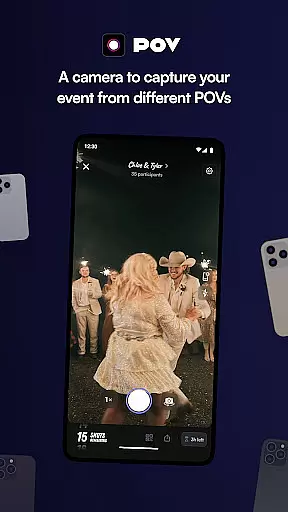
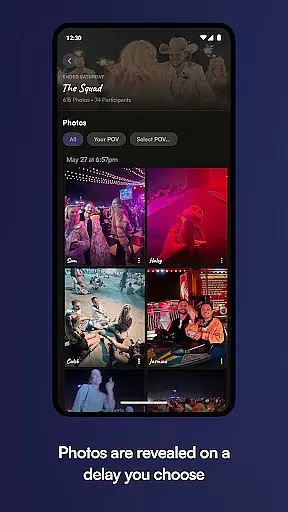

POV is an innovative event photography app that allows guests to capture and share moments through a unique disposable camera concept. The app enables event organizers to set photo limits for attendees, creating a curated collection of memories that reveal the next day. This approach not only preserves the authenticity of candid moments but also adds an element of anticipation and surprise.
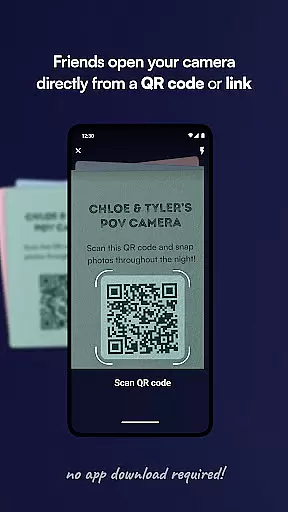
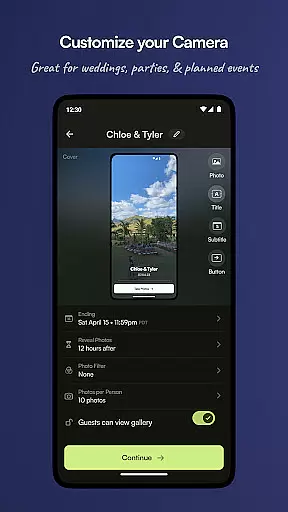
The application's key strength lies in its seamless guest experience – no app download required. Participants simply scan a code or click a link to access the camera feature. Event hosts can customize various aspects including photo limits, gallery reveal timing, and visual design elements. These features make POV particularly suitable for weddings, parties, and corporate events where controlled yet creative documentation is desired.
By combining controlled photography with customizable branding elements, POV delivers value beyond mere photo sharing. It creates a coordinated visual narrative that aligns with event themes while maintaining guest engagement through its delayed reveal feature. This makes it an excellent tool for creating lasting memories with a personal touch.
POV distinguishes itself through several remarkable features that enhance event documentation. The core functionality revolves around its virtual disposable camera system, where event organizers can precisely control how many photos each guest can capture. This limitation actually improves photo quality by encouraging more thoughtful photography rather than overwhelming quantity.
The app's customization capabilities extend far beyond basic settings. Hosts can personalize every aspect of the user interface, from branded color schemes and custom stickers to unique text overlays and background designs. The timed gallery reveal feature adds strategic value, allowing event organizers to control when memories are shared – either during the event for immediate enjoyment or the following day for heightened anticipation.
Additional notable features include multiple access points for guests through QR codes and NFC tags, ensuring easy participation regardless of technical proficiency. The platform's ability to function without requiring app installation for guests significantly broadens its accessibility. These combined features create a comprehensive event photography solution that maintains professional standards while encouraging authentic guest contributions.
Creating and customizing tasks within POV allows event organizers to define unique photo-taking experiences for their guests. This feature is crucial as it sets the framework for how participants interact with the camera functionality during events.
The app enables users to cap the number of photos each guest can take, mimicking the experience of a disposable camera. Event hosts have the flexibility to tailor these limits according to the type of event or their personal preferences, ensuring that every moment captured is intentional and meaningful.
Users benefit from this level of customization by being able to shape their event's narrative through controlled photography. By limiting photo counts, guests are encouraged to be more present and selective in capturing memories, which enhances the overall quality of shared experiences.
This task creation capability not only adds an element of exclusivity but also fosters anticipation as guests look forward to seeing the revealed photos. It transforms a simple photo-sharing platform into an engaging tool that enriches social gatherings.
POVu2019s reminder settings play a pivotal role in enhancing user engagement by keeping guests informed and reminded about the ongoing event activities. The importance of timely reminders cannot be overstated, especially when they contribute to maintaining guest participation throughout the event duration.
Event organizers can schedule reminders that prompt guests to engage with the disposable camera feature at optimal times. Whether it's before, during, or after the event, these notifications ensure that no significant moment slips through the cracks. They serve as gentle nudges for guests to capture and share their perspectives.
For users, this translates into an uninterrupted flow of interactions without missing out on key moments due to forgetfulness or oversight. Reminders help sustain momentum and excitement around viewing and sharing photos once they're revealed post-event.
By integrating customizable reminder settings, POV elevates its service offering beyond mere photo collection u2013 creating lasting impressions and seamless user journeys from start to finish.
User-friendly interface
Highly customizable options
Delayed reveal feature
No download for guests
Multiple access methods
Limited to event use
Requires planning ahead
Premium feature costs
Dependent on internet
Learning curve for setup

Manages display and transfer of tickets from the Mundo Tickets platform
 3.80
3.80
Browse events, find transportation, keep up with the latest news from your team
4.3
Create invitation cards for birthdays, weddings, Christmas and more.
4.80
The world's largest selection of tickets is now at your fingertips
3.90
ETH Mining provides secure way to mine Ethereum & earn ETH in Cloud mining app
3.50
TV Garden - World Live TV : Play & cast your videos seamlessly!
3.20
Octrober 2025: We've updated the MyGenMobile App with a new look and feel!
4.40
Freebie Games for Epic Games, Steam, Amazon, Rockstar etc.
4.40
Save money on concert, sport, and theater tickets, and discover upcoming events.
4.80
TodayTix is the easiest way to get tickets to the best shows in your city.
4.90
Find EDM shows near you! See your favorite artists live, and discover new music.
4.90
Plan your wedding for free on the go: vendors, budget, website and checklists!
4.80
Listen Full Quran MP3 Offline - Qibla Compass, Salah Timing & 99 Names of Allah
4.60
Meet people over dinner
4.40
Rocket Monkey - Space rocket launch schedule for launch sites around the world
4.20
Local events, contests, and giveaways for local dads
3.70
Audio guide companion APP for SEE's Michelangelo's Sistine Chapel
3.50
Create Birthday Cards in Birthday Invitation Maker and Birthday Card Creator App
3.00
The Official Football Ticketing App for Fans in Qatar
4.2


User Reviews