

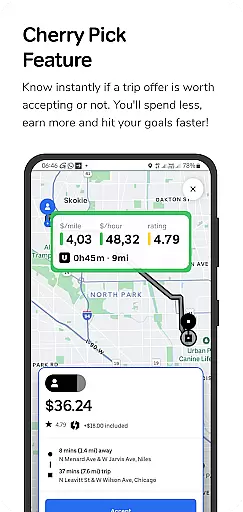
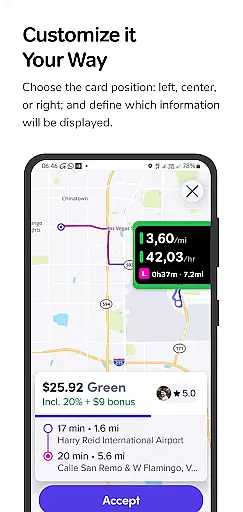
GigU is a smart assistant app designed to optimize earnings for rideshare drivers on platforms like Uber and Lyft. The app's standout feature, Cherry Pick, provides instant evaluations of trip offers, helping drivers make informed decisions that maximize their income while minimizing expenses. With its user-friendly interface and advanced indicators, GigU ensures drivers can hit their financial goals faster.
The app incorporates a range of intelligent tools such as live smart indicators, a colored grading system, and voice notifications, all aimed at simplifying the decision-making process. These features allow drivers to quickly assess ride profitability based on metrics like earnings per mile or hour. Additionally, GigU prioritizes security and privacy, ensuring no personal information is stored or shared, making it a reliable companion for professional drivers in the US.
GigU stands out with its comprehensive suite of features tailored specifically for rideshare drivers. The Live Smart Indicators provide real-time data on crucial metrics such as earnings per mile, hour, and minute, enabling drivers to evaluate the profitability of each trip instantly. This feature alone transforms how drivers choose which rides to accept, focusing on maximizing efficiency and income.
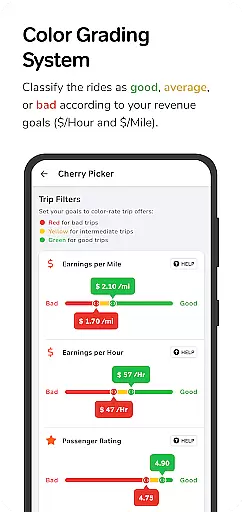
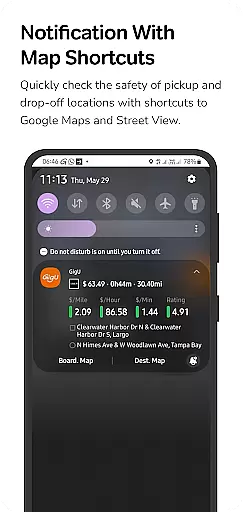
Another key feature is the Colored Grading System, which categorizes trips using color codes based on user-defined settings. This intuitive system allows drivers to make quick decisions without needing to analyze complex data. Additionally, the Quick Maps Shortcut Notification enhances safety by offering direct access to Google Maps and Street View for pickup and drop-off locations. With these innovative tools, GigU not only boosts earnings but also improves overall driving experience and security.
In the ridesharing industry, having access to detailed vehicle and trip information is crucial for drivers seeking to maximize their earnings. GigU provides comprehensive data on each ride offer, empowering drivers with critical details before accepting a trip.
The app's Cherry Pick feature evaluates potential trips based on various parameters including earnings per mile, hour, and minute. This granular analysis helps drivers make informed decisions about which rides to accept or decline, optimizing both time and income.
Additionally, GigU employs a colored grading system that rates trips according to user-defined settings. This visual representation ensures quick assessment of ride quality, allowing drivers to choose only the most profitable opportunities.
By delivering precise information about each trip's financial potential, GigU enables drivers to achieve their earning goals more efficiently while minimizing unnecessary expenses and time spent on less profitable rides.
Price transparency in ridesharing platforms is essential for drivers to understand their true earnings and costs. GigU addresses this need by providing clear insights into the financial aspects of each ride offer through its innovative features.
The application calculates and displays valuable metrics such as earnings per mile, hour, and minute for every trip opportunity. This level of transparency allows drivers to accurately assess the profitability of each ride before committing to it.
GigU's Quick Maps Shortcut Notification adds another layer of transparency by enabling drivers to quickly evaluate the safety and practicality of pickup and drop-off locations. This feature helps prevent unexpected delays or complications that could impact earnings.
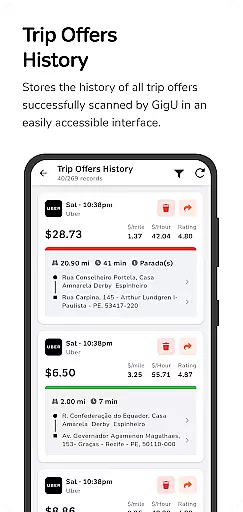
Furthermore, the app maintains complete records of all scanned ride offers through its Trip Offers History feature. This documentation provides drivers with a clear overview of their decision-making process and helps them refine their strategy for maximizing profits while maintaining full visibility of their operational costs.
User-friendly interface
Real-time earnings data
Enhanced security features
Customizable grading system
Voice notification support
Limited to rideshare platforms
Requires accessibility permissions
Premium features may cost extra
Occasional notification delays
Dependent on third-party apps

Theme for Car Launcher
 4.3
4.3
OBD diagnostics, Live Data, DPF regeneration for BMW
4.00
A full featured, real-time transit locator system
4.30
Control maps, media and messaging, with the Google Assistant while you drive
4.10
The ExtraMile App allows you to pay for fuel from the comfort of your car!
4.70
By enthusiasts, for enthusiasts
4.00
Monitor your behind-the-wheel behavior to become a safer driver and save.
4.10
Your go-to app for car, truck & SUV parts, DIY tools, and expert repair help.
4.70
PayByPhone: A quick and easy way to pay for parking.
3.80
The Texaco App allows you to pay for fuel from the comfort of your car!
4.80
Lexus app currently supports 2010 or newer vehicles (2018 or newer for Hawaii).
4.80
Oil change service & coupons for car maintenance at Valvoline Instant Oil Change
4.70
View your car’s service records and find out when maintenance is due.
4.70
DMV practice test 2025: Driver License permit test & written test for all states
4.70
Shop cars & see your financing
4.60
OBDII - ELM327 Terminal tool for 96-00 Volvos
4.50
Digital Car Key/Launcher, Screen Mirror, Android Dashboard, Remote Wireless Link
4.40
Available in select states.
4.00
Monitor specific TOYOTA parameters by adding this plugin to Torque Pro.
2.00


User Reviews